
에이전트 추적
에이전트 추적 (Tracking Agents)
작업을 특정 이름의 에이전트와 연결하는 방법을 소개해요. @agent 데코레이터 사용법, 멀티 에이전트 시스템, 대시보드 시각화, 모범 사례까지 알아볼게요.
출처: 문서
본문
AgentOps는 애플리케이션의 LLM 상호작용을 자동으로 추적합니다. 특히 멀티 에이전트 시스템에서 더 상세한 추적이 필요하다면, @agent 데코레이터를 사용해 작업을 특정 에이전트와 연결할 수 있어요.
에이전트 데코레이터 사용 (Using the Agent Decorator)
복잡한 애플리케이션의 구조화된 추적을 위해 @agent 데코레이터로 시스템의 서로 다른 에이전트를 명시적으로 식별할 수 있습니다.
import agentops
from agentops.sdk.decorators import agent, operation, trace
from openai import OpenAI

# Initialize AgentOps without auto-starting session since we use @trace
agentops.init("your-api-key", auto_start_session=False)

# Create a decorated agent class
@agent(name='ResearchAgent')
class MyAgent:
    def __init__(self):
        self.client = OpenAI()

    @operation
    def search(self, query):
        response = self.client.chat.completions.create(
            model="gpt-4o",
            messages=[{"role": "user", "content": f"Research about: {query}"}]
        )
        return response.choices[0].message.content

# Create a trace to group the agent operations
@trace(name="research-workflow")
def research_workflow(topic):
    agent = MyAgent()
    result = agent.search(topic)
    return result

# Execute the function to properly register the agent span
result = research_workflow("quantum computing")
이름을 지정하지 않으면 에이전트는 기본적으로 클래스 이름을 사용합니다.
@agent
class ResearchAgent:
    # This agent will have the name "ResearchAgent"
    pass
기본 에이전트 추적 (Basic Agent Tracking) (간단한 애플리케이션)
간단한 애플리케이션에서는 추가 설정 없이 AgentOps가 LLM 호출을 자동으로 추적합니다.
import agentops
from openai import OpenAI

# Initialize AgentOps
agentops.init("your-api-key")

# Create a simple agent function
def research_agent(query):
    client = OpenAI()
    response = client.chat.completions.create(
        model="gpt-4o",
        messages=[{"role": "user", "content": f"Research about: {query}"}]
    )
    return response.choices[0].message.content

# Use your agent - all LLM calls will be tracked automatically
result = research_agent("quantum computing")
멀티 에이전트 시스템 (Multi-Agent Systems)
복잡한 멀티 에이전트 시스템에서는 단일 트레이스 안에 여러 에이전트를 조직화할 수 있어요.
import agentops
from agentops.sdk.decorators import agent, operation, tool, trace

# Initialize AgentOps without auto-starting session since we use @trace
agentops.init("your-api-key", auto_start_session=False)

@agent
class DataCollectionAgent:
    @tool(cost=0.02)
    def fetch_data(self, source):
        return f"Data from {source}"

@agent
class AnalysisAgent:
    @operation
    def analyze_data(self, data):
        return f"Analysis of {data}"

@agent
class ReportingAgent:
    @tool(cost=0.01)
    def generate_report(self, analysis):
        return f"Report: {analysis}"

@trace(name="multi-agent-workflow")
def collaborative_workflow(data_source):
    """Workflow using multiple specialized agents"""

    # Data collection
    collector = DataCollectionAgent()
    raw_data = collector.fetch_data(data_source)

    # Analysis
    analyzer = AnalysisAgent()
    analysis = analyzer.analyze_data(raw_data)

    # Reporting
    reporter = ReportingAgent()
    report = reporter.generate_report(analysis)

    return {
        "source": data_source,
        "analysis": analysis,
        "report": report
    }

# Run the collaborative workflow
result = collaborative_workflow("customer_database")
에이전트 통신과 조정 (Agent Communication and Coordination)
복잡한 에이전트 상호작용과 통신 패턴을 추적할 수 있어요.
import agentops
from agentops.sdk.decorators import agent, operation, tool, trace

# Initialize AgentOps without auto-starting session since we use @trace
agentops.init("your-api-key", auto_start_session=False)

@agent
class CoordinatorAgent:
    def __init__(self):
        self.task_queue = []

    @operation
    def assign_task(self, task, agent_type):
        self.task_queue.append({"task": task, "agent": agent_type})
        return f"Task assigned to {agent_type}: {task}"

    @operation
    def collect_results(self, results):
        return f"Collected {len(results)} results"

@agent
class WorkerAgent:
    def __init__(self, agent_id):
        self.agent_id = agent_id

    @tool(cost=0.05)
    def process_task(self, task):
        return f"Agent {self.agent_id} processed: {task}"

@trace(name="coordinated-processing")
def coordinated_processing_workflow(tasks):
    """Workflow with agent coordination"""
    coordinator = CoordinatorAgent()
    workers = [WorkerAgent(f"worker_{i}") for i in range(3)]

    # Assign tasks
    assignments = []
    for i, task in enumerate(tasks):
        worker_type = f"worker_{i % len(workers)}"
        assignment = coordinator.assign_task(task, worker_type)
        assignments.append(assignment)

    # Process tasks
    results = []
    for i, task in enumerate(tasks):
        worker = workers[i % len(workers)]
        result = worker.process_task(task)
        results.append(result)

    # Collect results
    summary = coordinator.collect_results(results)

    return {
        "assignments": assignments,
        "results": results,
        "summary": summary
    }

# Run coordinated workflow
tasks = ["analyze_data", "generate_report", "send_notification"]
result = coordinated_processing_workflow(tasks)
대시보드 시각화 (Dashboard Visualization)
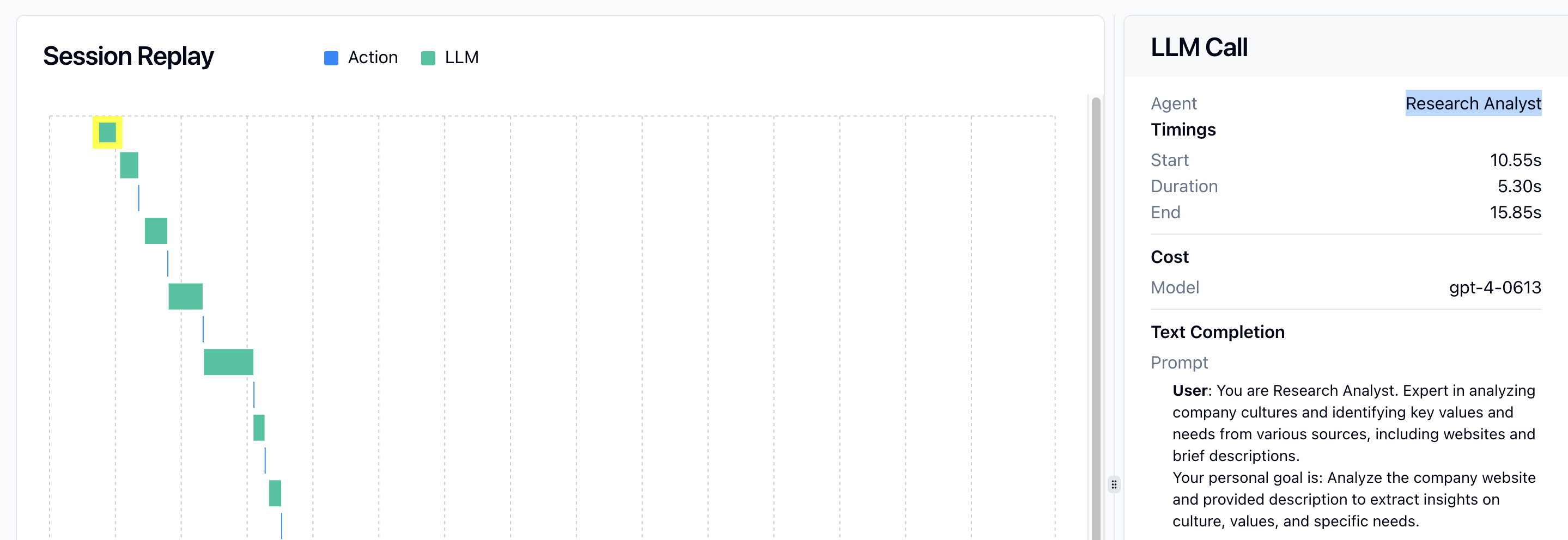
모든 작업은 그것을 시작한 에이전트와 자동으로 연결됩니다. 에이전트에는 이름이 부여되며, 그 이름이 대시보드에 표시됩니다.
모범 사례 (Best Practices)
-
단순하게 시작하세요: 대부분의 애플리케이션에서는
agentops.init()만 사용하는 것으로 충분합니다. -
필요할 때 데코레이터 사용: 시스템의 여러 에이전트를 명확히 구분해야 할 때
@agent데코레이터를 추가하세요. -
의미 있는 이름: 대시보드에서 식별하기 쉽도록 에이전트에 설명적인 이름을 선택하세요.
-
트레이스로 조직화:
@trace데코레이터로 관련 에이전트 작업을 논리적 워크플로우로 그룹화하세요. -
비용 추적:
@tool데코레이터를 비용 파라미터와 함께 사용해 에이전트 작업과 관련된 비용을 추적하세요. -
에이전트 특화: 다른 유형의 작업을 위한 특화 에이전트를 만들어 관측성과 유지보수성을 향상하세요.
세션 데코레이터에서 마이그레이션 (Migration from Session Decorator)
레거시 @session 데코레이터에서 마이그레이션한다면, 그것을 @trace 데코레이터로 교체하세요.
# New approach (recommended)
from agentops.sdk.decorators import trace, agent

@trace(name="my-workflow")
def my_workflow():
    # workflow code
    pass

# Old approach (deprecated)
from agentops.sdk.decorators import session, agent

@session
def my_workflow():
    # workflow code
    pass
@trace 데코레이터는 레거시 @session 데코레이터와 동일한 기능을 제공하지만, 더 유연하고 새 트레이스 관리 기능과의 통합이 더 좋습니다.