
Chat App with FastAPI
Chat App with FastAPI
FastAPI로 만든 간단한 채팅 앱 예시예요. 요청 사이에 채팅 히스토리를 저장해 두고, 그 대화를 컨텍스트로 활용해 새로운 응답을 만들어내는 흐름을 보여줍니다.
출처: 공식문서
예시가 보여주는 것
복잡한 로직의 대부분은 응답을 브라우저로 스트리밍하는 chat_app.py와 브라우저에서 메시지를 렌더링하는 chat_app.ts 사이에 있어요.
예시 실행하기
의존성을 설치하고 환경 변수를 설정했다면, 실행해요.
python -m pydantic_ai_examples.chat_app
uv run -m pydantic_ai_examples.chat_app
그 다음 localhost:8000에서 앱을 열어요.
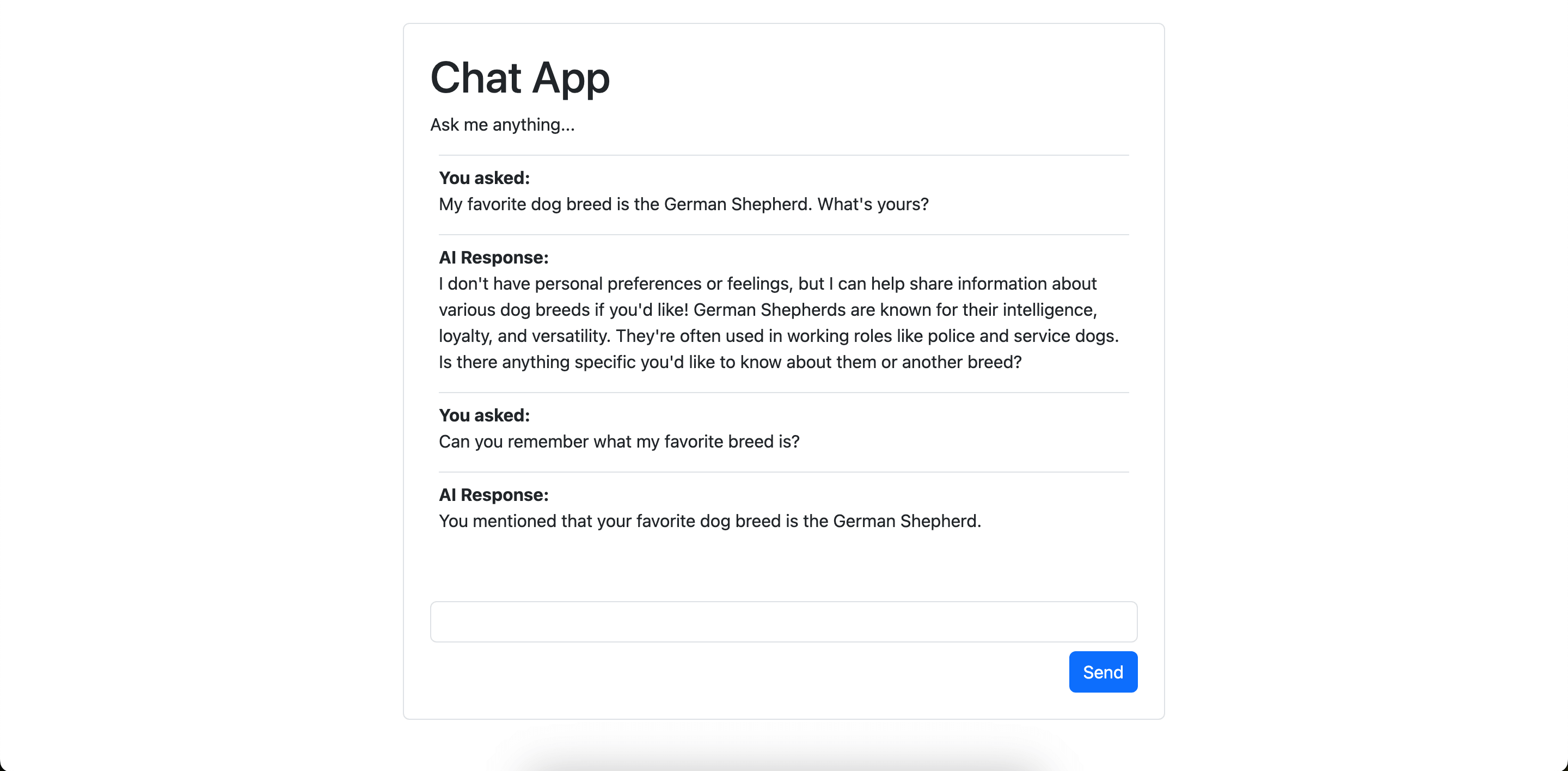
예시 코드
채팅 앱을 실행하는 Python 코드예요.
chat_app.py
from __future__ import annotations as _annotations

import asyncio
import json
import sqlite3
from collections.abc import AsyncGenerator, Callable
from concurrent.futures.thread import ThreadPoolExecutor
from contextlib import asynccontextmanager
from dataclasses import dataclass
from datetime import datetime, timezone
from functools import partial
from pathlib import Path
from typing import Annotated, Any, Literal, TypeVar

import fastapi
import logfire
from fastapi import Depends, Request
from fastapi.responses import FileResponse, Response, StreamingResponse
from typing_extensions import LiteralString, ParamSpec, TypedDict

from pydantic_ai import (
    Agent,
    ModelMessage,
    ModelMessagesTypeAdapter,
    ModelRequest,
    ModelResponse,
    TextPart,
    UnexpectedModelBehavior,
    UserPromptPart,
)

# 'if-token-present' means nothing will be sent (and the example will work) if you don't have logfire configured
logfire.configure(send_to_logfire='if-token-present')
logfire.instrument_pydantic_ai()

agent = Agent('openai:gpt-5.2')
THIS_DIR = Path(__file__).parent


@asynccontextmanager
async def lifespan(_app: fastapi.FastAPI):
    async with Database.connect() as db:
        yield {'db': db}


app = fastapi.FastAPI(lifespan=lifespan)
logfire.instrument_fastapi(app)


@app.get('/')
async def index() -> FileResponse:
    return FileResponse((THIS_DIR / 'chat_app.html'), media_type='text/html')


@app.get('/chat_app.ts')
async def main_ts() -> FileResponse:
    """Get the raw typescript code, it's compiled in the browser, forgive me."""
    return FileResponse((THIS_DIR / 'chat_app.ts'), media_type='text/plain')


async def get_db(request: Request) -> Database:
    return request.state.db


@app.get('/chat/')
async def get_chat(database: Database = Depends(get_db)) -> Response:
    msgs = await database.get_messages()
    return Response(
        b'\n'.join(json.dumps(to_chat_message(m)).encode('utf-8') for m in msgs),
        media_type='text/plain',
    )


class ChatMessage(TypedDict):
    """Format of messages sent to the browser."""

    role: Literal['user', 'model']
    timestamp: str
    content: str


def to_chat_message(m: ModelMessage) -> ChatMessage:
    first_part = m.parts[0]
    if isinstance(m, ModelRequest):
        if isinstance(first_part, UserPromptPart):
            assert isinstance(first_part.content, str)
            return {
                'role': 'user',
                'timestamp': first_part.timestamp.isoformat(),
                'content': first_part.content,
            }
    elif isinstance(m, ModelResponse):
        if isinstance(first_part, TextPart):
            return {
                'role': 'model',
                'timestamp': m.timestamp.isoformat(),
                'content': first_part.content,
            }
    raise UnexpectedModelBehavior(f'Unexpected message type for chat app: {m}')


@app.post('/chat/')
async def post_chat(
    prompt: Annotated[str, fastapi.Form()], database: Database = Depends(get_db)
) -> StreamingResponse:
    async def stream_messages():
        """Streams new line delimited JSON `Message`s to the client."""
        # stream the user prompt so that can be displayed straight away
        yield (
            json.dumps(
                {
                    'role': 'user',
                    'timestamp': datetime.now(tz=timezone.utc).isoformat(),
                    'content': prompt,
                }
            ).encode('utf-8')
            + b'\n'
        )
        # get the chat history so far to pass as context to the agent
        messages = await database.get_messages()
        # run the agent with the user prompt and the chat history
        async with agent.run_stream(prompt, message_history=messages) as result:
            async for text in result.stream_output(debounce_by=0.01):
                # text here is a `str` and the frontend wants
                # JSON encoded ModelResponse, so we create one
                m = ModelResponse(parts=[TextPart(text)], timestamp=result.timestamp)
                yield json.dumps(to_chat_message(m)).encode('utf-8') + b'\n'

        # add new messages (e.g. the user prompt and the agent response in this case) to the database
        await database.add_messages(result.new_messages_json())

    return StreamingResponse(stream_messages(), media_type='text/plain')


P = ParamSpec('P')
R = TypeVar('R')


@dataclass
class Database:
    """Rudimentary database to store chat messages in SQLite.

    The SQLite standard library package is synchronous, so we
    use a thread pool executor to run queries asynchronously.
    """

    con: sqlite3.Connection
    _loop: asyncio.AbstractEventLoop
    _executor: ThreadPoolExecutor

    @classmethod
    @asynccontextmanager
    async def connect(
        cls, file: Path = THIS_DIR / '.chat_app_messages.sqlite'
    ) -> AsyncGenerator[Database]:
        with logfire.span('connect to DB'):
            loop = asyncio.get_running_loop()
            executor = ThreadPoolExecutor(max_workers=1)
            con = await loop.run_in_executor(executor, cls._connect, file)
            slf = cls(con, loop, executor)
        try:
            yield slf
        finally:
            await slf._asyncify(con.close)

    @staticmethod
    def _connect(file: Path) -> sqlite3.Connection:
        con = sqlite3.connect(str(file))
        con = logfire.instrument_sqlite3(con)
        cur = con.cursor()
        cur.execute(
            'CREATE TABLE IF NOT EXISTS messages (id INT PRIMARY KEY, message_list TEXT);'
        )
        con.commit()
        return con

    async def add_messages(self, messages: bytes):
        await self._asyncify(
            self._execute,
            'INSERT INTO messages (message_list) VALUES (?);',
            messages,
            commit=True,
        )
        await self._asyncify(self.con.commit)

    async def get_messages(self) -> list[ModelMessage]:
        c = await self._asyncify(
            self._execute, 'SELECT message_list FROM messages order by id'
        )
        rows = await self._asyncify(c.fetchall)
        messages: list[ModelMessage] = []
        for row in rows:
            messages.extend(ModelMessagesTypeAdapter.validate_json(row[0]))
        return messages

    def _execute(
        self, sql: LiteralString, *args: Any, commit: bool = False
    ) -> sqlite3.Cursor:
        cur = self.con.cursor()
        cur.execute(sql, args)
        if commit:
            self.con.commit()
        return cur

    async def _asyncify(
        self, func: Callable[P, R], *args: P.args, **kwargs: P.kwargs
    ) -> R:
        return await self._loop.run_in_executor(  # pyright: ignore[reportUnknownVariableType]
            self._executor,
            partial(func, **kwargs),
            *args,  # pyright: ignore[reportCallIssue]
        )


if __name__ == '__main__':
    import uvicorn

    uvicorn.run(
        'pydantic_ai_examples.chat_app:app', reload=True, reload_dirs=[str(THIS_DIR)]
    )
앱을 렌더링하는 단순한 HTML 페이지예요.
chat_app.html
<!DOCTYPE html>
<html lang="en">
<head>
  <meta charset="UTF-8">
  <meta name="viewport" content="width=device-width, initial-scale=1.0">
  <title>Chat App</title>
  <link href="https://cdn.jsdelivr.net/npm/[email protected]/dist/css/bootstrap.min.css" rel="stylesheet">
  <style>
    main {
      max-width: 700px;
    }
    #conversation .user::before {
      content: 'You asked: ';
      font-weight: bold;
      display: block;
    }
    #conversation .model::before {
      content: 'AI Response: ';
      font-weight: bold;
      display: block;
    }
    #spinner {
      opacity: 0;
      transition: opacity 500ms ease-in;
      width: 30px;
      height: 30px;
      border: 3px solid #222;
      border-bottom-color: transparent;
      border-radius: 50%;
      animation: rotation 1s linear infinite;
    }
    @keyframes rotation {
      0% { transform: rotate(0deg); }
      100% { transform: rotate(360deg); }
    }
    #spinner.active {
      opacity: 1;
    }
  </style>
</head>
<body>
  <main class="border rounded mx-auto my-5 p-4">
    <h1>Chat App</h1>
    <p>Ask me anything...</p>
    <div id="conversation" class="px-2"></div>
    <div class="d-flex justify-content-center mb-3">
      <div id="spinner"></div>
    </div>
    <form method="post">
      <input id="prompt-input" name="prompt" class="form-control"/>
      <div class="d-flex justify-content-end">
        <button class="btn btn-primary mt-2">Send</button>
      </div>
    </form>
    <div id="error" class="d-none text-danger">
      Error occurred, check the browser developer console for more information.
    </div>
  </main>
</body>
</html>
<script src="https://cdnjs.cloudflare.com/ajax/libs/typescript/5.6.3/typescript.min.js" integrity="sha512-TvPkf1JgpB7FBf8dpYVD+2FXCy+Wn4sHIIWyTQijjOOt8Z20BAbwm0Si991w2k++oXFHp5NlOfWYud/R1sJUNA==" crossorigin="anonymous" referrerpolicy="no-referrer"></script>
<script type="module">
  // to let me write TypeScript, without adding the burden of npm we do a dirty, non-production-ready hack
  // and transpile the TypeScript code in the browser
  // this is (arguably) A neat demo trick, but not suitable for production!
  async function loadTs() {
    const response = await fetch('/chat_app.ts');
    const tsCode = await response.text();
    const jsCode = window.ts.transpile(tsCode, { target: "es2015" });
    let script = document.createElement('script');
    script.type = 'module';
    script.text = jsCode;
    document.body.appendChild(script);
  }

  loadTs().catch((e) => {
    console.error(e);
    document.getElementById('error').classList.remove('d-none');
    document.getElementById('spinner').classList.remove('active');
  });
</script>
메시지 렌더링을 담당하는 TypeScript예요. 단순하게 하기 위해(그리고 프론트엔드 개발자들의 감정을 상하게 할 위험을 무릅쓰고) TypeScript 코드를 평문 텍스트로 브라우저에 넘겨, 브라우저 안에서 트랜스파일해요.
chat_app.ts
// BIG FAT WARNING: to avoid the complexity of npm, this typescript is compiled in the browser
// there's currently no static type checking

import { marked } from 'https://cdnjs.cloudflare.com/ajax/libs/marked/15.0.0/lib/marked.esm.js'
const convElement = document.getElementById('conversation')

const promptInput = document.getElementById('prompt-input') as HTMLInputElement
const spinner = document.getElementById('spinner')

// stream the response and render messages as each chunk is received
// data is sent as newline-delimited JSON
async function onFetchResponse(response: Response): Promise<void> {
  let text = ''
  let decoder = new TextDecoder()
  if (response.ok) {
    const reader = response.body.getReader()
    while (true) {
      const {done, value} = await reader.read()
      if (done) {
        break
      }
      text += decoder.decode(value)
      addMessages(text)
      spinner.classList.remove('active')
    }
    addMessages(text)
    promptInput.disabled = false
    promptInput.focus()
  } else {
    const text = await response.text()
    console.error(`Unexpected response: ${response.status}`, {response, text})
    throw new Error(`Unexpected response: ${response.status}`)
  }
}

// The format of messages, this matches pydantic-ai both for brevity and understanding
// in production, you might not want to keep this format all the way to the frontend
interface Message {
  role: string
  content: string
  timestamp: string
}

// take raw response text and render messages into the `#conversation` element
// Message timestamp is assumed to be a unique identifier of a message, and is used to deduplicate
// hence you can send data about the same message multiple times, and it will be updated
// instead of creating a new message elements
function addMessages(responseText: string) {
  const lines = responseText.split('\n')
  const messages: Message[] = lines.filter(line => line.length > 1).map(j => JSON.parse(j))
  for (const message of messages) {
    // we use the timestamp as a crude element id
    const {timestamp, role, content} = message
    const id = `msg-${timestamp}`
    let msgDiv = document.getElementById(id)
    if (!msgDiv) {
      msgDiv = document.createElement('div')
      msgDiv.id = id
      msgDiv.title = `${role} at ${timestamp}`
      msgDiv.classList.add('border-top', 'pt-2', role)
      convElement.appendChild(msgDiv)
    }
    msgDiv.innerHTML = marked.parse(content)
  }
  window.scrollTo({ top: document.body.scrollHeight, behavior: 'smooth' })
}

function onError(error: any) {
  console.error(error)
  document.getElementById('error').classList.remove('d-none')
  document.getElementById('spinner').classList.remove('active')
}

async function onSubmit(e: SubmitEvent): Promise<void> {
  e.preventDefault()
  spinner.classList.add('active')
  const body = new FormData(e.target as HTMLFormElement)

  promptInput.value = ''
  promptInput.disabled = true

  const response = await fetch('/chat/', {method: 'POST', body})
  await onFetchResponse(response)
}

// call onSubmit when the form is submitted (e.g. user clicks the send button or hits Enter)
document.querySelector('form').addEventListener('submit', (e) => onSubmit(e).catch(onError))

// load messages on page load
fetch('/chat/').then(onFetchResponse).catch(onError)
이 예시의 흐름
이 채팅 앱의 핵심은 "대화 내역을 DB에 보관하고, 다음 요청의 컨텍스트로 재사용"하는 것이에요.
Database 클래스는 SQLite에 메시지를 저장해요. SQLite 표준 라이브러리는 동기 방식이라, ThreadPoolExecutor로 쿼리를 비동기로 수행해요(_asyncify). 메시지는 ModelMessagesTypeAdapter.validate_json(...)으로 직렬화·역직렬화되며, add_messages는 result.new_messages_json()을 통째로 저장해요.
GET /chat/은 저장된 메시지를 읽어 브라우저에 보내고, POST /chat/은 새 프롬프트와 함께 agent.run_stream(prompt, message_history=messages)로 에이전트를 실행해요. message_history에 이전 대화를 넘겨주는 것이 "재사용"의 핵심이에요. 응답은 result.stream_output()으로 스트리밍되며, 개행으로 구분된 JSON(newline delimited JSON) 형태로 브라우저에 전달돼요.
프론트엔드(chat_app.ts)는 이 스트림을 읽어 marked.parse로 마크다운을 렌더링하고, 메시지의 timestamp를 id로 써서 중복 없이 갱신해요.