
getContainer 변경 사항 — 팝업 마운트 노드의 동적 전환
개발하다 보면 Select 드롭다운이나 Modal 같은 팝업 엘리먼트가 필요할 때가 많아요. 이 글에서는 Ant Design의 팝업이 어디에 렌더링되는지, getContainer가 어떻게 동작하는지, 그리고 React 18 StrictMode에서 어떤 변화가 있었는지 설명해 드릴게요.
출처: 문서
본문
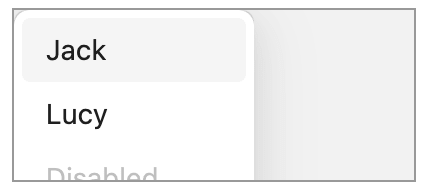
개발을 하다 보면 Select 드롭다운 박스나 Modal 컴포넌트 같은 팝업 엘리먼트가 필요한 경우를 자주 만나요. 현재 노드 아래에 직접 렌더링하면, 부모 노드의 overflow: hidden에 잘려 버릴 수 있어요:
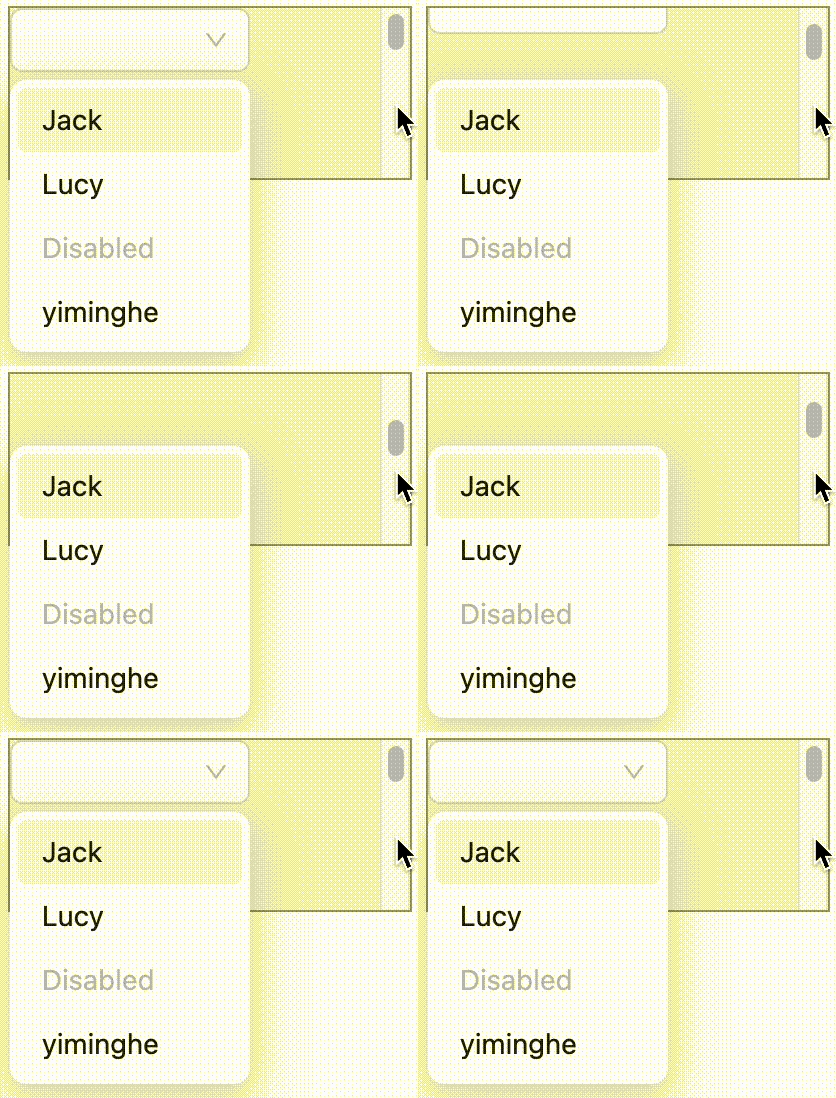
그래서 Ant Design에서는 기본적으로 body 아래에 렌더링해요. 하지만 이건 새로운 문제를 가져와요. 같은 컨테이너에 있지 않기 때문에, 사용자가 화면을 스크롤하면 팝업 레이어가 스크롤을 따라오지 않는다는 걸 발견하게 돼요:
이 문제를 해결하기 위해 getContainer 속성을 제공해요. 이 속성으로 사용자가 렌더링 컨테이너를 커스터마이징할 수 있어요. getContainer 메서드는 컴포넌트가 마운트될 때 호출되어 컨테이너 노드를 반환하고, 컴포넌트는 createPortal을 통해 이 노드 아래에 렌더링돼요.
// Fake Code. Just for Demo
const PopupWrapper = () => {
  const eleRef = React.useRef<HTMLDivElement>(null);

  React.useEffect(() => {
    // It's much complex with timing in real world. You can view the source for more detail:
    // https://github.com/react-component/portal/blob/master/src/Portal.tsx
    const container: HTMLElement = getContainer(eleRef.current);

    // ...
  }, []);

  return (
    <div ref={eleRef}>
      {...}
    </div>
  );
}
// Fake Code. Just for Demo
const defaultGetContainer = () => {
  const div = document.createElement('div');
  document.body.appendChild(div);
  return div;
};

const SomeComponent = ({ getContainer = defaultGetContainer }) => (
  <PopupWrapper getContainer={getContainer} />
);
당분간 getContainer가 마운트 노드를 동적으로 전환해야 하는 필요성은 신경 쓰지 않아요 (실은 과거에도 한동안 전환이 불가능했어요). 단지 React 18 관점에서 몇 가지 문제가 생겼다는 것만 짚어볼게요.
React 18 Concurrent Mode
React 18에서 effects는 여러 번 실행될 수 있어요. 개발자 동작을 실수로 깨뜨리는 걸 막기 위해 StrictMode 아래에서도 그에 맞게 조정됐어요:
- React mounts the component.
- Layout effects are created.
- Effect effects are created.
- React simulates effects being destroyed on a mounted component.
- Layout effects are destroyed.
- Effects are destroyed.
- React simulates effects being re-created on a mounted component.
- Layout effects are created
- Effect setup code runs
간단히 이해하면, StrictMode 아래에서는 deps가 빈 객체를 담고 있더라도 effect가 여전히 여러 번 트리거돼요. React 18 StrictMode로 전환하면 HTML에 마운트 노드 쌍이 생기고, 그중 하나는 비어 있는 걸 발견하게 돼요:
<body>
  <div id="root">...</div>

  <!-- Empty -->
  <div className="sample-holder"></div>

  <!-- Real in use -->
  <div className="sample-holder">
    <div className="ant-component-wrapper">...</div>
  </div>
</body>
그래서 호출 구현을 조정했고, 기본 getContainer도 state를 통해 관리해서 이전 effect에서 생성된 노드가 StrictMode에서 정리되도록 했어요:
// Fake Code. Just for Demo
const SomeComponent = ({ getContainer }) => {
  const [myContainer, setMyContainer] = React.useState<HTMLElement | null>(null);

  React.useEffect(() => {
    if (getContainer) {
      setMyContainer(getContainer());
      return;
    }

    const div = document.createElement('div');
    document.body.appendChild(div);
    setMyContainer(div);

    return () => {
      document.body.removeChild(div);
    };
  }, [getContainer]);

  return <PopupWrapper getContainer={() => myContainer} />;
};
getContainer를 effect 관리 안에 넣은 후, React 라이프사이클에 더 잘 맞는 방식으로 노드를 관리할 수 있어요. getContainer가 변경될 때도 정리할 수 있고요. 그래서 getContainer를 동적으로 변경하는 시나리오를 지원할 수 있게 됐어요 (비록 이 사용 시나리오의 보편성에 대해서는 개인적으로 의문이 있지만요).
마무리
getContainer가 동적 변경을 지원하지 않던 문제가 고쳐졌지만, 동시에 잠재적인 breaking change도 도입됐어요. 개발자가 매번 새 DOM 노드를 만드는 getContainer를 커스터마이징하면, effect가 계속 실행되면서 노드가 무한히 생성되는 무한 루프가 발생할 수 있어요. 이 방식을 쓰면서 문제가 생기면, 이 부분을 확인해 봐야 해요.