
Contour 카나리아 배포
이 가이드에서는 Contour 인그레스 컨트롤러와 Flagger를 사용해 카나리아 릴리스와 A/B 테스트를 자동화하는 방법을 보여드립니다. Contour의 HTTPProxy를 활용해 점진 배포를 구성하는 전체 과정을 살펴볼게요.
출처: 문서
본문
이 가이드에서는 Contour 인그레스 컨트롤러와 Flagger를 사용해 카나리아 릴리스와 A/B 테스트를 자동화하는 방법을 보여드립니다.
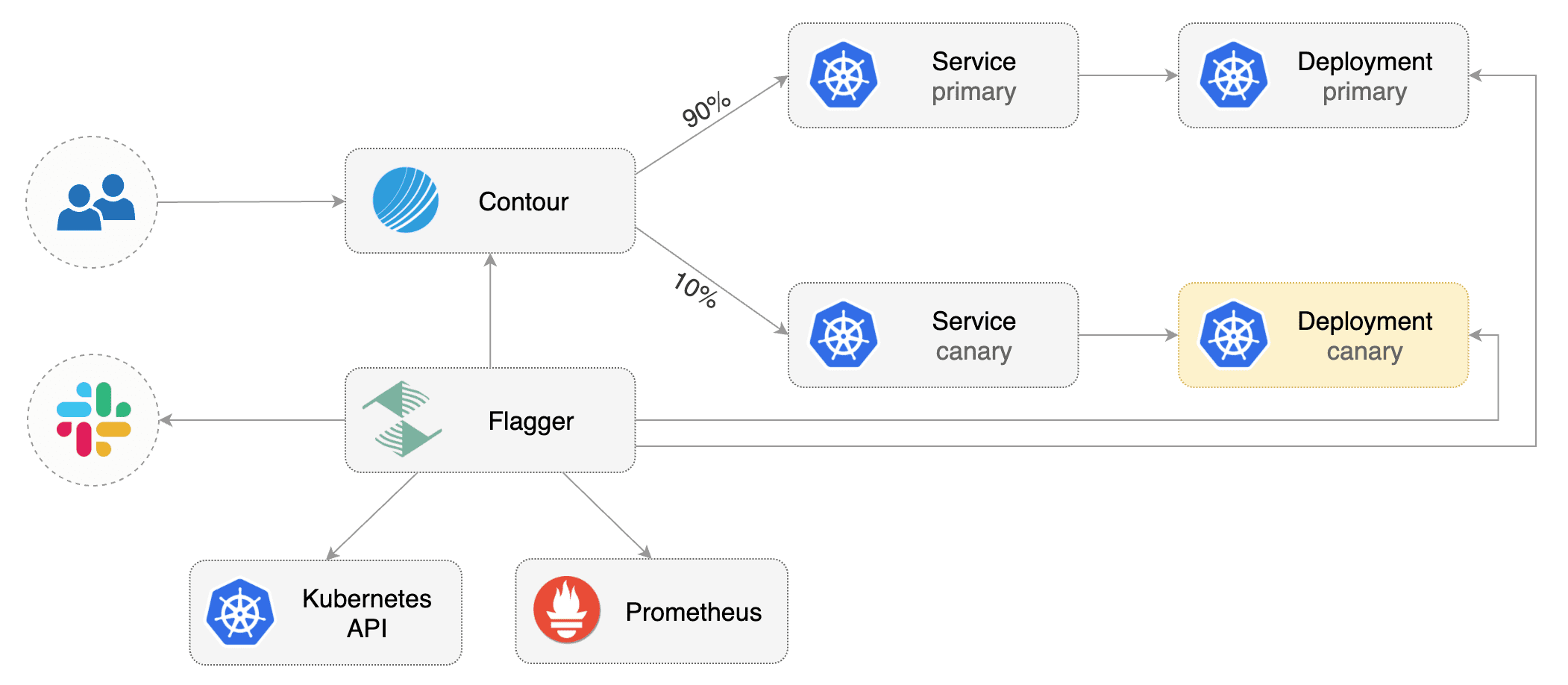
사전 요구사항 (Prerequisites)
Flagger는 Kubernetes 클러스터 v1.16 이상과 Contour v1.0 이상이 필요합니다.
LoadBalancer를 지원하는 클러스터에 Contour를 설치합니다:
kubectl apply -f https://projectcontour.io/quickstart/contour.yaml
위 명령은 projectcontour 네임스페이스에 Contour와 Envoy daemonset을 배포합니다.
projectcontour 네임스페이스에 Kustomize(kubectl 1.14)로 Flagger를 설치합니다:
kubectl apply -k https://github.com/fluxcd/flagger//kustomize/contour?ref=main
위 명령은 Contour의 Envoy 인스턴스를 스크랩하도록 구성된 Flagger와 Prometheus를 배포합니다.
또는 Helm v3로 Flagger를 설치할 수 있습니다:
helm repo add flagger https://flagger.app

helm upgrade -i flagger flagger/flagger \
--namespace projectcontour \
--set meshProvider=contour \
--set ingressClass=contour \
--set prometheus.install=true
Slack, Discord, Rocket, MS Teams 알림도 활성화할 수 있습니다. 알림 문서를 참고하세요.
부트스트랩 (Bootstrap)
Flagger는 Kubernetes deployment와 선택적으로 horizontal pod autoscaler(HPA)를 받아, 일련의 오브젝트(Kubernetes deployments, ClusterIP services, Contour HTTPProxy)를 생성합니다. 이 오브젝트들은 클러스터에서 애플리케이션을 노출하고 카나리아 분석과 승격을 구동합니다.
테스트 네임스페이스를 만듭니다:
kubectl create ns test
카나리아 분석 중 트래픽을 생성할 부하 테스트 서비스를 설치합니다:
kubectl apply -k https://github.com/fluxcd/flagger//kustomize/tester?ref=main
deployment와 horizontal pod autoscaler를 만듭니다:
kubectl apply -k https://github.com/fluxcd/flagger//kustomize/podinfo?ref=main
canary 커스텀 리소스를 만듭니다 (app.example.com을 자신의 도메인으로 바꾸세요):
apiVersion: flagger.app/v1beta1
kind: Canary
metadata:
  name: podinfo
  namespace: test
spec:
  # deployment reference
  targetRef:
    apiVersion: apps/v1
    kind: Deployment
    name: podinfo
  # HPA reference
  autoscalerRef:
    apiVersion: autoscaling/v2
    kind: HorizontalPodAutoscaler
    name: podinfo
  service:
    # service port
    port: 80
    # container port
    targetPort: 9898
    # Contour request timeout
    timeout: 15s
    # Contour retry policy
    retries:
      attempts: 3
      perTryTimeout: 5s
      # supported values for retryOn - https://projectcontour.io/docs/main/config/api/#projectcontour.io/v1.RetryOn
      retryOn: "5xx"
  # define the canary analysis timing and KPIs
  analysis:
    # schedule interval (default 60s)
    interval: 30s
    # max number of failed metric checks before rollback
    threshold: 5
    # max traffic percentage routed to canary
    # percentage (0-100)
    maxWeight: 50
    # canary increment step
    # percentage (0-100)
    stepWeight: 5
    # Contour Prometheus checks
    metrics:
    - name: request-success-rate
      # minimum req success rate (non 5xx responses)
      # percentage (0-100)
      thresholdRange:
        min: 99
      interval: 1m
    - name: request-duration
      # maximum req duration P99 in milliseconds
      thresholdRange:
        max: 500
      interval: 30s
    # testing
    webhooks:
    - name: acceptance-test
      type: pre-rollout
      url: http://flagger-loadtester.test/
      timeout: 30s
      metadata:
        type: bash
        cmd: "curl -sd 'test' http://podinfo-canary.test/token | grep token"
    - name: load-test
      url: http://flagger-loadtester.test/
      type: rollout
      timeout: 5s
      metadata:
        cmd: "hey -z 1m -q 10 -c 2 -host app.example.com http://envoy.projectcontour"
위 리소스를 podinfo-canary.yaml로 저장한 뒤 적용합니다:
kubectl apply -f ./podinfo-canary.yaml
카나리아 분석은 매 30초마다 HTTP 메트릭과 롤아웃 훅을 검증하면서 5분 동안 실행됩니다.
몇 초 후 Flagger가 canary 오브젝트를 생성합니다:
# applied
deployment.apps/podinfo
horizontalpodautoscaler.autoscaling/podinfo
canary.flagger.app/podinfo

# generated
deployment.apps/podinfo-primary
horizontalpodautoscaler.autoscaling/podinfo-primary
service/podinfo
service/podinfo-canary
service/podinfo-primary
httpproxy.projectcontour.io/podinfo
부트스트랩 후 podinfo 배포는 0으로 스케일되고 podinfo.test로 가는 트래픽은 primary 파드로 라우팅됩니다. 카나리아 분석 중에는 podinfo-canary.test 주소로 canary 파드를 직접 대상으로 삼을 수 있습니다.
앱을 클러스터 외부로 노출하기 (Expose the app outside the cluster)
Contour Envoy 로드 밸런서의 외부 주소를 찾습니다:
export ADDRESS="$(kubectl -n projectcontour get svc/envoy -ojson \
|| jq -r ".status.loadBalancer.ingress[].hostname")"
echo $ADDRESS
DNS 서버에 CNAME 레코드(AWS) 또는 A 레코드(GKE/AKS/DOKS)를 구성하고 예를 들어 app.example.com 같은 도메인을 LB 주소로 지정합니다.
HTTPProxy 정의를 만들고 Flagger가 생성한 podinfo 프록시를 포함합니다 (app.example.com을 자신의 도메인으로 바꾸세요):
apiVersion: projectcontour.io/v1
kind: HTTPProxy
metadata:
  name: podinfo-ingress
  namespace: test
spec:
  virtualhost:
    fqdn: app.example.com
  includes:
    - name: podinfo
      namespace: test
      conditions:
        - prefix: /
위 리소스를 podinfo-ingress.yaml로 저장한 뒤 적용합니다:
kubectl apply -f ./podinfo-ingress.yaml
Contour가 프록시 정의를 처리했는지 확인합니다:
kubectl -n test get httpproxies

NAME              FQDN                STATUS
podinfo                               valid
podinfo-ingress   app.example.com     valid
이제 도메인 주소로 podinfo UI에 접근할 수 있습니다.
프로덕션 워크로드를 인터넷에 노출할 때는 HTTPS를 사용해야 합니다. Let's Encrypt에서 무료 TLS 인증서를 얻을 수 있으며, cert-manager를 구성해 Contour를 TLS 인증서로 보호하는 방법은 이 가이드를 읽어보세요.
자동 카나리아 승격 (Automated canary promotion)
Flagger는 HTTP 요청 성공률, 요청 평균 지속 시간, 파드 상태 같은 핵심 성과 지표를 측정하면서 점진적으로 canary로 트래픽을 옮기는 제어 루프를 구현합니다. KPI 분석에 따라 canary는 승격되거나 중단됩니다.

canary 배포는 다음 오브젝트 중 하나의 변경으로 트리거됩니다:
- Deployment PodSpec (컨테이너 이미지, 명령, 포트, env, 리소스 등)
- 볼륨으로 마운트되거나 환경 변수로 매핑된 ConfigMaps와 Secrets
컨테이너 이미지를 업데이트해 카나리아 배포를 트리거합니다:
kubectl -n test set image deployment/podinfo \
podinfod=ghcr.io/stefanprodan/podinfo:6.0.1
Flagger는 배포 리비전이 변경되었음을 감지하고 새 롤아웃을 시작합니다:
kubectl -n test describe canary/podinfo

Status:
  Canary Weight:         0
  Failed Checks:         0
  Phase:                 Succeeded
Events:
 New revision detected! Scaling up podinfo.test
 Waiting for podinfo.test rollout to finish: 0 of 1 updated replicas are available
 Pre-rollout check acceptance-test passed
 Advance podinfo.test canary weight 5
 Advance podinfo.test canary weight 10
 Advance podinfo.test canary weight 15
 Advance podinfo.test canary weight 20
 Advance podinfo.test canary weight 25
 Advance podinfo.test canary weight 30
 Advance podinfo.test canary weight 35
 Advance podinfo.test canary weight 40
 Advance podinfo.test canary weight 45
 Advance podinfo.test canary weight 50
 Copying podinfo.test template spec to podinfo-primary.test
 Waiting for podinfo-primary.test rollout to finish: 1 of 2 updated replicas are available
 Routing all traffic to primary
 Promotion completed! Scaling down podinfo.test
카나리아 분석이 시작되면 Flagger는 트래픽을 canary로 라우팅하기 전에 pre-rollout 웹훅을 호출합니다.
참고 카나리아 분석 중에 배포에 새 변경 사항을 적용하면 Flagger가 분석을 다시 시작합니다.
모든 canary는 다음과 같이 모니터링할 수 있습니다:
watch kubectl get canaries --all-namespaces

NAMESPACE   NAME      STATUS        WEIGHT   LASTTRANSITIONTIME
test        podinfo   Progressing   15       2019-12-20T14:05:07Z
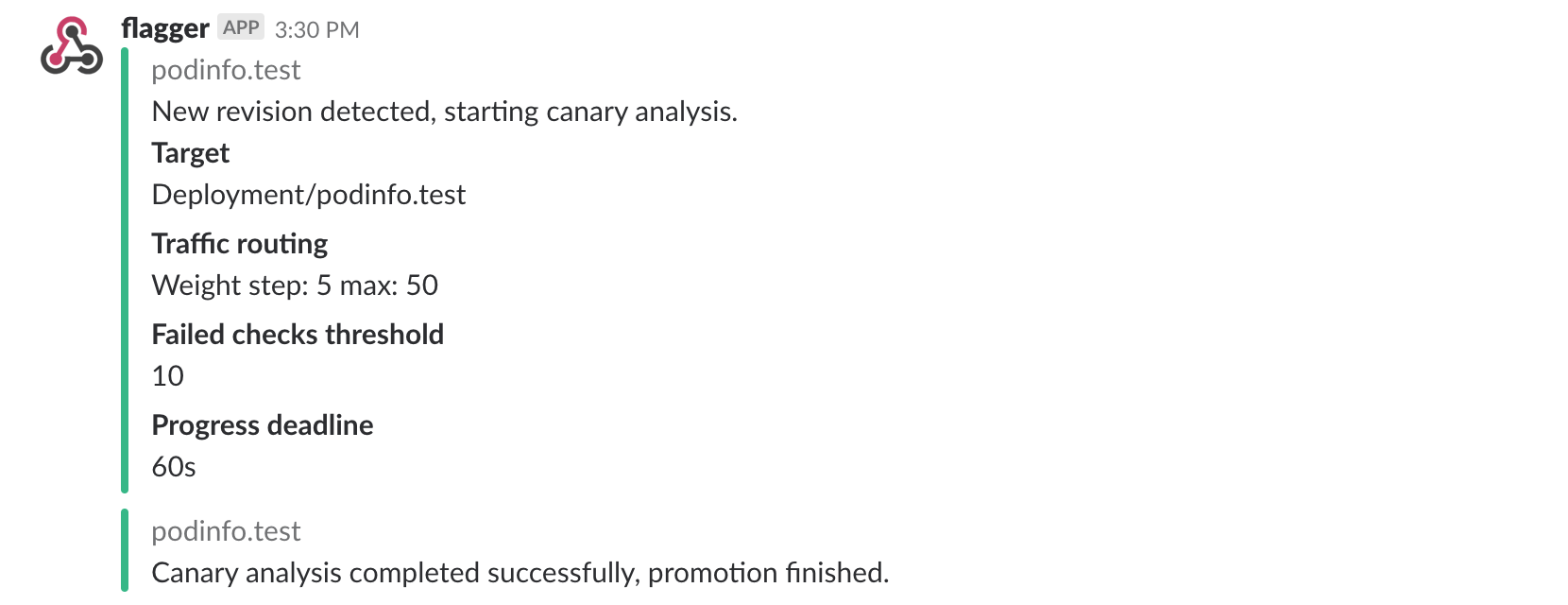
Slack 알림을 활성화했다면 다음과 같은 메시지를 받게 됩니다:
자동 롤백 (Automated rollback)
카나리아 분석 중에 HTTP 500 오류나 높은 지연 시간을 생성해 Flagger가 롤아웃을 일시 중지하는지 테스트할 수 있습니다.
카나리아 배포를 트리거합니다:
kubectl -n test set image deployment/podinfo \
podinfod=ghcr.io/stefanprodan/podinfo:6.0.2
로드 테스터 파드에 exec로 들어갑니다:
kubectl -n test exec -it deploy/flagger-loadtester bash
HTTP 500 오류를 생성합니다:
hey -z 1m -c 5 -q 5 http://app.example.com/status/500
지연 시간을 생성합니다:
watch -n 1 curl http://app.example.com/delay/1
실패한 검사 횟수가 카나리아 분석 임계값에 도달하면 트래픽은 primary로 다시 라우팅되고, canary는 0으로 스케일되며 롤아웃은 실패로 표시됩니다.
kubectl -n projectcontour logs deploy/flagger -f | jq .msg

New revision detected! progressing canary analysis for podinfo.test
Pre-rollout check acceptance-test passed
Advance podinfo.test canary weight 5
Advance podinfo.test canary weight 10
Advance podinfo.test canary weight 15
Halt podinfo.test advancement success rate 69.17% < 99%
Halt podinfo.test advancement success rate 61.39% < 99%
Halt podinfo.test advancement success rate 55.06% < 99%
Halt podinfo.test advancement request duration 1.20s > 500ms
Halt podinfo.test advancement request duration 1.45s > 500ms
Rolling back podinfo.test failed checks threshold reached 5
Canary failed! Scaling down podinfo.test
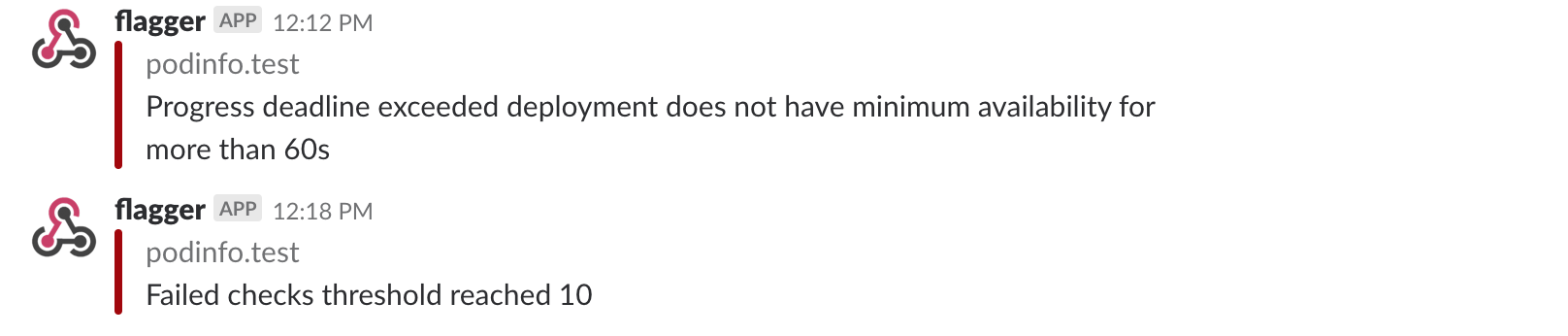
Slack 알림을 활성화했다면, progress deadline이 초과되거나 분석이 최대 실패 검사 횟수에 도달하면 메시지를 받게 됩니다:
A/B 테스트
가중치 라우팅 외에도 Flagger는 HTTP 매치 조건을 기반으로 canary로 트래픽을 라우팅하도록 구성할 수 있습니다. A/B 테스트 시나리오에서는 HTTP 헤더나 쿠키를 사용해 특정 사용자 세그먼트를 대상으로 삼게 됩니다. 이는 세션 어피니티가 필요한 프론트엔드 애플리케이션에 특히 유용합니다.
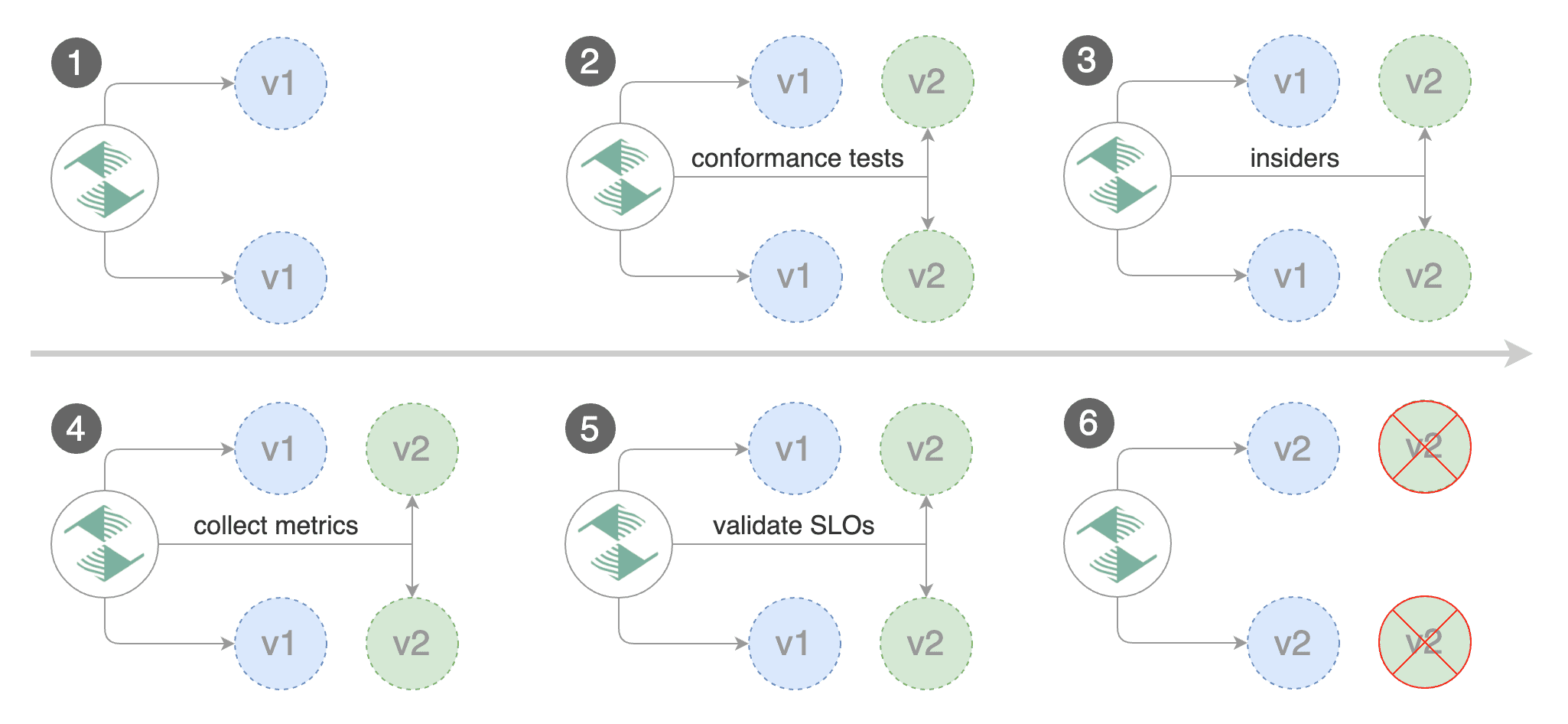
카나리아 분석을 편집해 max/step weight를 제거하고 match 조건과 iterations를 추가합니다:
analysis:
  interval: 1m
  threshold: 5
  iterations: 10
  match:
  - headers:
      x-canary:
        exact: "insider"
  webhooks:
  - name: load-test
    url: http://flagger-loadtester.test/
    metadata:
      cmd: "hey -z 1m -q 5 -c 5 -H 'X-Canary: insider' -host app.example.com http://envoy.projectcontour"
위 구성은 X-Canary: insider 헤더를 가진 사용자를 대상으로 10분 동안 분석을 실행합니다.
HTTP 쿠키도 사용할 수 있습니다. insider로 설정된 쿠키를 가진 모든 사용자를 대상으로 하려면 match 조건은 다음과 같아야 합니다:
match:
- headers:
    cookie:
      suffix: "insider"
webhooks:
- name: load-test
  url: http://flagger-loadtester.test/
  metadata:
    cmd: "hey -z 1m -q 5 -c 5 -H 'Cookie: canary=insider' -host app.example.com http://envoy.projectcontour"
컨테이너 이미지를 업데이트해 카나리아 배포를 트리거합니다:
kubectl -n test set image deployment/podinfo \
podinfod=ghcr.io/stefanprodan/podinfo:6.0.3
Flagger는 배포 리비전이 변경되었음을 감지하고 A/B 테스트를 시작합니다:
kubectl -n projectcontour logs deploy/flagger -f | jq .msg

New revision detected! Progressing canary analysis for podinfo.test
Advance podinfo.test canary iteration 1/10
Advance podinfo.test canary iteration 2/10
Advance podinfo.test canary iteration 3/10
Advance podinfo.test canary iteration 4/10
Advance podinfo.test canary iteration 5/10
Advance podinfo.test canary iteration 6/10
Advance podinfo.test canary iteration 7/10
Advance podinfo.test canary iteration 8/10
Advance podinfo.test canary iteration 9/10
Advance podinfo.test canary iteration 10/10
Copying podinfo.test template spec to podinfo-primary.test
Waiting for podinfo-primary.test rollout to finish: 1 of 2 updated replicas are available
Routing all traffic to primary
Promotion completed! Scaling down podinfo.test
웹 브라우저의 user agent 헤더는 기기나 OS를 기준으로 사용자 세그먼트를 나눌 수 있게 해 줍니다.
예를 들어 모든 모바일 사용자를 canary 인스턴스로 라우팅하려면:
match:
- headers:
    user-agent:
      prefix: "Mobile"
또는 Android 사용자만 대상으로 하려면:
match:
- headers:
    user-agent:
      prefix: "Android"
또는 특정 브라우저 버전:
match:
- headers:
    user-agent:
      suffix: "Firefox/71.0"
분석 과정을 심층적으로 살펴보려면 사용 문서를 읽어보세요.