
Gateway API 카나리아 배포
이 가이드에서는 Gateway API와 Flagger를 사용해 카나리아 배포와 A/B 테스트를 자동화하는 방법을 보여드립니다. Gateway API 기반의 라우팅을 활용해 점진적으로 트래픽을 옮기고 메트릭으로 검증하는 전체 과정을 따라 해 볼게요.
출처: 문서
본문
이 가이드에서는 Gateway API와 Flagger를 사용해 카나리아 배포와 A/B 테스트를 자동화하는 방법을 보여드립니다.
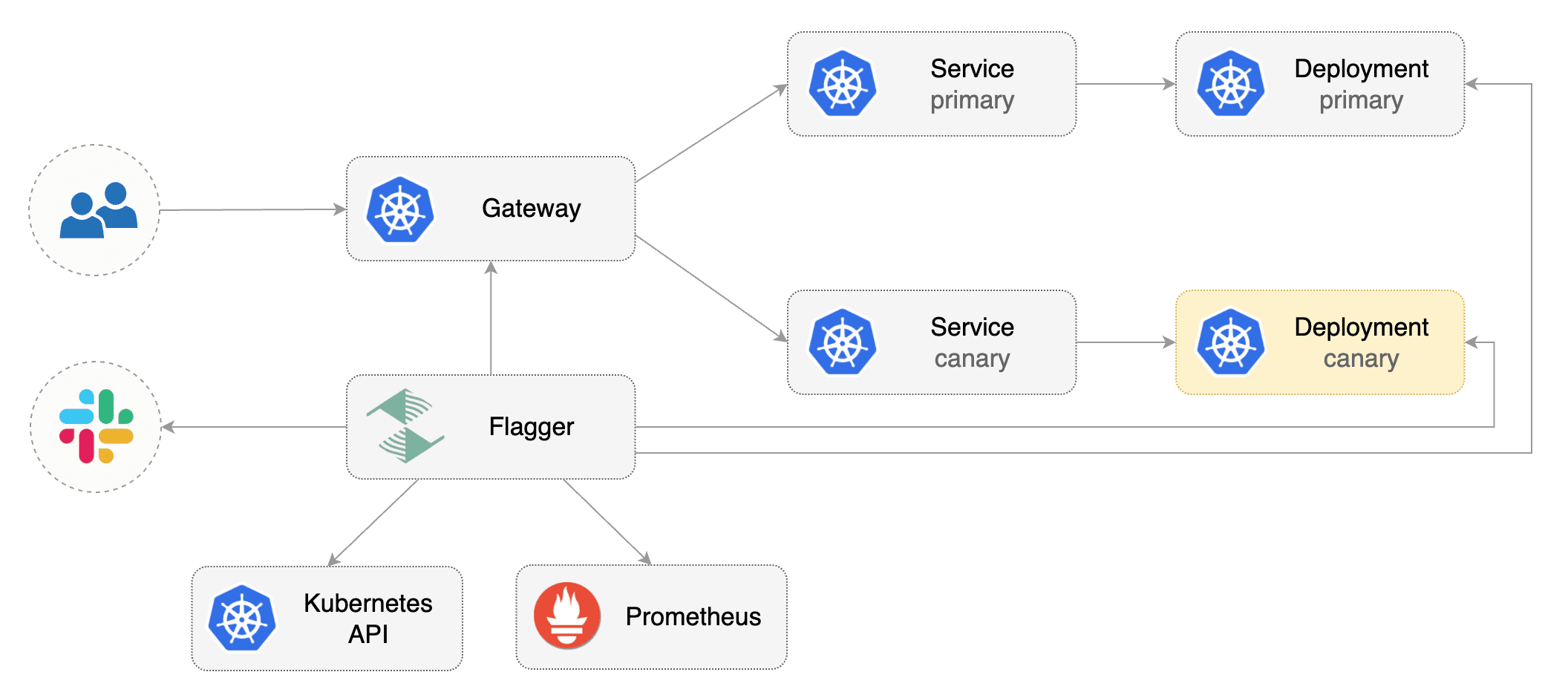
사전 요구사항 (Prerequisites)
Flagger는 Gateway API HTTPRoute (v1 또는 v1beta1)를 구현하는 인그레스 컨트롤러 또는 서비스 메시가 필요합니다.
이 튜토리얼에서는 Istio를 사용하겠지만, 다른 구현체도 사용할 수 있습니다.
Gateway API CRD를 설치합니다:
# Suggestion: Change v1.4.0 in to the latest Gateway API version
kubectl apply --server-side -k "github.com/kubernetes-sigs/gateway-api/config/crd?ref=v1.4.0"
Istio를 설치합니다:
istioctl install --set profile=minimal -y

# Suggestion: Change release-1.27 in to the latest Istio version
kubectl apply -f https://raw.githubusercontent.com/istio/istio/release-1.27/samples/addons/prometheus.yaml
flagger-system 네임스페이스에 Flagger를 설치합니다:
kubectl create ns flagger-system

helm repo add flagger https://flagger.app
helm upgrade -i flagger flagger/flagger \
  --namespace flagger-system \
  --set prometheus.install=false \
  --set meshProvider=gatewayapi:v1 \
  --set metricsServer=http://prometheus.istio-system:9090
Gateway용 네임스페이스를 만듭니다:
kubectl create ns istio-ingress
로드 밸런싱, 트래픽 ACL 등을 구성하는 Gateway를 만듭니다:
apiVersion: gateway.networking.k8s.io/v1
kind: Gateway
metadata:
  name: gateway
  namespace: istio-ingress
spec:
  gatewayClassName: istio
  listeners:
  - name: default
    hostname: "*.example.com"
    port: 80
    protocol: HTTP
    allowedRoutes:
      namespaces:
        from: All
부트스트랩 (Bootstrap)
Flagger는 Kubernetes deployment와 선택적으로 horizontal pod autoscaler(HPA)를 받아, 일련의 오브젝트(Kubernetes deployments, ClusterIP services, Gateway용 HTTPRoutes)를 생성합니다. 이 오브젝트들은 메시 내부에서 애플리케이션을 노출하고 카나리아 분석과 승격(promotion)을 구동합니다.
테스트 네임스페이스를 만듭니다:
kubectl create ns test
deployment와 horizontal pod autoscaler를 만듭니다:
kubectl apply -k https://github.com/fluxcd/flagger//kustomize/podinfo?ref=main
카나리아 분석 중 트래픽을 생성할 부하 테스트 서비스를 배포합니다:
kubectl apply -k https://github.com/fluxcd/flagger//kustomize/tester?ref=main
flagger-system 네임스페이스의 Prometheus 서버를 대상으로 하는 메트릭 템플릿을 만듭니다. 아래 PromQL 쿼리는 Envoy용이므로, 자신의 인그레스/메시 프로바이더에 맞게 변경할 수 있습니다.
apiVersion: flagger.app/v1beta1
kind: MetricTemplate
metadata:
  name: latency
  namespace: flagger-system
spec:
  provider:
    type: prometheus
    address: http://prometheus.istio-system:9090
  query: |
    histogram_quantile(0.99,
      sum(
        rate(
          istio_request_duration_milliseconds_bucket{
            reporter="source",
            destination_workload_namespace=~"{{ namespace }}",
            destination_workload=~"{{ target }}",
          }[{{ interval }}]
        )
      ) by (le)
    )/1000
---
apiVersion: flagger.app/v1beta1
kind: MetricTemplate
metadata:
  name: error-rate
  namespace: flagger-system
spec:
  provider:
    type: prometheus
    address: http://prometheus.istio-system:9090
  query: |
    100 - sum(
      rate(
        istio_requests_total{
          reporter="source",
          destination_workload_namespace=~"{{ namespace }}",
          destination_workload=~"{{ target }}",
          response_code!~"5.*"
        }[{{ interval }}]
      )
    )
    /
    sum(
      rate(
        istio_requests_total{
          reporter="source",
          destination_workload_namespace=~"{{ namespace }}",
          destination_workload=~"{{ target }}",
        }[{{ interval }}]
      )
    )
    * 100
위 리소스를 metric-templates.yaml로 저장한 뒤 적용합니다:
kubectl apply -f metric-templates.yaml
Canary 커스텀 리소스를 만듭니다 ("www.example.com"을 자신의 도메인으로 바꾸세요):
apiVersion: flagger.app/v1beta1
kind: Canary
metadata:
  name: podinfo
  namespace: test
spec:
  # deployment reference
  targetRef:
    apiVersion: apps/v1
    kind: Deployment
    name: podinfo
  # the maximum time in seconds for the canary deployment
  # to make progress before it is rollback (default 600s)
  progressDeadlineSeconds: 60
  # HPA reference (optional)
  autoscalerRef:
    apiVersion: autoscaling/v2
    kind: HorizontalPodAutoscaler
    name: podinfo
  service:
    # service port number
    port: 9898
    # container port number or name (optional)
    targetPort: 9898
    # Gateway API HTTPRoute host names
    hosts:
     - www.example.com
    # Reference to the Gateway that the generated HTTPRoute would attach to.
    gatewayRefs:
      - name: gateway
        namespace: istio-ingress
  analysis:
    # schedule interval (default 60s)
    interval: 1m
    # max number of failed metric checks before rollback
    threshold: 5
    # max traffic percentage routed to canary
    # percentage (0-100)
    maxWeight: 50
    # canary increment step
    # percentage (0-100)
    stepWeight: 10
    metrics:
    - name: error-rate
      # max error rate (5xx responses)
      # percentage (0-100)
      templateRef:
        name: error-rate
        namespace: flagger-system
      thresholdRange:
        max: 1
      interval: 1m
    - name: latency
      templateRef:
        name: latency
        namespace: flagger-system
      # seconds
      thresholdRange:
         max: 0.5
      interval: 30s
    # testing (optional)
    webhooks:
      - name: smoke-test
        type: pre-rollout
        url: http://flagger-loadtester.test/
        timeout: 15s
        metadata:
          type: bash
          cmd: "curl -sd 'anon' http://podinfo-canary.test:9898/token | grep token"
      - name: load-test
        url: http://flagger-loadtester.test/
        timeout: 5s
        metadata:
          cmd: "hey -z 2m -q 10 -c 2 -host www.example.com http://gateway-istio.istio-ingress/"
위 리소스를 podinfo-canary.yaml로 저장한 뒤 적용합니다:
kubectl apply -f ./podinfo-canary.yaml
카나리아 분석이 시작되면 Flagger는 트래픽을 canary로 라우팅하기 전에 pre-rollout 웹훅을 호출합니다. 카나리아 분석은 매분 HTTP 메트릭과 롤아웃 훅을 검증하면서 5분 동안 실행됩니다.
몇 초 후 Flagger가 canary 오브젝트를 생성합니다:
# applied
deployment.apps/podinfo
horizontalpodautoscaler.autoscaling/podinfo
canary.flagger.app/podinfo

# generated
deployment.apps/podinfo-primary
horizontalpodautoscaler.autoscaling/podinfo-primary
service/podinfo
service/podinfo-canary
service/podinfo-primary
httproutes.gateway.networking.k8s.io/podinfo
앱을 클러스터 외부로 노출하기 (Expose the app outside the cluster)
Istio 로드 밸런서의 외부 주소를 찾습니다:
export ADDRESS="$(kubectl -n istio-ingress get svc/gateway-istio -ojson \
|| jq -r ".status.loadBalancer.ingress[].hostname")"
echo $ADDRESS
DNS 서버에 CNAME 레코드(AWS) 또는 A 레코드(GKE/AKS/DOKS)를 구성하고 예를 들어 www.example.com 같은 도메인을 LB 주소로 지정합니다.
이제 도메인 주소로 podinfo UI에 접근할 수 있습니다.
프로덕션 워크로드를 인터넷에 노출할 때는 HTTPS를 사용해야 합니다. 로컬 클러스터를 사용한다면 Envoy LoadBalancer 서비스로 포트 포워딩할 수 있습니다:
kubectl port-forward -n istio-ingress svc/gateway-istio 8080:80
이제 curl -H "Host: www.example.com" localhost:8080으로 podinfo에 접근할 수 있습니다.
자동 카나리아 승격 (Automated canary promotion)
애플리케이션이 부트스트랩되면 Flagger는 배포의 변경을 지속적으로 모니터링합니다. 새 리비전이 감지되면 Flagger는 카나리아 분석을 시작하고 점진적으로 새 버전으로 트래픽을 옮깁니다.

컨테이너 이미지를 업데이트해 카나리아 배포를 트리거합니다:
kubectl -n test set image deployment/podinfo \
podinfod=stefanprodan/podinfo:6.0.1
Flagger는 배포 리비전이 변경되었음을 감지하고 새 롤아웃을 시작합니다:
kubectl -n test describe canary/podinfo

Status:
  Canary Weight:         0
  Failed Checks:         0
  Phase:                 Succeeded
Events:
  Type     Reason  Age   From     Message
  ----     ------  ----  ----     -------
  Normal   Synced  3m    flagger  New revision detected podinfo.test
  Normal   Synced  3m    flagger  Scaling up podinfo.test
  Warning  Synced  3m    flagger  Waiting for podinfo.test rollout to finish: 0 of 1 updated replicas are available
  Normal   Synced  3m    flagger  Advance podinfo.test canary weight 5
  Normal   Synced  3m    flagger  Advance podinfo.test canary weight 10
  Normal   Synced  3m    flagger  Advance podinfo.test canary weight 15
  Normal   Synced  2m    flagger  Advance podinfo.test canary weight 20
  Normal   Synced  2m    flagger  Advance podinfo.test canary weight 25
  Normal   Synced  1m    flagger  Advance podinfo.test canary weight 30
  Normal   Synced  1m    flagger  Advance podinfo.test canary weight 35
  Normal   Synced  55s   flagger  Advance podinfo.test canary weight 40
  Normal   Synced  45s   flagger  Advance podinfo.test canary weight 45
  Normal   Synced  35s   flagger  Advance podinfo.test canary weight 50
  Normal   Synced  25s   flagger  Copying podinfo.test template spec to podinfo-primary.test
  Warning  Synced  15s   flagger  Waiting for podinfo-primary.test rollout to finish: 1 of 2 updated replicas are available
  Normal   Synced  5s    flagger  Promotion completed! Scaling down podinfo.test
참고 카나리아 분석 중에 배포에 새 변경 사항을 적용하면 Flagger가 분석을 다시 시작합니다.
canary 배포는 다음 오브젝트 중 하나의 변경으로 트리거됩니다:
- Deployment PodSpec (컨테이너 이미지, 명령, 포트, env, 리소스 등)
- 볼륨으로 마운트되거나 환경 변수로 매핑된 ConfigMaps
- 볼륨으로 마운트되거나 환경 변수로 매핑된 Secrets
Flagger가 Gateway에 연결된 HTTPRoute 오브젝트의 가중치를 점진적으로 변경하는 모습은 다음과 같이 모니터링할 수 있습니다:
watch kubectl get httproute -n test podinfo -o=jsonpath='{.spec.rules}'
모든 canary는 다음과 같이 모니터링할 수 있습니다:
watch kubectl get canaries --all-namespaces

NAMESPACE   NAME      STATUS        WEIGHT   LASTTRANSITIONTIME
test        podinfo   Progressing   15       2025-10-16T14:05:07Z
prod        frontend  Succeeded     0        2025-10-15T16:15:07Z
prod        backend   Failed        0        2025-10-14T17:05:07Z
자동 롤백 (Automated rollback)
카나리아 분석 중에 HTTP 500 오류와 높은 지연 시간을 생성해 Flagger가 롤아웃을 일시 중지하는지 테스트할 수 있습니다.
또 다른 카나리아 배포를 트리거합니다:
kubectl -n test set image deployment/podinfo \
podinfod=stefanprodan/podinfo:6.0.2
로드 테스터 파드에 exec로 들어갑니다:
kubectl -n test exec -it flagger-loadtester-xx-xx sh
HTTP 500 오류를 생성합니다:
watch curl http://podinfo-canary:9898/status/500
지연 시간을 생성합니다:
watch curl http://podinfo-canary:9898/delay/1
실패한 검사 횟수가 카나리아 분석 임계값에 도달하면 트래픽은 primary로 다시 라우팅되고, canary는 0으로 스케일되며 롤아웃은 실패로 표시됩니다.
kubectl -n test describe canary/podinfo

Status:
  Canary Weight:         0
  Failed Checks:         10
  Phase:                 Failed
Events:
  Type     Reason  Age   From     Message
  ----     ------  ----  ----     -------
  Normal   Synced  3m    flagger  Starting canary deployment for podinfo.test
  Normal   Synced  3m    flagger  Advance podinfo.test canary weight 5
  Normal   Synced  3m    flagger  Advance podinfo.test canary weight 10
  Normal   Synced  3m    flagger  Advance podinfo.test canary weight 15
  Normal   Synced  3m    flagger  Halt podinfo.test advancement error rate 69.17% > 1%
  Normal   Synced  2m    flagger  Halt podinfo.test advancement error rate 61.39% > 1%
  Normal   Synced  2m    flagger  Halt podinfo.test advancement error rate 55.06% > 1%
  Normal   Synced  2m    flagger  Halt podinfo.test advancement error rate 47.00% > 1%
  Normal   Synced  2m    flagger  (combined from similar events): Halt podinfo.test advancement error rate 38.08% > 1%
  Warning  Synced  1m    flagger  Rolling back podinfo.test failed checks threshold reached 10
  Warning  Synced  1m    flagger  Canary failed! Scaling down podinfo.test
A/B 테스트
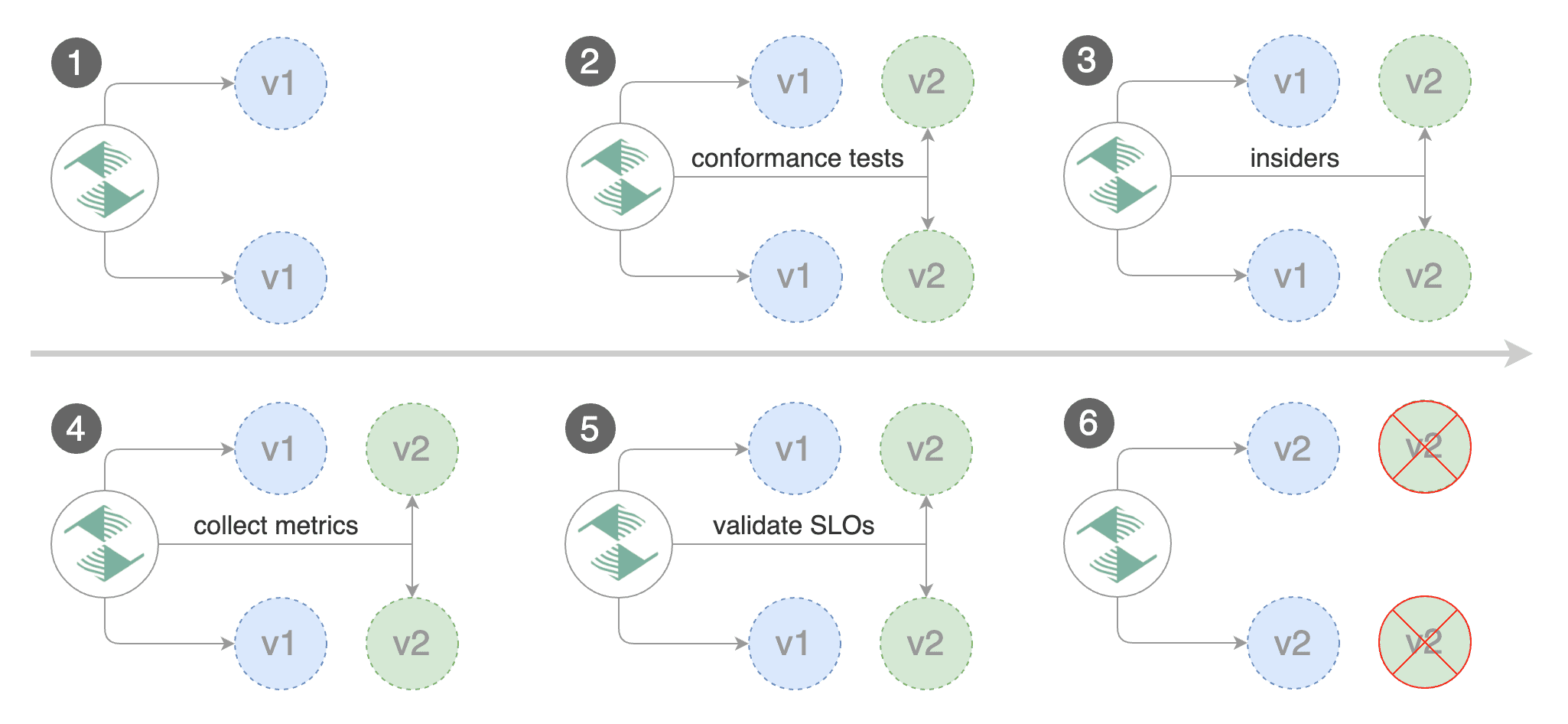
가중치 라우팅 외에도 Flagger는 HTTP 매치 조건을 기반으로 canary로 트래픽을 라우팅하도록 구성할 수 있습니다. A/B 테스트 시나리오에서는 HTTP 헤더와 쿠키를 사용해 특정 사용자 세그먼트를 대상으로 삼게 됩니다.
canary 커스텀 리소스를 만듭니다 ("www.example.com"을 자신의 도메인으로 바꾸세요):
apiVersion: flagger.app/v1beta1
kind: Canary
metadata:
  name: podinfo
  namespace: test
spec:
  # deployment reference
  targetRef:
    apiVersion: apps/v1
    kind: Deployment
    name: podinfo
  # the maximum time in seconds for the canary deployment
  # to make progress before it is rollback (default 600s)
  progressDeadlineSeconds: 60
  # HPA reference (optional)
  autoscalerRef:
    apiVersion: autoscaling/v2
    kind: HorizontalPodAutoscaler
    name: podinfo
  service:
    # service port number
    port: 9898
    # container port number or name (optional)
    targetPort: 9898
    # Gateway API HTTPRoute host names
    hosts:
     - www.example.com
    # Reference to the Gateway that the generated HTTPRoute would attach to.
    gatewayRefs:
      - name: gateway
        namespace: istio-ingress
  analysis:
    # schedule interval (default 60s)
    interval: 1m
    # total number of iterations
    iterations: 10
    # max number of failed iterations before rollback
    threshold: 2
    # canary match condition
    match:
      - headers:
          user-agent:
            regex: ".*Firefox.*"
      - headers:
          cookie:
            regex: "^(.*?;)?(type=insider)(;.*)?$"
    metrics:
    - name: error-rate
      # max error rate (5xx responses)
      # percentage (0-100)
      templateRef:
        name: error-rate
        namespace: flagger-system
      thresholdRange:
        max: 1
      interval: 1m
    - name: latency
      templateRef:
        name: latency
        namespace: flagger-system
      # seconds
      thresholdRange:
         max: 0.5
      interval: 30s
    # testing (optional)
    webhooks:
      - name: load-test
        url: http://flagger-loadtester.test/
        timeout: 5s
        metadata:
          cmd: "hey -z 2m -q 10 -c 2 -host www.example.com -H 'Cookie: type=insider' http://gateway-istio.istio-ingress/"
위 구성은 insider 쿠키가 있거나 Firefox를 브라우저로 사용하는 사용자를 대상으로 10분 동안 분석을 실행합니다.
위 리소스를 podinfo-ab-canary.yaml로 저장한 뒤 적용합니다:
kubectl apply -f ./podinfo-ab-canary.yaml
컨테이너 이미지를 업데이트해 카나리아 배포를 트리거합니다:
kubectl -n test set image deployment/podinfo \
podinfod=stefanprodan/podinfo:6.0.3
Flagger는 배포 리비전이 변경되었음을 감지하고 새 롤아웃을 시작합니다:
kubectl -n test describe canary/podinfo

Status:
  Failed Checks:         0
  Phase:                 Succeeded
Events:
  Type     Reason  Age   From     Message
  ----     ------  ----  ----     -------
  Normal   Synced  3m    flagger  New revision detected podinfo.test
  Normal   Synced  3m    flagger  Scaling up podinfo.test
  Warning  Synced  3m    flagger  Waiting for podinfo.test rollout to finish: 0 of 1 updated replicas are available
  Normal   Synced  3m    flagger  Advance podinfo.test canary iteration 1/10
  Normal   Synced  3m    flagger  Advance podinfo.test canary iteration 2/10
  Normal   Synced  3m    flagger  Advance podinfo.test canary iteration 3/10
  Normal   Synced  2m    flagger  Advance podinfo.test canary iteration 4/10
  Normal   Synced  2m    flagger  Advance podinfo.test canary iteration 5/10
  Normal   Synced  1m    flagger  Advance podinfo.test canary iteration 6/10
  Normal   Synced  1m    flagger  Advance podinfo.test canary iteration 7/10
  Normal   Synced  55s   flagger  Advance podinfo.test canary iteration 8/10
  Normal   Synced  45s   flagger  Advance podinfo.test canary iteration 9/10
  Normal   Synced  35s   flagger  Advance podinfo.test canary iteration 10/10
  Normal   Synced  25s   flagger  Copying podinfo.test template spec to podinfo-primary.test
  Warning  Synced  15s   flagger  Waiting for podinfo-primary.test rollout to finish: 1 of 2 updated replicas are available
  Normal   Synced  5s    flagger  Promotion completed! Scaling down podinfo.test
세션 어피니티 (Session Affinity)
Flagger는 가중치 라우팅과 A/B 테스트를 개별적으로 수행할 수 있지만, Gateway API에서는 이 둘을 결합해 세션 어피니티가 있는 Canary 릴리스를 만들 수 있습니다. 자세한 내용은 배포 전략 문서에서 확인하세요.
참고: 세션 어피니티는
ResponseHeaderModifierAPI를 지원하는 Gateway API 구현체가 필요합니다.
canary 커스텀 리소스를 만듭니다 (www.example.com을 자신의 도메인으로 바꾸세요):
apiVersion: flagger.app/v1beta1
kind: Canary
metadata:
  name: podinfo
  namespace: test
spec:
  # deployment reference
  targetRef:
    apiVersion: apps/v1
    kind: Deployment
    name: podinfo
  # the maximum time in seconds for the canary deployment
  # to make progress before it is rollback (default 600s)
  progressDeadlineSeconds: 60
  # HPA reference (optional)
  autoscalerRef:
    apiVersion: autoscaling/v2
    kind: HorizontalPodAutoscaler
    name: podinfo
  service:
    # service port number
    port: 9898
    # container port number or name (optional)
    targetPort: 9898
    # Gateway API HTTPRoute host names
    hosts:
     - www.example.com
    # Reference to the Gateway that the generated HTTPRoute would attach to.
    gatewayRefs:
      - name: gateway
        namespace: istio-ingress
  analysis:
    # schedule interval (default 60s)
    interval: 1m
    # max number of failed metric checks before rollback
    threshold: 5
    # max traffic percentage routed to canary
    # percentage (0-100)
    maxWeight: 50
    # canary increment step
    # percentage (0-100)
    stepWeight: 10
    # session affinity config
    sessionAffinity:
      # name of the cookie used
      cookieName: flagger-cookie
      # max age of the cookie (in seconds)
      # optional; defaults to 86400
      maxAge: 21600
    metrics:
    - name: error-rate
      # max error rate (5xx responses)
      # percentage (0-100)
      templateRef:
        name: error-rate
        namespace: flagger-system
      thresholdRange:
        max: 1
      interval: 1m
    - name: latency
      templateRef:
        name: latency
        namespace: flagger-system
      # seconds
      thresholdRange:
         max: 0.5
      interval: 30s
    # testing (optional)
    webhooks:
      - name: load-test
        url: http://flagger-loadtester.test/
        timeout: 5s
        metadata:
          cmd: "hey -z 2m -q 10 -c 2 -host www.example.com http://gateway-istio.istio-ingress/"
위 리소스를 podinfo-canary-session-affinity.yaml로 저장한 뒤 적용합니다:
kubectl apply -f ./podinfo-canary-session-affinity.yaml
컨테이너 이미지를 업데이트해 카나리아 배포를 트리거합니다:
kubectl -n test set image deployment/podinfo \
podinfod=ghcr.io/stefanprodan/podinfo:6.0.1
브라우저에서 www.example.com을 로드하고 podinfo:6.0.1이 요청을 처리하는 것이 보일 때까지 새로고침할 수 있습니다. 이후의 모든 요청은 HTTPRoute 오브젝트에 Flagger가 구성한 세션 어피티니 덕분에 podinfo:6.0.0이 아니라 podinfo:6.0.1이 처리합니다.
공정한 가중치 트래픽 라우팅을 위해 Primary 배포의 고정성(stickiness)을 구성하려면 배포 전략 문서를 확인하세요.
트래픽 미러링 (Traffic mirroring)
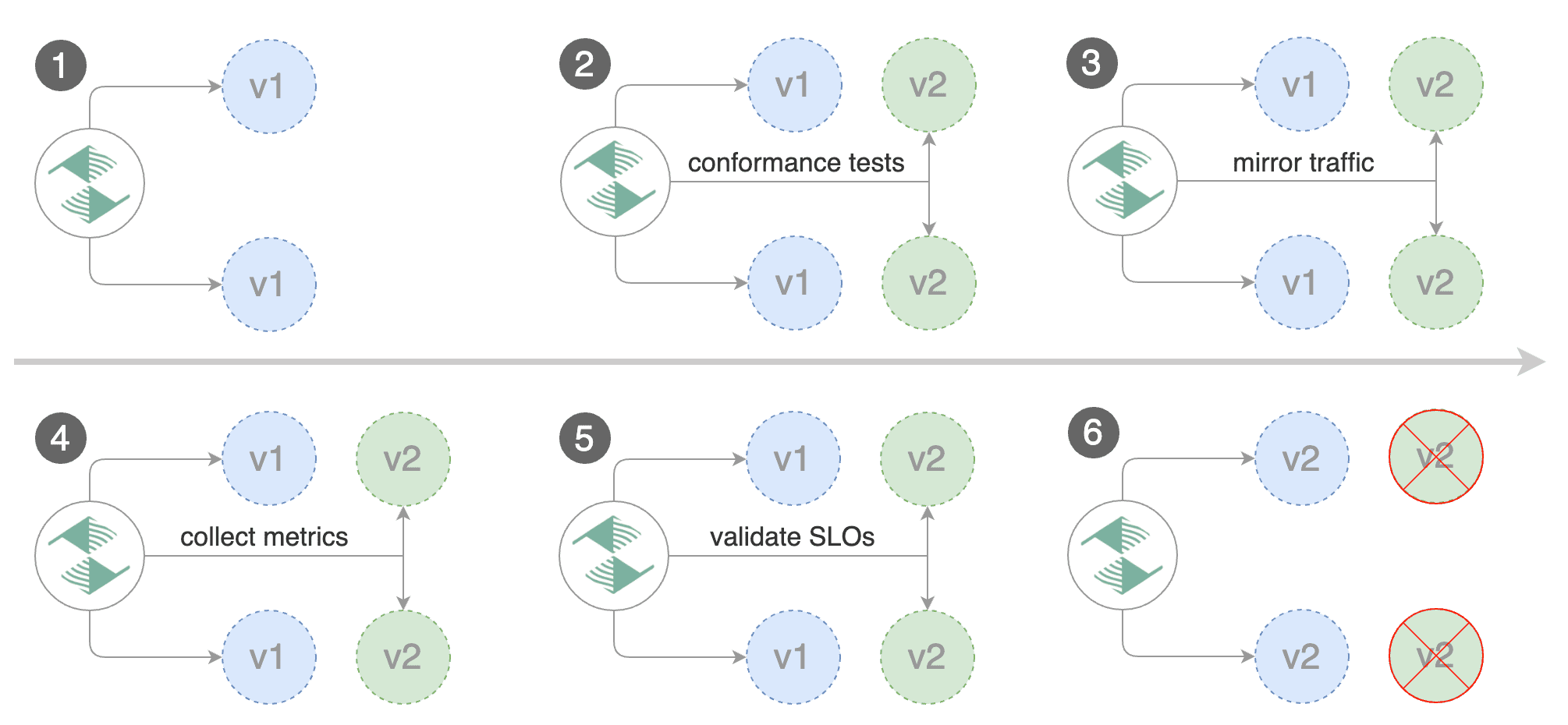
읽기(read) 연산을 수행하는 애플리케이션의 경우 Flagger를 트래픽 미러링을 사용하는 B/G 테스트로 구성할 수 있습니다.
참고: 트래픽 미러링은
RequestMirror필터를 지원하는 Gateway API 구현체가 필요합니다.
stepWeight를 iterations로 바꾸고 analysis.mirror를 true로 설정하면 미러링을 활성화할 수 있습니다:
apiVersion: flagger.app/v1beta1
kind: Canary
metadata:
  name: podinfo
  namespace: test
spec:
  # deployment reference
  targetRef:
    apiVersion: apps/v1
    kind: Deployment
    name: podinfo
  service:
    # service port number
    port: 9898
    # container port number or name (optional)
    targetPort: 9898
    # Gateway API HTTPRoute host names
    hosts:
     - www.example.com
    # Reference to the Gateway that the generated HTTPRoute would attach to.
    gatewayRefs:
      - name: gateway
        namespace: istio-ingress
  analysis:
    # schedule interval
    interval: 1m
    # max number of failed metric checks before rollback
    threshold: 5
    # total number of iterations
    iterations: 10
    # enable traffic shadowing
    mirror: true
    # Gateway API HTTPRoute host names
    metrics:
      - name: request-success-rate
        thresholdRange:
          min: 99
        interval: 1m
      - name: request-duration
        thresholdRange:
          max: 500
        interval: 1m
    webhooks:
      - name: load-test
        url: http://flagger-loadtester.test/
        timeout: 5s
        metadata:
          cmd: "hey -z 2m -q 10 -c 2 -host www.example.com http://gateway-istio.istio-ingress/"
Gateway API 트래픽 미러링은 들어오는 각 요청을 복사해 primary 서비스와 canary 서비스에 각각 하나씩 보냅니다. primary의 응답은 사용자에게 돌려보내고 canary의 응답은 버립니다.
두 요청 모두에서 메트릭을 수집하므로 canary 메트릭이 임계값 범위 내에 있을 때만 배포가 진행됩니다.
위 절차는 커스텀 메트릭 검사, 웹훅, 수동 승격 승인, Slack 또는 MS Teams 알림으로 확장할 수 있습니다.
HTTPRoute 사용자 지정 (Customising the HTTPRoute)
hosts와 gatewayRefs 필드 외에도 Canary의 spec.service 필드 아래에 노출된 다양한 옵션으로 생성되는 HTTPRoute를 사용자 지정할 수 있습니다.
헤더 조작 (Header Manipulation)
Canary의 spec.service.headers 필드를 사용해 요청·응답 헤더 조작을 구성할 수 있습니다.
참고: 헤더 조작은
RequestHeaderModifier와ResponseHeaderModifier필터를 지원하는 Gateway API 구현체가 필요합니다.
구성 예시:
apiVersion: flagger.app/v1beta1
kind: Canary
metadata:
  name: podinfo
  namespace: test
spec:
  service:
    headers:
      request:
        add:
          x-custom-header: "custom-value"
        set:
          x-api-version: "v1"
        remove:
          - x-debug-header
      response:
        add:
          x-frame-options: "DENY"
          x-content-type-options: "nosniff"
        set:
          cache-control: "no-cache"
        remove:
          - x-powered-by
URL 리라이팅 (URL Rewriting)
Canary의 spec.service.rewrite 필드를 사용해 요청의 경로나 호스트네임을 수정하는 URL 리라이팅을 구성할 수 있습니다.
참고: URL 리라이팅은
URLRewrite필터를 지원하는 Gateway API 구현체가 필요합니다.
구성 예시:
apiVersion: flagger.app/v1beta1
kind: Canary
metadata:
  name: podinfo
  namespace: test
spec:
  service:
    rewrite:
      # Rewrite the URI path
      uri: "/v2/api"
      # Optionally specify the rewrite type: "ReplaceFullPath" or "ReplacePrefixMatch"
      # Defaults to "ReplaceFullPath" if not specified
      type: "ReplaceFullPath"
      # Rewrite the hostname/authority header
      authority: "api.example.com"
type 필드는 URI 리라이팅이 수행되는 방식을 결정합니다:
- ReplaceFullPath: 요청 경로 전체를 지정된
uri값으로 대체합니다 - ReplacePrefixMatch: 매치된 경로의 접두사 부분만 대체합니다
접두사 대체 예시:
apiVersion: flagger.app/v1beta1
kind: Canary
metadata:
  name: podinfo
  namespace: test
spec:
  service:
    rewrite:
      uri: "/api/v2"
      type: "ReplacePrefixMatch"
ReplacePrefixMatch를 사용할 때 /old/path로 요청이 오고 HTTPRoute가 /old 접두사를 매치하면, 요청은 /api/v2/path로 리라이팅됩니다.
CORS 정책
CORS(Cross-origin resource sharing) 정책은 Canary의 spec.service.corsPolicy 필드로 구성할 수 있습니다.
참고: CORS는
CORS필터를 지원하는 Gateway API 구현체가 필요합니다.
구성 예시:
apiVersion: flagger.app/v1beta1
kind: Canary
metadata:
  name: podinfo
  namespace: test
spec:
  service:
    corsPolicy:
      allowOrigin:
        - https://foo.example
        - http://foo.example
      allowMethods:
        - GET
        - PUT
        - POST
        - DELETE
        - PATCH
        - OPTIONS
      allowCredentials: true
      allowHeaders:
        - Keep-Alive
        - User-Agent
        - X-Requested-With
        - If-Modified-Since
        - Cache-Control
        - Content-Type
        - Authorization
      maxAge: 24h