
Huawei Cloud
Huawei Cloud
Huawei Cloud Container Engine을 사용해서 Istio용 클러스터를 준비하는 방법을 알려드려요.
출처: Istio 문서
본문
다음 안내를 따라 Huawei Cloud Container Engine을 사용해서 Istio용 클러스터를 준비하세요.
Cloud Container Engine Console에서 Huawei Cloud에 Kubernetes 클러스터를 빠르고 쉽게 배포할 수 있는데, 이것은 Istio를 완전히 지원해요.
Huawei Cloud 안내를 따라 Istio를 수동 설치하기 전에 클러스터를 준비하려면 다음과 같이 진행해요:
- CCE 콘솔에 로그인해요. Dashboard > Buy Cluster를 선택해 Buy Hybrid Cluster 페이지를 열어요. 이 페이지를 여는 다른 방법은 내비게이션 창에서 Resource Management > Clusters를 선택하고 Hybrid Cluster 옆의 Buy를 클릭하는 거예요.
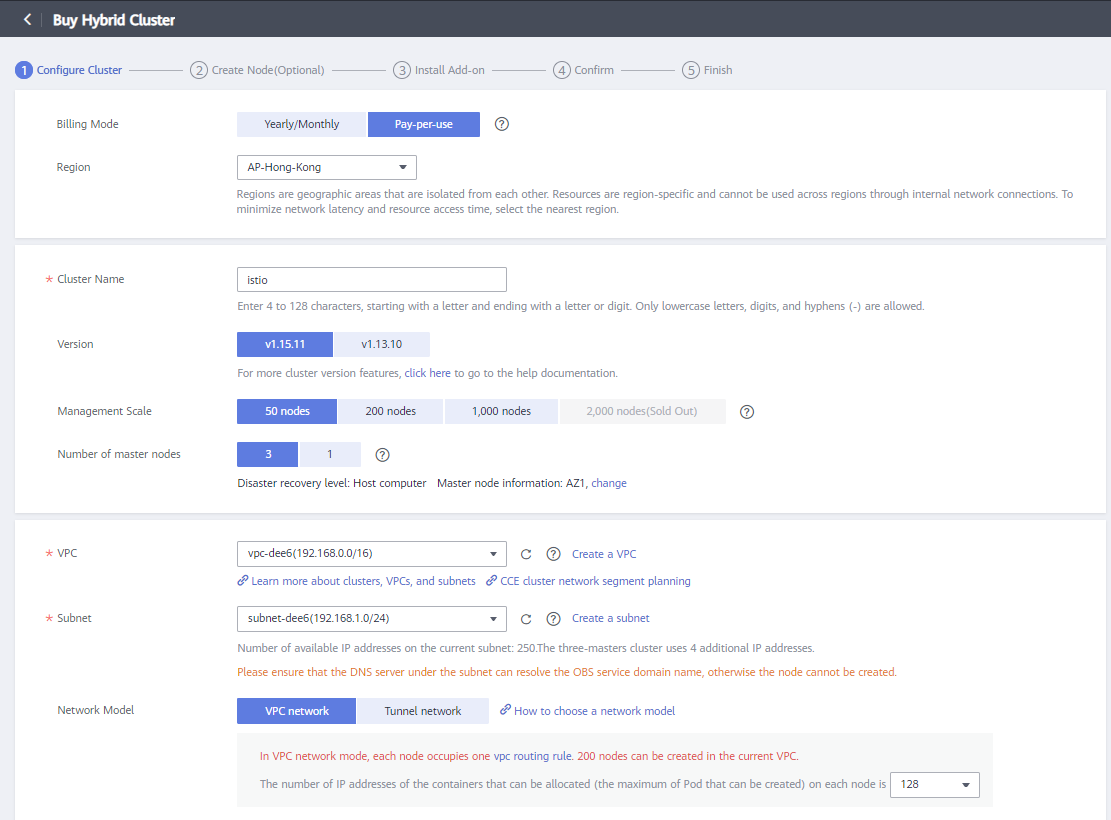
- Configure Cluster 페이지에서 클러스터 파라미터를 설정해요. 이 예시에서는 대부분의 파라미터가 기본값을 유지해요. 클러스터 설정이 끝나면 Next: Create Node를 클릭해 노드 생성 페이지로 이동해요.
아래 이미지는 클러스터를 만들고 설정하는 GUI를 보여줘요:
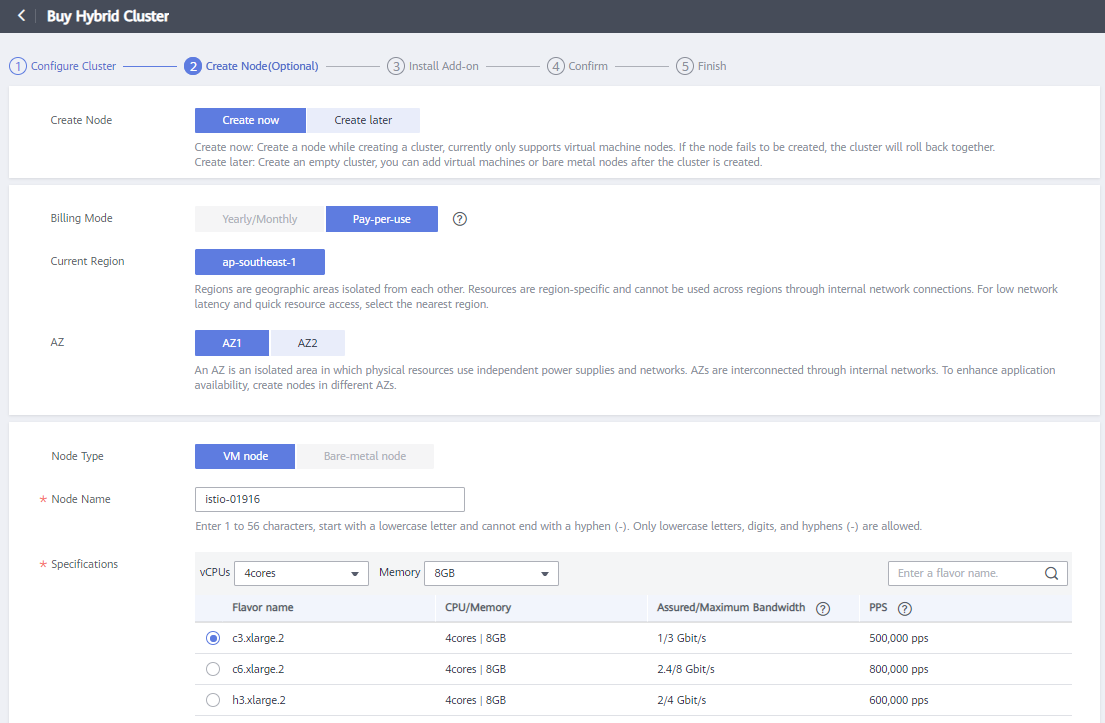
Configure Cluster 3. 노드 생성 페이지에서 다음 파라미터를 설정해요
아래 이미지는 노드를 만들고 설정하는 GUI를 보여줘요:
Configure Node 4. kubectl을 설정해요 5. 이제 설치 가이드에 따라 CCE 클러스터에 Istio를 설치할 수 있어요. 6. 필요하다면 Istio ingress 게이트웨이를 노출하도록 ELB를 설정해요.
Create Elastic Load BalancerELB 인스턴스를 istio-ingressgateway 서비스에 바인딩ELB 인스턴스 ID와 loadBalancerIP를 istio-ingressgateway로 설정.
$ kubectl apply -f - <<EOF
apiVersion: v1
kind: Service
metadata:
  annotations:
    kubernetes.io/elb.class: union
    kubernetes.io/elb.id: 4ee43d2b-cec5-4100-89eb-2f77837daa63 # ELB ID
    kubernetes.io/elb.lb-algorithm: ROUND_ROBIN
  labels:
    app: istio-ingressgateway
    install.operator.istio.io/owning-resource: unknown
    install.operator.istio.io/owning-resource-namespace: istio-system
    istio: ingressgateway
    istio.io/rev: default
    operator.istio.io/component: IngressGateways
    operator.istio.io/managed: Reconcile
    operator.istio.io/version: 1.9.0
    release: istio
  name: istio-ingressgateway
  namespace: istio-system
spec:
  clusterIP: 10.247.7.192
  externalTrafficPolicy: Cluster
  loadBalancerIP: 119.8.36.132     ## ELB EIP
  ports:
  - name: status-port
    nodePort: 32484
    port: 15021
    protocol: TCP
    targetPort: 15021
  - name: http2
    nodePort: 30294
    port: 80
    protocol: TCP
    targetPort: 8080
  - name: https
    nodePort: 31301
    port: 443
    protocol: TCP
    targetPort: 8443
  - name: tcp
    nodePort: 30229
    port: 31400
    protocol: TCP
    targetPort: 31400
  - name: tls
    nodePort: 32028
    port: 15443
    protocol: TCP
    targetPort: 15443
  selector:
    app: istio-ingressgateway
    istio: ingressgateway
  sessionAffinity: None
  type: LoadBalancer
EOF
다양한 작업(tasks)을 시도하면서 Istio를 사용해 보세요.