
코드 실행
코드 실행 (Code execution)
Gemini API의 코드 실행 도구는 모델이 Python 코드를 생성하고 실행할 수 있게 해줘요. 모델은 코드 실행 결과에서 반복 학습하며 최종 출력에 도달해요. 방정식을 풀거나 텍스트를 처리하는 것 같은 코드 기반 추론이 도움이 되는 앱을 만드는 데 쓸 수 있어요.
출처: 원문
본문
Gemini API는 모델이 Python 코드를 생성하고 실행할 수 있게 해주는 코드 실행 도구를 제공해요. 모델은 코드 실행 결과에서 반복적으로 배우며 최종 출력에 도달할 수 있어요. 코드 기반 추론이 도움이 되는 애플리케이션을 만드는 데 코드 실행을 사용할 수 있어요. 예를 들어 방정식을 풀거나 텍스트를 처리하는 데 코드 실행을 사용할 수 있어요. 코드 실행 환경에 포함된 라이브러리를 사용해 더 특수한 작업을 수행할 수도 있어요.
Gemini는 Python에서만 코드를 실행할 수 있어요. 다른 언어로 코드를 생성하도록 요청할 수는 있지만, 모델이 코드 실행 도구로 그것을 실행할 수는 없어요.
코드 실행 활성화
코드 실행을 활성화하려면 모델에 코드 실행 도구를 구성하세요. 이렇게 하면 모델이 코드를 생성하고 실행할 수 있어요.
Python
from google import genai
from google.genai import types

client = genai.Client()

response = client.models.generate_content(
    model="gemini-3.8-flash",
    contents="What is the sum of the first 50 prime numbers? "
    "Generate and run code for the calculation, and make sure you get all 50.",
    config=types.GenerateContentConfig(
        tools=[types.Tool(code_execution=types.ToolCodeExecution)]
    ),
)

for part in response.candidates[0].content.parts:
    if part.text is not None:
        print(part.text)
    if part.executable_code is not None:
        print(part.executable_code.code)
    if part.code_execution_result is not None:
        print(part.code_execution_result.output)
JavaScript
import { GoogleGenAI } from "@google/genai";

const ai = new GoogleGenAI({});

let response = await ai.models.generateContent({
  model: "gemini-3.8-flash",
  contents: [
    "What is the sum of the first 50 prime numbers? " +
      "Generate and run code for the calculation, and make sure you get all 50.",
  ],
  config: {
    tools: [{ codeExecution: {} }],
  },
});

const parts = response?.candidates?.[0]?.content?.parts || [];
parts.forEach((part) => {
  if (part.text) {
    console.log(part.text);
  }

  if (part.executableCode && part.executableCode.code) {
    console.log(part.executableCode.code);
  }

  if (part.codeExecutionResult && part.codeExecutionResult.output) {
    console.log(part.codeExecutionResult.output);
  }
});
Go
package main

import (
    "context"
    "fmt"
    "os"
    "google.golang.org/genai"
)

func main() {

    ctx := context.Background()
    client, err := genai.NewClient(ctx, nil)
    if err != nil {
        log.Fatal(err)
    }

    config := &genai.GenerateContentConfig{
        Tools: []*genai.Tool{
            {CodeExecution: &genai.ToolCodeExecution{}},
        },
    }

    result, _ := client.Models.GenerateContent(
        ctx,
        "gemini-3.8-flash",
        genai.Text("What is the sum of the first 50 prime numbers? " +
                  "Generate and run code for the calculation, and make sure you get all 50."),
        config,
    )

    fmt.Println(result.Text())
    fmt.Println(result.ExecutableCode())
    fmt.Println(result.CodeExecutionResult())
}
REST
curl "https://generativelanguage.googleapis.com/v1beta/models/gemini-3.8-flash:generateContent" \
-H "x-goog-api-key: *** \
-H 'Content-Type: application/json' \
-d ' {"tools": [{"code_execution": {}}],
    "contents": {
      "parts":
        {
            "text": "What is the sum of the first 50 prime numbers? Generate and run code for the calculation, and make sure you get all 50."
        }
    },
}'
참고: 이 REST 예시는 예시 출력에 표시된 것처럼 JSON 응답을 파싱하지 않아요.
출력은 가독성을 위해 포맷된 대략 다음과 같을 수 있어요:
Okay, I need to calculate the sum of the first 50 prime numbers. Here's how I'll
approach this:

1.  **Generate Prime Numbers:** I'll use an iterative method to find prime
    numbers. I'll start with 2 and check if each subsequent number is divisible
    by any number between 2 and its square root. If not, it's a prime.
2.  **Store Primes:** I'll store the prime numbers in a list until I have 50 of
    them.
3.  **Calculate the Sum:**  Finally, I'll sum the prime numbers in the list.

Here's the Python code to do this:

def is_prime(n):
  """Efficiently checks if a number is prime."""
  if n <= 1:
    return False
  if n <= 3:
    return True
  if n % 2 == 0 or n % 3 == 0:
    return False
  i = 5
  while i * i <= n:
    if n % i == 0 or n % (i + 2) == 0:
      return False
    i += 6
  return True

primes = []
num = 2
while len(primes) < 50:
  if is_prime(num):
    primes.append(num)
  num += 1

sum_of_primes = sum(primes)
print(f'{primes=}')
print(f'{sum_of_primes=}')

primes=[2, 3, 5, 7, 11, 13, 17, 19, 23, 29, 31, 37, 41, 43, 47, 53, 59, 61, 67,
71, 73, 79, 83, 89, 97, 101, 103, 107, 109, 113, 127, 131, 137, 139, 149, 151,
157, 163, 167, 173, 179, 181, 191, 193, 197, 199, 211, 223, 227, 229]
sum_of_primes=5117

The sum of the first 50 prime numbers is 5117.
이 출력은 코드 실행을 사용할 때 모델이 반환하는 여러 콘텐츠 파트를 결합해요:
text: 모델이 생성한 인라인 텍스트executableCode: 실행되도록 생성된 모델 코드codeExecutionResult: 실행 가능한 코드의 결과
이 파트들의 명명 규칙은 프로그래밍 언어마다 달라요.
이미지와 함께 쓰는 코드 실행 (Gemini 3)
Gemini 3 Flash 모델은 이제 Python 코드를 작성·실행해 이미지를 적극적으로 조작·검사할 수 있어요.
사용 사례
- 확대·검사: 모델이 디테일이 너무 작을 때(예: 먼 계기판 읽기) 암시적으로 감지하고 그 영역을 더 높은 해상도로 자르고 다시 검사하는 코드를 작성해요.
- 시각적 수학: 모델이 코드로 다중 단계 계산을 실행할 수 있어요 (예: 영수증의 항목 합산).
- 이미지 주석: 관계를 보여주기 위해 화살표를 그리는 것처럼, 질문에 답하기 위해 이미지에 주석을 달 수 있어요.
참고: 모델이 작은 디테일 확대는 자동 처리하지만, "기어 개수를 세는 코드를 작성해 줘"나 "이 이미지를 똑바로 돌려줘" 같은 다른 작업에는 코드를 사용하도록 명시적으로 프롬프트해야 해요.
이미지 코드 실행 활성화
이미지 코드 실행은 Gemini 3 Flash에서 공식 지원돼요. 도구로 코드 실행과 Thinking을 모두 활성화하면 이 동작을 켤 수 있어요.
Python
from google import genai
from google.genai import types
import requests
from PIL import Image
import io

image_path = "https://goo.gle/instrument-img"
image_bytes = requests.get(image_path).content
image = types.Part.from_bytes(
  data=image_bytes, mime_type="image/jpeg"
)

# Ensure you have your API key set
client = genai.Client()

response = client.models.generate_content(
    model="gemini-3.8-flash",
    contents=[image, "Zoom into the expression pedals and tell me how many pedals are there?"],
    config=types.GenerateContentConfig(
        tools=[types.Tool(code_execution=types.ToolCodeExecution)]
    ),
)

for part in response.candidates[0].content.parts:
    if part.text is not None:
        print(part.text)
    if part.executable_code is not None:
        print(part.executable_code.code)
    if part.code_execution_result is not None:
        print(part.code_execution_result.output)
    if part.as_image() is not None:
        # display() is a standard function in Jupyter/Colab notebooks
        display(Image.open(io.BytesIO(part.as_image().image_bytes)))
JavaScript
async function main() {
  const ai = new GoogleGenAI({ });

  // 1. Prepare Image Data
  const imageUrl = "https://goo.gle/instrument-img";
  const response = await fetch(imageUrl);
  const imageArrayBuffer = await response.arrayBuffer();
  const base64ImageData = Buffer.from(imageArrayBuffer).toString('base64');

  // 2. Call the API with Code Execution enabled
  const result = await ai.models.generateContent({
    model: "gemini-3.8-flash",
    contents: [
      {
        inlineData: {
          mimeType: 'image/jpeg',
          data: base64ImageData,
        },
      },
      { text: "Zoom into the expression pedals and tell me how many pedals are there?" }
    ],
    config: {
      tools: [{ codeExecution: {} }],
    },
  });

  // 3. Process the response (Text, Code, and Execution Results)
  const candidates = result.candidates;
  if (candidates && candidates[0].content.parts) {
    for (const part of candidates[0].content.parts) {
      if (part.text) {
        console.log("Text:", part.text);
      }
      if (part.executableCode) {
        console.log(`\nGenerated Code (${part.executableCode.language}):\n`, part.executableCode.code);
      }
      if (part.codeExecutionResult) {
        console.log(`\nExecution Output (${part.codeExecutionResult.outcome}):\n`, part.codeExecutionResult.output);
      }
    }
  }
}

main();
Go
package main

import (
    "context"
    "fmt"
    "io"
    "log"
    "net/http"
    "os"

    "google.golang.org/genai"
)

func main() {
    ctx := context.Background()
    // Initialize Client (Reads GEMINI_API_KEY from env)
    client, err := genai.NewClient(ctx, nil)
    if err != nil {
        log.Fatal(err)
    }

    // 1. Download the image
    imageResp, err := http.Get("https://goo.gle/instrument-img")
    if err != nil {
        log.Fatal(err)
    }
    defer imageResp.Body.Close()

    imageBytes, err := io.ReadAll(imageResp.Body)
    if err != nil {
        log.Fatal(err)
    }

    // 2. Configure Code Execution Tool
    config := &genai.GenerateContentConfig{
        Tools: []*genai.Tool{
            {CodeExecution: &genai.ToolCodeExecution{}},
        },
    }

    // 3. Generate Content
    result, err := client.Models.GenerateContent(
        ctx,
        "gemini-3.8-flash",
        []*genai.Content{
            {
                Parts: []*genai.Part{
                    {InlineData: &genai.Blob{MIMEType: "image/jpeg", Data: imageBytes}},
                    {Text: "Zoom into the expression pedals and tell me how many pedals are there?"},
                },
                Role: "user",
            },
        },
        config,
    )
    if err != nil {
        log.Fatal(err)
    }

    // 4. Parse Response (Text, Code, Output)
    for _, cand := range result.Candidates {
        for _, part := range cand.Content.Parts {
            if part.Text != "" {
                fmt.Println("Text:", part.Text)
            }
            if part.ExecutableCode != nil {
                fmt.Printf("\nGenerated Code (%s):\n%s\n",
                    part.ExecutableCode.Language,
                    part.ExecutableCode.Code)
            }
            if part.CodeExecutionResult != nil {
                fmt.Printf("\nExecution Output (%s):\n%s\n",
                    part.CodeExecutionResult.Outcome,
                    part.CodeExecutionResult.Output)
            }
        }
    }
}
REST
IMG_URL="https://goo.gle/instrument-img"
MODEL="gemini-3.8-flash"

MIME_TYPE=$(curl -sIL "$IMG_URL" | grep -i '^content-type:' | awk -F ': ' '{print $2}' | sed 's/\r$//' | head -n 1)
if [[ -z "$MIME_TYPE" || ! "$MIME_TYPE" == image/* ]]; then
  MIME_TYPE="image/jpeg"
fi

if [[ "$(uname)" == "Darwin" ]]; then
  IMAGE_B64=$(curl -sL "$IMG_URL" | base64 -b 0)
elif [[ "$(base64 --version 2>&1)" = *"FreeBSD"* ]]; then
  IMAGE_B64=$(curl -sL "$IMG_URL" | base64)
else
  IMAGE_B64=$(curl -sL "$IMG_URL" | base64 -w0)
fi

curl "https://generativelanguage.googleapis.com/v1beta/models/$MODEL:generateContent" \
    -H "x-goog-api-key: *** \
    -H 'Content-Type: application/json' \
    -X POST \
    -d '{
      "contents": [{
        "parts":[
            {
              "inline_data": {
                "mime_type":"'"$MIME_TYPE"'",
                "data": "'"$IMAGE_B64"'"
              }
            },
            {"text": "Zoom into the expression pedals and tell me how many pedals are there?"}
        ]
      }],
      "tools": [
        {
          "code_execution": {}
        }
      ]
    }'
채팅에서 코드 실행 사용
채팅의 일부로도 코드 실행을 사용할 수 있어요.
Python
from google import genai
from google.genai import types

client = genai.Client()

chat = client.chats.create(
    model="gemini-3.8-flash",
    config=types.GenerateContentConfig(
        tools=[types.Tool(code_execution=types.ToolCodeExecution)]
    ),
)

response = chat.send_message("I have a math question for you.")
print(response.text)

response = chat.send_message(
    "What is the sum of the first 50 prime numbers? "
    "Generate and run code for the calculation, and make sure you get all 50."
)

for part in response.candidates[0].content.parts:
    if part.text is not None:
        print(part.text)
    if part.executable_code is not None:
        print(part.executable_code.code)
    if part.code_execution_result is not None:
        print(part.code_execution_result.output)
JavaScript
import {GoogleGenAI} from "@google/genai";

const ai = new GoogleGenAI({});

const chat = ai.chats.create({
  model: "gemini-3.8-flash",
  history: [
    {
      role: "user",
      parts: [{ text: "I have a math question for you:" }],
    },
    {
      role: "model",
      parts: [{ text: "Great! I'm ready for your math question. Please ask away." }],
    },
  ],
  config: {
    tools: [{codeExecution:{}}],
  }
});

const response = await chat.sendMessage({
  message: "What is the sum of the first 50 prime numbers? " +
            "Generate and run code for the calculation, and make sure you get all 50."
});
console.log("Chat response:", response.text);
Go
package main

import (
    "context"
    "fmt"
    "os"
    "google.golang.org/genai"
)

func main() {

    ctx := context.Background()
    client, err := genai.NewClient(ctx, nil)
    if err != nil {
        log.Fatal(err)
    }

    config := &genai.GenerateContentConfig{
        Tools: []*genai.Tool{
            {CodeExecution: &genai.ToolCodeExecution{}},
        },
    }

    chat, _ := client.Chats.Create(
        ctx,
        "gemini-3.8-flash",
        config,
        nil,
    )

    result, _ := chat.SendMessage(
                    ctx,
                    genai.Part{Text: "What is the sum of the first 50 prime numbers? " +
                                          "Generate and run code for the calculation, and " +
                                          "make sure you get all 50.",
                              },
                )

    fmt.Println(result.Text())
    fmt.Println(result.ExecutableCode())
    fmt.Println(result.CodeExecutionResult())
}
REST
curl "https://generativelanguage.googleapis.com/v1beta/models/gemini-3.8-flash:generateContent" \
-H "x-goog-api-key: *** \
-H 'Content-Type: application/json' \
-d '{"tools": [{"code_execution": {}}],
    "contents": [
        {
            "role": "user",
            "parts": [{
                "text": "Write code to print \"Hello world!\" and execute it"
            }]
        },{
            "role": "model",
            "parts": [
              {
                "executable_code": {
                  "id": "a1b2c3d4",
                  "language": "PYTHON",
                  "code": "\nprint(\"hello world!\")\n"
                }
                "thought_signature": "..."
              },
              {
                "code_execution_result": {
                  "id": "a1b2c3d4",
                  "outcome": "OUTCOME_OK",
                  "output": "hello world!\n"
                }
              },
              {
                "text": "I have printed \"hello world!\" using the provided python code block. \n",
                "thought_signature": "..."
              }
            ],
        },{
            "role": "user",
            "parts": [{
                "text": "What is the sum of the first 50 prime numbers? Generate and run code for the calculation, and make sure you get all 50."
            }]
        }
    ]
}'
입출력 (I/O)
코드 실행은 파일 입력과 그래프 출력을 지원해요. 이 입출력 기능을 사용해 CSV와 텍스트 파일을 업로드하고, 파일에 대해 질문하며, Matplotlib 그래프를 응답의 일부로 생성할 수 있어요. 출력 파일은 응답에서 인라인 이미지로 반환돼요.
I/O 가격
코드 실행 I/O를 사용하면 입력 토큰과 출력 토큰으로 청구돼요:
입력 토큰:
- 사용자 프롬프트
출력 토큰:
- 모델이 생성한 코드
- 코드 환경에서의 코드 실행 출력
- Thinking 토큰
- 모델이 생성한 요약
I/O 상세
코드 실행 I/O로 작업할 때 다음 기술적 세부 사항을 유의하세요:
- 코드 환경의 최대 실행 시간은 30초예요.
- 코드 환경이 오류를 생성하면 모델이 코드 출력을 재생성하기로 결정할 수 있어요. 이는 최대 5회 발생할 수 있어요.
- 최대 파일 입력 크기는 모델 토큰 창으로 제한돼요. AI Studio에서 최대 입력 파일 크기는 1백만 토큰(지원 입력 유형의 텍스트 파일 대략 2MB)이에요. 너무 큰 파일을 업로드하면 AI Studio가 보내지 못하게 해요.
- 코드 실행은 텍스트와 CSV 파일에서 가장 잘 작동해요.
- 입력 파일은
part.inlineData또는part.fileData(Files API로 업로드)로 전달할 수 있고, 출력 파일은 항상part.inlineData로 반환돼요.
결제
Gemini API에서 코드 실행을 활성화하는 데 추가 비용은 없어요. 사용 중인 Gemini 모델에 따라 입력·출력 토큰의 현재 요율로 청구돼요.
코드 실행 결제에 대해 알아 둘 몇 가지가 더 있어요:
- 모델에 전달한 입력 토큰에 대해 한 번만 청구되고, 모델이 반환하는 최종 출력 토큰에 대해 청구돼요.
- 생성된 코드를 나타내는 토큰은 출력 토큰으로 계산돼요. 생성된 코드는 텍스트와 이미지 같은 멀티모달 출력을 포함할 수 있어요.
- 코드 실행 결과도 출력 토큰으로 계산돼요.
결제 모델은 다음 다이어그램에 나와 있어요:
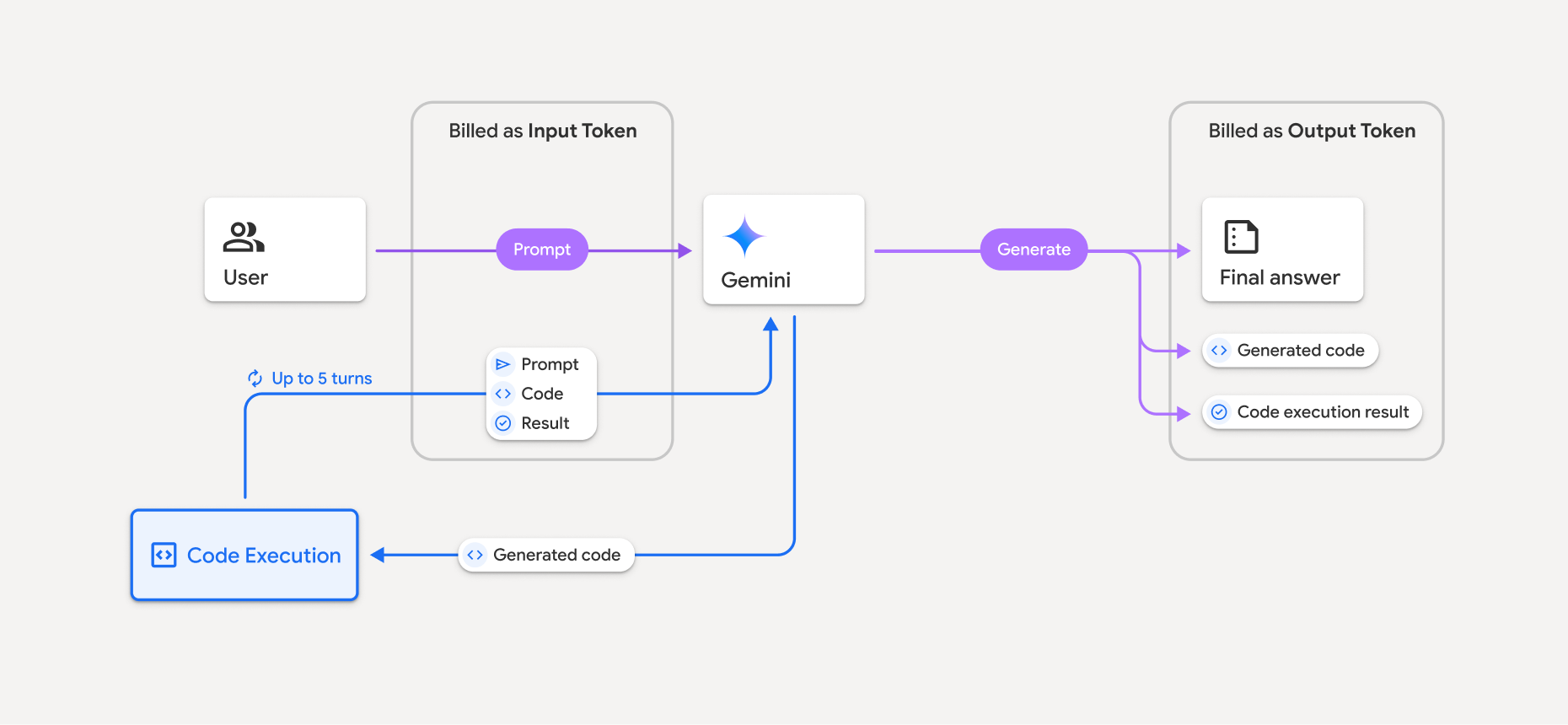
- 사용 중인 Gemini 모델에 따라 입력·출력 토큰의 현재 요율로 청구돼요.
- Gemini가 응답 생성 시 코드 실행을 사용하면, 원래 프롬프트, 생성된 코드, 실행된 코드의 결과가 중간 토큰(intermediate tokens) 으로 표시되고 입력 토큰 으로 청구돼요.
- 그다음 Gemini가 요약을 생성하고 생성된 코드, 실행된 코드의 결과, 최종 요약을 반환해요. 이들은 출력 토큰 으로 청구돼요.
- Gemini API는 API 응답에 중간 토큰 수를 포함해, 초기 프롬프트 이상의 추가 입력 토큰이 왜 나오는지 알 수 있게 해요.
제한 사항
- 모델은 코드만 생성·실행할 수 있어요. 미디어 파일 같은 다른 산출물은 반환할 수 없어요.
- 경우에 따라 코드 실행을 활성화하면 모델 출력의 다른 영역(예: 스토리 작성)에서 회귀가 발생할 수 있어요.
- 서로 다른 모델이 코드 실행을 성공적으로 사용하는 능력에는 약간의 차이가 있어요.
지원 도구 조합
코드 실행 도구는 Google 검색 접지와 결합해 더 복잡한 사용 사례를 지원할 수 있어요.
Gemini 3 모델은 내장 도구(코드 실행 등)를 커스텀 도구(함수 호출)와 결합하는 것을 지원해요. 도구 결합이 작동하려면 id와 thought_signature 필드를 다시 전달해야 해요. 자세한 내용은 도구 결합 페이지를 참고하세요.
지원 라이브러리
코드 실행 환경에는 다음 라이브러리가 포함돼요:
- attrs
- chess
- contourpy
- fpdf
- geopandas
- imageio
- jinja2
- joblib
- jsonschema
- jsonschema-specifications
- lxml
- matplotlib
- mpmath
- numpy
- opencv-python
- openpyxl
- packaging
- pandas
- pillow
- protobuf
- pylatex
- pyparsing
- PyPDF2
- python-dateutil
- python-docx
- python-pptx
- reportlab
- scikit-learn
- scipy
- seaborn
- six
- striprtf
- sympy
- tabulate
- tensorflow
- toolz
- xlrd
자체 라이브러리를 설치할 수는 없어요.
참고: 코드 실행을 사용한 그래프 렌더링은 matplotlib만 지원돼요.
다음으로
- 코드 실행 Colab 사용해 보기.
- 다른 Gemini API 도구 알아보기: