
생각 서명
생각 서명 (Thought signatures)
생각 서명은 모델의 내부 사고 과정을 암호화한 표현으로, 다중 단계 상호작용에서 추론 컨텍스트를 보존하는 데 사용돼요. 공식 Google GenAI SDK를 쓰면 자동으로 처리되지만, REST API를 직접 쓰거나 파트 기록을 수동으로 다룰 때는 직접 다뤄야 해요.
출처: 원문
본문
중요: 생각 서명은 공식 Google GenAI SDK를 사용하고 전체 모델 응답 객체를 히스토리에 직접 추가하면 자동으로 처리돼요. 생각 서명을 직접 다뤄야 하는 경우는 REST API를 사용할 때, 또는 다중 턴 대화에서 파트 기록을 수동으로 추출해 반환할 때뿐이에요.
생각 서명은 모델의 내부 사고 과정을 암호화한 표현으로, 다중 단계 상호작용에서 추론 컨텍스트를 보존하는 데 사용돼요.
thinking 모델(Gemini 3, 2.5 시리즈 등)을 사용하면 API가 응답의 콘텐츠 파트 안에 thoughtSignature 필드를 반환할 수 있어요 (예: text, functionCall 파트).
일반 규칙으로, 모델 응답에서 생각 서명을 받았다면 다음 턴에 대화 기록을 보낼 때 받은 그대로 정확히 다시 전달해야 해요.
Gemini 3 모델을 사용할 때는 함수 호출 중 생각 서명을 다시 전달해야 하며, 그렇지 않으면 검증 오류(4xx 상태 코드)가 나요. Gemini 3 Flash의 minimal thinking 수준 설정을 사용할 때도 마찬가지예요.
동작 방식
아래 그래픽은 Gemini API에서 함수 호출과 관련된 "턴(turn)"과 "단계(step)"의 의미를 시각화해요. "턴"은 사용자와 모델 사이 대화에서 단일 완전한 교환을 뜻해요. "단계"는 모델이 수행하는 더 세분화된 동작·작업으로, 종종 턴을 완료하는 더 큰 프로세스의 일부예요.
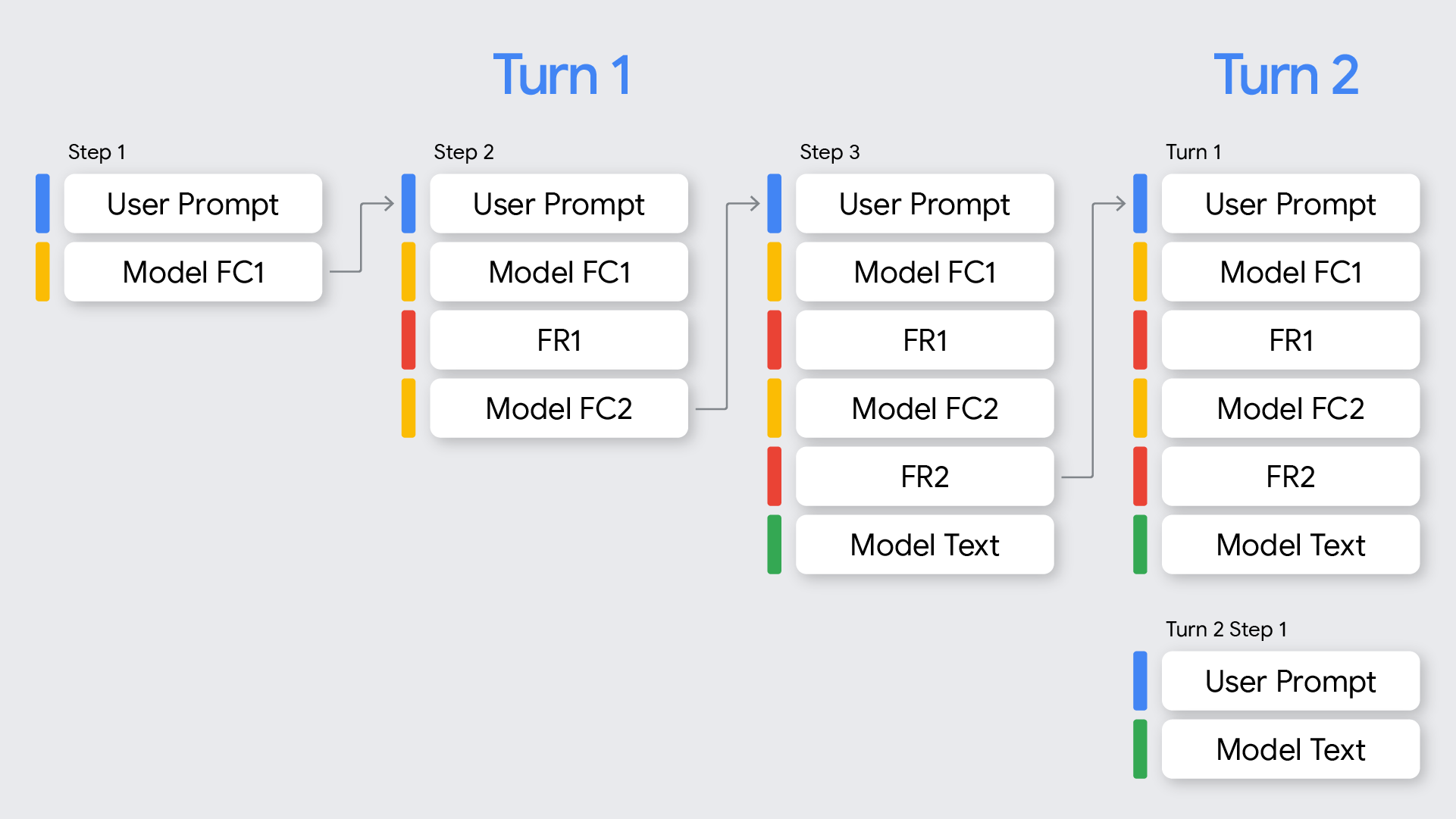
이 문서는 Gemini 3 모델의 함수 호출 처리를 중점적으로 다뤄요. 2.5와의 차이는 모델 동작 섹션을 참고하세요.
Gemini 3는 함수 호출이 있는 모든 모델 응답(API 응답)에 대해 생각 서명을 반환해요. 생각 서명은 다음 경우에 나타나요:
- 병렬 함수 호출이 있을 때, 모델 응답이 반환하는 첫 번째 함수 호출 파트에 생각 서명이 있어요.
- 순차 함수 호출(다중 단계)이 있을 때 각 함수 호출에 서명이 있으며, 모든 서명을 다시 전달해야 해요.
- 함수 호출이 없는 모델 응답은 모델이 반환한 마지막 파트 안에 생각 서명이 있어요.
다음 표는 턴과 단계의 정의를 서명 개념과 결합한 다중 단계 함수 호출을 시각화해요:
| 턴 | 단계 | 사용자 요청 | 모델 응답 | FunctionResponse |
|---|---|---|---|---|
| 1 | 1 | request1 = user_prompt | FC1 + signature | FR1 |
| 1 | 2 | request2 = request1 + (FC1 + signature) + FR1 | FC2 + signature | FR2 |
| 1 | 3 | request3 = request2 + (FC2 + signature) + FR2 | text_output (no FCs) | None |
함수 호출 파트의 서명
Gemini가 functionCall을 생성하면 다음 턴에서 도구 출력을 올바르게 처리하기 위해 thought_signature에 의존해요.
- 동작:
- 단일 함수 호출:
functionCall파트에thought_signature이 포함돼요. - 병렬 함수 호출: 모델이 응답에서 병렬 함수 호출을 생성하면
thought_signature은 첫 번째functionCall파트에만 붙어요. 같은 응답의 후속functionCall파트에는 서명이 없어요.
- 단일 함수 호출:
- 요구사항: 대화 기록을 보낼 때 이 서명을 받은 정확한 파트에 반환해야 해요.
- 검증: 현재 턴 내의 모든 함수 호출에 대해 엄격한 검증이 적용돼요. (현재 턴만 필요하며, 이전 턴은 검증하지 않아요.)
- API가 기록을 거슬러(최신→오래된) 찾아 표준 콘텐츠(예:
text)가 포함된 가장 최근 사용자 메시지를 찾아요 (이것이 현재 턴의 시작이에요). 이것은functionResponse가 아니에요. - 해당 사용자 메시지 이후에 발생한 모든 모델
functionCall턴은 그 턴의 일부로 간주돼요. - 현재 턴의 각 단계에서 첫 번째
functionCall파트는 반드시thought_signature을 포함해야 해요. - 현재 턴의 어느 단계에서든 첫 번째
functionCall파트에thought_signature을 생략하면 요청이 400 오류로 실패해요.
- API가 기록을 거슬러(최신→오래된) 찾아 표준 콘텐츠(예:
- 올바른 서명을 반환하지 않으면 이렇게 오류가 나요:
- Gemini 3 모델: 서명을 포함하지 않으면 400 오류가 나요. 문구는 대략 다음 형태예요:
contents배열의<index>콘텐츠 블록에 있는 함수 호출<Function Call>에thought_signature이 없습니다. 예: Function callFC1in the1.content block is missing athought_signature.
- Gemini 3 모델: 서명을 포함하지 않으면 400 오류가 나요. 문구는 대략 다음 형태예요:
순차 함수 호출 예시
이 섹션은 사용자가 여러 작업이 필요한 복잡한 질문을 할 때의 다중 함수 호출 예시를 보여줘요.
"Check flight status for AA100 and book a taxi if delayed"처럼 여러 작업이 필요한 복잡한 질문을 하는 다중 턴 함수 호출 예시를 살펴볼게요.
| 턴 | 단계 | 사용자 요청 | 모델 응답 | FunctionResponse |
|---|---|---|---|---|
| 1 | 1 | request1="Check flight status for AA100 and book a taxi 2 hours before if delayed." | FC1 ("check_flight") + signature | FR1 |
| 1 | 2 | request2 = request1 + FC1 ("check_flight") + signature + FR1 | FC2("book_taxi") + signature | FR2 |
| 1 | 3 | request3 = request2 + FC2 ("book_taxi") + signature + FR2 | text_output (no FCs) | None |
다음 코드는 위 표의 시퀀스를 보여줘요.
Turn 1, Step 1 (사용자 요청)
{
  "contents": [
    {
      "role": "user",
      "parts": [
        {
          "text": "Check flight status for AA100 and book a taxi 2 hours before if delayed."
        }
      ]
    }
  ],
  "tools": [
    {
      "functionDeclarations": [
        {
          "name": "check_flight",
          "description": "Gets the current status of a flight",
          "parameters": {
            "type": "object",
            "properties": {
              "flight": {
                "type": "string",
                "description": "The flight number to check"
              }
            },
            "required": [
              "flight"
            ]
          }
        },
        {
          "name": "book_taxi",
          "description": "Book a taxi",
          "parameters": {
            "type": "object",
            "properties": {
              "time": {
                "type": "string",
                "description": "time to book the taxi"
              }
            },
            "required": [
              "time"
            ]
          }
        }
      ]
    }
  ]
}
Turn 1, Step 1 (모델 응답)
{
"content": {
        "role": "model",
        "parts": [
          {
            "functionCall": {
              "name": "check_flight",
              "args": {
                "flight": "AA100"
              }
            },
            "thoughtSignature": "<Signature A>"
          }
        ]
  }
}
Turn 1, Step 2 (사용자 응답 - 도구 출력 보내기) 이 사용자 턴은 functionResponse만 포함하므로(새 텍스트 없음) 여전히 Turn 1이에요. <Signature_A>를 보존해야 해요.
{
      "role": "user",
      "parts": [
        {
          "text": "Check flight status for AA100 and book a taxi 2 hours before if delayed."
        }
      ]
    },
    {
        "role": "model",
        "parts": [
          {
            "functionCall": {
              "name": "check_flight",
              "args": {
                "flight": "AA100"
              }
            },
            "thoughtSignature": "<Signature A>" //Required and Validated
          }
        ]
      },
      {
        "role": "user",
        "parts": [
          {
            "functionResponse": {
              "name": "check_flight",
              "response": {
                "status": "delayed",
                "departure_time": "12 PM"
                }
              }
            }
        ]
}
Turn 1, Step 2 (모델) 모델이 이제 이전 도구 출력에 기반해 택시를 예약하기로 결정해요.
{
      "content": {
        "role": "model",
        "parts": [
          {
            "functionCall": {
              "name": "book_taxi",
              "args": {
                "time": "10 AM"
              }
            },
            "thoughtSignature": "<Signature B>"
          }
        ]
      }
}
Turn 1, Step 3 (사용자 - 도구 출력 보내기) 택시 예약 확인을 보내려면 이 루프의 모든 함수 호출에 대한 서명(<Signature A> + <Signature B>)을 포함해야 해요.
{
      "role": "user",
      "parts": [
        {
          "text": "Check flight status for AA100 and book a taxi 2 hours before if delayed."
        }
      ]
    },
    {
        "role": "model",
        "parts": [
          {
            "functionCall": {
              "name": "check_flight",
              "args": {
                "flight": "AA100"
              }
            },
            "thoughtSignature": "<Signature A>" //Required and Validated
          }
        ]
      },
      {
        "role": "user",
        "parts": [
          {
            "functionResponse": {
              "name": "check_flight",
              "response": {
                "status": "delayed",
                "departure_time": "12 PM"
              }
              }
            }
        ]
      },
      {
        "role": "model",
        "parts": [
          {
            "functionCall": {
              "name": "book_taxi",
              "args": {
                "time": "10 AM"
              }
            },
            "thoughtSignature": "<Signature B>" //Required and Validated
          }
        ]
      },
      {
        "role": "user",
        "parts": [
          {
            "functionResponse": {
              "name": "book_taxi",
              "response": {
                "booking_status": "success"
              }
              }
            }
        ]
    }
}
병렬 함수 호출 예시
사용자가 "Check weather in Paris and London"이라고 물어 모델이 어디서 검증을 하는지 보여주는 병렬 함수 호출 예시를 살펴볼게요.
| 턴 | 단계 | 사용자 요청 | 모델 응답 | FunctionResponse |
|---|---|---|---|---|
| 1 | 1 | request1="Check the weather in Paris and London" | FC1 ("Paris") + signature FC2 ("London") | FR1 |
| 1 | 2 | request 2 = request1 + FC1 ("Paris") + signature + FC2 ("London") | text_output (no FCs) | None |
다음 코드는 위 표의 시퀀스를 보여줘요.
Turn 1, Step 1 (사용자 요청)
{
  "contents": [
    {
      "role": "user",
      "parts": [
        {
          "text": "Check the weather in Paris and London."
        }
      ]
    }
  ],
  "tools": [
    {
      "functionDeclarations": [
        {
          "name": "get_current_temperature",
          "description": "Gets the current temperature for a given location.",
          "parameters": {
            "type": "object",
            "properties": {
              "location": {
                "type": "string",
                "description": "The city name, e.g. San Francisco"
              }
            },
            "required": [
              "location"
            ]
          }
        }
      ]
    }
  ]
}
Turn 1, Step 1 (모델 응답)
{
  "content": {
    "parts": [
      {
        "functionCall": {
          "name": "get_current_temperature",
          "args": {
            "location": "Paris"
          }
        },
        "thoughtSignature": "<Signature_A>"// INCLUDED on First FC
      },
      {
        "functionCall": {
          "name": "get_current_temperature",
          "args": {
            "location": "London"
          }// NO signature on subsequent parallel FCs
        }
      }
    ]
  }
}
Turn 1, Step 2 (사용자 응답 - 도구 출력 보내기) <Signature_A>를 첫 번째 파트에 받은 그대로 보존해야 해요.
[
  {
    "role": "user",
    "parts": [
      {
        "text": "Check the weather in Paris and London."
      }
    ]
  },
  {
    "role": "model",
    "parts": [
      {
        "functionCall": {
          "name": "get_current_temperature",
          "args": {
            "city": "Paris"
          }
        },
        "thought_signature": "<Signature_A>" // MUST BE INCLUDED
      },
      {
        "functionCall": {
          "name": "get_current_temperature",
          "args": {
            "city": "London"
          }
        }
      } // NO SIGNATURE FIELD
    ]
  },
  {
    "role": "user",
    "parts": [
      {
        "functionResponse": {
          "name": "get_current_temperature",
          "response": {
            "temp": "15C"
          }
        }
      },
      {
        "functionResponse": {
          "name": "get_current_temperature",
          "response": {
            "temp": "12C"
          }
        }
      }
    ]
  }
]
functionCall이 아닌 파트의 서명
Gemini는 응답의 마지막 파트에서도 function-call이 아닌 파트에 thought_signatures을 반환할 수 있어요.
- 동작: 모델이 반환하는 마지막 콘텐츠 파트(
text, inlineData…)에thought_signature이 포함될 수 있어요. - 권장: 이 서명을 반환하면 모델이 고품질 추론을 유지하는 데 권장돼요. 특히 복잡한 지침 따르기나 시뮬레이션된 에이전트 워크플로에서요.
- 검증: API는 엄격하게 검증을 강제하지 않아요. 생략해도 차단 오류는 받지 않지만, 성능이 저하될 수 있어요.
텍스트/컨텍스트 내 추론 (검증 없음)
Turn 1, Step 1 (모델 응답)
{
  "role": "model",
  "parts": [
    {
      "text": "I need to calculate the risk. Let me think step-by-step...",
      "thought_signature": "<Signature_C>" // OPTIONAL (Recommended)
    }
  ]
}
Turn 2, Step 1 (사용자)
[
  { "role": "user", "parts": [{ "text": "What is the risk?" }] },
  {
    "role": "model",
    "parts": [
      {
        "text": "I need to calculate the risk. Let me think step-by-step...",
        // If you omit <Signature_C> here, no error will occur.
      }
    ]
  },
  { "role": "user", "parts": [{ "text": "Summarize it." }] }
]
OpenAI 호환성용 서명
다음 예시는 OpenAI 호환성을 사용한 채팅 완성 API에서 생각 서명을 처리하는 방법을 보여줘요.
순차 함수 호출 예시
사용자가 여러 작업이 필요한 복잡한 질문을 하는 다중 함수 호출 예시예요.
Check flight status for AA100 and book a taxi if delayed를 묻고 사용자가 여러 작업이 필요한 복잡한 질문을 할 때 무슨 일이 일어나는지 볼 수 있어요.
| 턴 | 단계 | 사용자 요청 | 모델 응답 | FunctionResponse |
|---|---|---|---|---|
| 1 | 1 | request1 = "Check flight status for AA100 and book a taxi 2 hours before if delayed." | FC1 ("check_flight") + signature | FR1 |
| 1 | 2 | request2 = request1 + FC1 ("check_flight") + signature + FR1 | FC2("book_taxi") + signature | FR2 |
| 1 | 3 | request3 = request2 + FC2 ("book_taxi") + signature + FR2 | text_output (no FCs) | None |
다음 코드는 주어진 시퀀스를 따라갑니다.
Turn 1, Step 1 (사용자 요청)
{
  "model": "google/gemini-3.1-pro-preview",
  "messages": [
    {
      "role": "user",
      "content": "Check flight status for AA100 and book a taxi 2 hours before if delayed."
    }
  ],
  "tools": [
    {
      "type": "function",
      "function": {
        "name": "check_flight",
        "description": "Gets the current status of a flight",
        "parameters": {
          "type": "object",
          "properties": {
            "flight": {
              "type": "string",
              "description": "The flight number to check."
            }
          },
          "required": [
            "flight"
          ]
        }
      }
    },
    {
      "type": "function",
      "function": {
        "name": "book_taxi",
        "description": "Book a taxi",
        "parameters": {
          "type": "object",
          "properties": {
            "time": {
              "type": "string",
              "description": "time to book the taxi"
            }
          },
          "required": [
            "time"
          ]
        }
      }
    }
  ]
}
Turn 1, Step 1 (모델 응답)
{
      "role": "model",
        "tool_calls": [
          {
            "extra_content": {
              "google": {
                "thought_signature": "<Signature A>"
              }
            },
            "function": {
              "arguments": "{\"flight\":\"AA100\"}",
              "name": "check_flight"
            },
            "id": "function-call-1",
            "type": "function"
          }
        ]
    }
Turn 1, Step 2 (사용자 응답 - 도구 출력 보내기)
이 사용자 턴은 functionResponse만 포함하므로(새 텍스트 없음) 여전히 Turn 1이며 <Signature_A>를 보존해야 해요.
"messages": [
    {
      "role": "user",
      "content": "Check flight status for AA100 and book a taxi 2 hours before if delayed."
    },
    {
      "role": "model",
        "tool_calls": [
          {
            "extra_content": {
              "google": {
                "thought_signature": "<Signature A>" //Required and Validated
              }
            },
            "function": {
              "arguments": "{\"flight\":\"AA100\"}",
              "name": "check_flight"
            },
            "id": "function-call-1",
            "type": "function"
          }
        ]
    },
    {
      "role": "tool",
      "name": "check_flight",
      "tool_call_id": "function-call-1",
      "content": "{\"status\":\"delayed\",\"departure_time\":\"12 PM\"}"
    }
  ]
Turn 1, Step 2 (모델)
모델이 이제 이전 도구 출력에 기반해 택시를 예약하기로 결정해요.
{
"role": "model",
"tool_calls": [
{
"extra_content": {
"google": {
"thought_signature": "<Signature B>"
}
            },
            "function": {
              "arguments": "{\"time\":\"10 AM\"}",
              "name": "book_taxi"
            },
            "id": "function-call-2",
            "type": "function"
          }
       ]
}
Turn 1, Step 3 (사용자 - 도구 출력 보내기)
택시 예약 확인을 보내려면 이 루프의 모든 함수 호출에 대한 서명(<Signature A> + <Signature B>)을 포함해야 해요.
"messages": [
    {
      "role": "user",
      "content": "Check flight status for AA100 and book a taxi 2 hours before if delayed."
    },
    {
      "role": "model",
        "tool_calls": [
          {
            "extra_content": {
              "google": {
                "thought_signature": "<Signature A>" //Required and Validated
              }
            },
            "function": {
              "arguments": "{\"flight\":\"AA100\"}",
              "name": "check_flight"
            },
            "id": "function-call-1d6a1a61-6f4f-4029-80ce-61586bd86da5",
            "type": "function"
          }
        ]
    },
    {
      "role": "tool",
      "name": "check_flight",
      "tool_call_id": "function-call-1d6a1a61-6f4f-4029-80ce-61586bd86da5",
      "content": "{\"status\":\"delayed\",\"departure_time\":\"12 PM\"}"
    },
    {
      "role": "model",
        "tool_calls": [
          {
            "extra_content": {
              "google": {
                "thought_signature": "<Signature B>" //Required and Validated
              }
            },
            "function": {
              "arguments": "{\"time\":\"10 AM\"}",
              "name": "book_taxi"
            },
            "id": "function-call-65b325ba-9b40-4003-9535-8c7137b35634",
            "type": "function"
          }
        ]
    },
    {
      "role": "tool",
      "name": "book_taxi",
      "tool_call_id": "function-call-65b325ba-9b40-4003-9535-8c7137b35634",
      "content": "{\"booking_status\":\"success\"}"
    }
  ]
병렬 함수 호출 예시
사용자가 "Check weather in Paris and London"이라고 물어 모델이 어디서 검증을 하는지 볼 수 있는 병렬 함수 호출 예시를 살펴볼게요.
| 턴 | 단계 | 사용자 요청 | 모델 응답 | FunctionResponse |
|---|---|---|---|---|
| 1 | 1 | request1="Check the weather in Paris and London" | FC1 ("Paris") + signature FC2 ("London") | FR1 |
| 1 | 2 | request 2 = request1 + FC1 ("Paris") + signature + FC2 ("London") | text_output (no FCs) | None |
다음 코드는 주어진 시퀀스를 따라갑니다.
Turn 1, Step 1 (사용자 요청)
{
  "contents": [
    {
      "role": "user",
      "parts": [
        {
          "text": "Check the weather in Paris and London."
        }
      ]
    }
  ],
  "tools": [
    {
      "functionDeclarations": [
        {
          "name": "get_current_temperature",
          "description": "Gets the current temperature for a given location.",
          "parameters": {
            "type": "object",
            "properties": {
              "location": {
                "type": "string",
                "description": "The city name, e.g. San Francisco"
              }
            },
            "required": [
              "location"
            ]
          }
        }
      ]
    }
  ]
}
Turn 1, Step 1 (모델 응답)
{
"role": "assistant",
        "tool_calls": [
          {
            "extra_content": {
              "google": {
                "thought_signature": "<Signature A>" //Signature returned
              }
            },
            "function": {
              "arguments": "{\"location\":\"Paris\"}",
              "name": "get_current_temperature"
            },
            "id": "function-call-f3b9ecb3-d55f-4076-98c8-b13e9d1c0e01",
            "type": "function"
          },
          {
            "function": {
              "arguments": "{\"location\":\"London\"}",
              "name": "get_current_temperature"
            },
            "id": "function-call-335673ad-913e-42d1-bbf5-387c8ab80f44",
            "type": "function" // No signature on Parallel FC
          }
        ]
}
Turn 1, Step 2 (사용자 응답 - 도구 출력 보내기)
<Signature_A>를 첫 번째 파트에 받은 그대로 보존해야 합니다.
"messages": [
    {
      "role": "user",
      "content": "Check the weather in Paris and London."
    },
    {
      "role": "assistant",
        "tool_calls": [
          {
            "extra_content": {
              "google": {
                "thought_signature": "<Signature A>" //Required
              }
            },
            "function": {
              "arguments": "{\"location\":\"Paris\"}",
              "name": "get_current_temperature"
            },
            "id": "function-call-f3b9ecb3-d55f-4076-98c8-b13e9d1c0e01",
            "type": "function"
          },
          {
            "function": { //No Signature
              "arguments": "{\"location\":\"London\"}",
              "name": "get_current_temperature"
            },
            "id": "function-call-335673ad-913e-42d1-bbf5-387c8ab80f44",
            "type": "function"
          }
        ]
    },
    {
      "role":"tool",
      "name": "get_current_temperature",
      "tool_call_id": "function-call-f3b9ecb3-d55f-4076-98c8-b13e9d1c0e01",
      "content": "{\"temp\":\"15C\"}"
    },
    {
      "role":"tool",
      "name": "get_current_temperature",
      "tool_call_id": "function-call-335673ad-913e-42d1-bbf5-387c8ab80f44",
      "content": "{\"temp\":\"12C\"}"
    }
  ]
자주 묻는 질문
- 현재 턴과 단계에 함수 호출 파트가 있는 상태에서 다른 모델에서 Gemini 3로 히스토리를 전송하려면 어떻게 하나요? API가 생성하지 않아 관련 생각 서명이 없는 함수 호출 파트를 제공해야 합니다.
요청에 커스텀 함수 호출 블록을 주입하는 것은 강력히 권장되지 않지만, 피할 수 없는 경우 — 예: 클라이언트가 결정적으로 실행한 함수 호출·응답에 대한 정보를 모델에 제공하거나, 생각 서명이 없는 다른 모델에서 트레이스를 전송할 때 — 생각 서명 필드에
"context_engineering_is_the_way_to_go"또는"skip_thought_signature_validator"중 하나의 더미 서명을 설정해 검증을 건너뛸 수 있어요. - 병렬 함수 호출과 응답을 인터리브해서 보내는데 API가 400을 반환합니다. 왜 그런가요? API가 병렬 함수 호출 "FC1 + signature, FC2"를 반환할 때 기대하는 사용자 응답은 "FC1+ signature, FC2, FR1, FR2"예요. "FC1 + signature, FR1, FC2, FR2"로 인터리브하면 API가 400 오류를 반환해요.
- 스트리밍할 때 모델이 함수 호출을 반환하지 않아 생각 서명을 찾을 수 없습니다.
함수 호출을 포함하지 않는 스트리밍 요청의 모델 응답 중, 모델이 빈 텍스트 콘텐츠 파트에 생각 서명을 반환할 수 있어요. 모델이
finish_reason을 반환할 때까지 전체 요청을 파싱하는 것이 좋아요.
모델별 생각 서명
Gemini 3 모델과 Gemini 2.5 모델은 함수 호출에서 생각 서명을 다루는 방식이 달라요:
- 응답에 함수 호출이 있으면,
- Gemini 3은 항상 첫 번째 함수 호출 파트에 서명을 가져요. 그 파트를 반환하는 것은 필수예요.
- Gemini 2.5는 첫 번째 파트(유형과 무관)에 서명을 가져요. 그 파트를 반환하는 것은 선택이에요.
- 응답에 함수 호출이 없으면,
- Gemini 3은 모델이 생각을 생성하면 마지막 파트에 서명을 가져요.
- Gemini 2.5는 어떤 파트에도 서명이 없어요.
더 자세한 비교는 Thinking 페이지를 참고하세요. Gemini 3 이미지 모델의 경우 이미지 생성 가이드의 thinking 프로세스 섹션을 참고하세요.