
비디오 이해
비디오 이해 (Video understanding)
Gemini Robotics ER 2는 연속 비디오 피드에서 작업 진행 상황을 추적할 수 있어요. 순간 탐지와 진행 분류 두 가지 기능으로 동작해요.
출처: 원문
본문
참고: 비디오 이해는 Gemini Robotics ER 2(gemini-robotics-er-2-preview)가 필요하며, ER 1.6에서는 사용할 수 없어요.
Gemini Robotics ER 2는 연속 비디오 피드에서 작업 진행 상황을 추적하기 위해 두 가지 기능을 사용해요:
- 순간 탐지(Moment finding): 핵심 사건이 발생하는 정확한 타임스탬프를 식별해요.
- 진행 분류(Progress classification): 각 비디오를 다섯 가지 완료 구간(0–20%, 20–40%, 40–60%, 60–80%, 80–100%) 중 하나로 분류해요.
순간 탐지
순간 탐지는 컵이 가득 차는 순간, 매듭이 묶이는 순간처럼 결정적인 사건이 발생하는 정확한 비디오 프레임을 식별해요. 로봇은 이를 통해 성공을 확인하고, 단계를 순서대로 진행하며, 수정을 트리거해요.
다음 예시 프롬프트는 비디오에서 주어진 작업의 완료 순간을 식별하도록 모델에 요청해요:
from google import genai
from google.genai import types

client = genai.Client()

with open("task_video.mp4", "rb") as f:
    video_bytes = f.read()

prompt = """
At what timestamp (in seconds) does the task reach successful completion?
Return a JSON object: {"completion_time_seconds": <float>}.
If the task is not completed, return {"completion_time_seconds": null}.
"""

response = client.models.generate_content(
    model="gemini-robotics-er-2-preview",
    contents=[
        types.Part.from_bytes(data=video_bytes, mime_type="video/mp4"),
        prompt,
    ],
)

print(response.text)
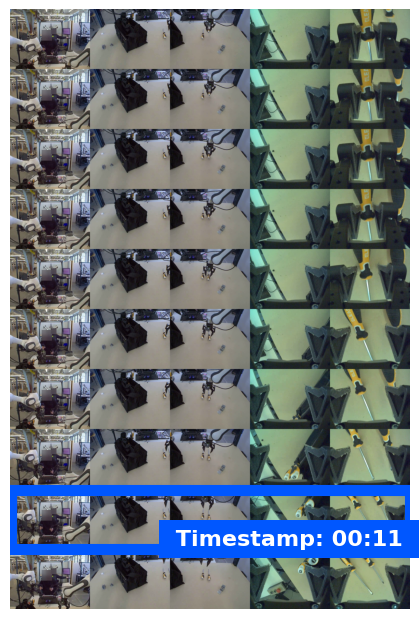
다음은 순간 탐지 비디오의 예시 프레임으로, 모델이 작업 완료 타임스탬프를 식별한 모습을 보여줘요:
진행 분류
진행 분류는 비디오를 다섯 가지 완료 구간(0–20%, 20–40%, 40–60%, 60–80%, 80–100%) 중 하나로 분류해요. 이를 통해 로봇이 실시간 상황 인식을 얻어, 전체 워크플로를 다시 시작하지 않고도 동작을 조정하거나 실패한 단계를 재시도할 수 있어요.
다음 예시 프롬프트는 비디오에서 현재 진행 수준을 분류하도록 모델에 요청해요:
from google import genai
from google.genai import types

client = genai.Client()

with open("task_video.mp4", "rb") as f:
    video_bytes = f.read()

prompt = """
Watch this video and classify the task progress level at the final frame.
Return a JSON object with the progress bracket:
{"progress_level": "0-20" | "20-40" | "40-60" | "60-80" | "80-100"}.
"""

response = client.models.generate_content(
    model="gemini-robotics-er-2-preview",
    contents=[
        types.Part.from_bytes(data=video_bytes, mime_type="video/mp4"),
        prompt,
    ],
)

print(response.text)
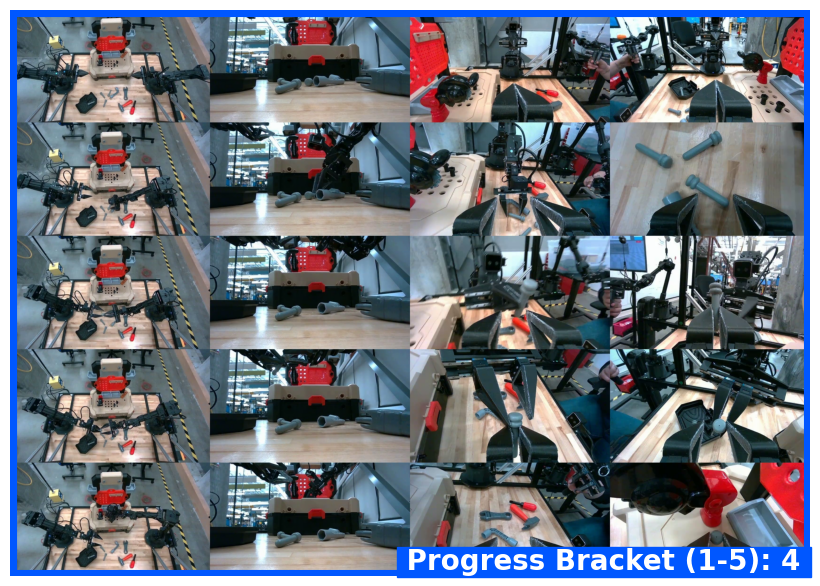
다음은 진행 분류 비디오의 예시 프레임으로, 모델이 진행 구간을 할당한 모습을 보여줘요:
예시
다중 단계 작업 추적을 포함한 전체 실행 가능한 예시는 Robotics cookbook을 참고하세요.
다음으로
- 로보틱스용 Live API — 실시간 양방향 스트리밍
- 작업 오케스트레이션 — 공간 추론을 포함한 장기 작업
- Gemini Robotics ER 개요 — 모델 비교와 기능