
퀵스타트 예제
퀵스타트 예제 (Quick Start Examples)
이 섹션은 모든 Pinot 구성 요소를 단일 프로세스로 띄우는 퀵스타트 명령을 설명해요. 미리 만들어진 데이터셋을 함께 가져오는 QuickStart 명령이 기본으로 내장되어 있어서, Pinot를 처음 시작할 때 시작점으로 좋아요.
본문
Pinot에는 모든 Pinot 구성 요소를 단일 프로세스에서 시작하고 미리 구축된 데이터셋을 가져오는 QuickStart 명령이 함께 제공돼요. 아래 주의 사항을 읽은 뒤 배치 처리(Batch Processing) 예제부터 시작하면 돼요.
-
사전 요구 사항 (Prerequisites)
Pinot를 로컬에 설치하거나, Pinot Docker 이미지를 사용하고 싶다면 Docker를 설치해야 해요. 각 옵션에서 예제를 사용할 수 있고 동일하게 동작해요. 어떤 것을 선택할지는 설치 선호도와 평소 작업 방식에 달려 있어요. 잘 모르겠다면 Docker를 쓰는 게 예제를 끝낸 뒤 정리하기 더 쉽답니다.
-
예제의 Pinot 버전 (Pinot versions in examples)
이 페이지의 Docker 기반 예제는
pinot:latest를 사용해요. 이는 Docker가 Apache Pinot의 가장 최근 릴리스를 내려받아 사용하도록 지시해요. 특정 릴리스를 사용하려면latest를 릴리스 번호로 바꾸면 돼요. 예:pinot:0.12.1.런처 스크립트로 실행하는 로컬 설치 기반 예제는 자신이 설치한 Apache Pinot 버전을 사용해요.
-
실행 중인 예제 중지 (Stopping a running example)
실행 중인 예제를 중지하려면 예제를 시작할 때
docker run명령을 실행한 터미널에서Ctrl+C를 입력하면 돼요.
⚠️ macOS Monterey 사용자
기본적으로 Airplay 수신 서버가 7000 포트에서 실행되는데, 이 포트는 Quick Start의 Pinot Server도 사용하는 포트예요. 예제를 실행할 때 다음과 같은 오류가 나타날 수 있어요:
Failed to start a Pinot [SERVER]
java.lang.RuntimeException: java.net.BindException: Address already in use
	at org.apache.pinot.core.transport.QueryServer.start(QueryServer.java:103) ~[pinot-all-0.9.0-jar-with-dependencies.jar:0.9.0-cf8b84e8b0d6ab62374048de586ce7da21132906]
	at org.apache.pinot.server.starter.ServerInstance.start(ServerInstance.java:158) ~[pinot-all-0.9.0-jar-with-dependencies.jar:0.9.0-cf8b84e8b0d6ab62374048de586ce7da21132906]
	at org.apache.helix.manager.zk.ParticipantManager.handleNewSession(ParticipantManager.java:110) ~[pinot-all-0.9.0-jar-with-dependencies.jar:0.9.0-cf8b84e8b0d6ab62374048de586ce7da2113
Airplay 수신 서버를 비활성화하고 다시 시도하면 이 오류 메시지가 더 이상 나타나지 않을 거예요.
💡 새 예제에는 표준(정규) 퀵스타트 유형을 사용하세요. 배치 예제에는
BATCH(또는OFFLINE), 스트리밍 예제에는REALTIME(또는STREAM)을 사용해요. 각 표준 퀵스타트는 이전에 개별 기능별 퀵스타트가 시작하던 샘플들을 초기화하고 샘플 쿼리를 실행해요.다음 레거시 유형은 deprecated 별칭으로 계속 사용할 수 있지만 경고를 내보내고 명령 도움말에는 나열되지 않아요:
MULTI_STAGE,JOIN,TIMESTAMP,BATCH_JSON_INDEX,BATCH_COMPLEX_TYPE대신BATCH를 사용하세요.UPSERT,PARTIAL_UPSERT,UPSERT_JSON_INDEX,REALTIME_JSON_INDEX,REALTIME_COMPLEX_TYPE대신REALTIME을 사용하세요.
명령 옵션 (Command Options)
모든 QuickStart 명령은 -type 외에 다음 선택적 파라미터를 지원해요:
| 옵션 | 별칭 | 설명 |
|---|---|---|
-type |
실행할 퀵스타트 유형 (아래 섹션 참조) | |
-tmpDir |
-quickstartDir, -dataDir |
퀵스타트 데이터를 저장할 디렉터리. 재시작 간 데이터를 유지해 테이블과 세그먼트를 다시 생성하지 않고 디스크에서 다시 로드하도록 하는 데 사용 |
-bootstrapTableDir |
테이블 스키마, 테이블 설정, 원본 데이터를 각각 포함하는 디렉터리 목록. -type EMPTY 또는 -type GENERIC과 함께 사용해 자신의 테이블을 퀵스타트 클러스터에 로드 |
|
-configFile |
-configFilePath |
기본 Pinot 설정 값(controller, broker, server 등)을 재정의하는 properties 파일 경로 |
-zkAddress |
-zkUrl, -zkExternalAddress |
기본 내장 인스턴스 대신 사용할 외부 ZooKeeper 인스턴스 URL (예: localhost:2181) |
-kafkaBrokerList |
스트리밍 퀵스타트용 Kafka 브로커 목록 (예: localhost:9092). 내장 클러스터 대신 외부 Kafka 클러스터에 연결할 때 사용 |
예제: 재시작 간 데이터 유지
# 첫 실행: quickstart가 지정된 디렉터리에 데이터를 생성
./bin/pinot-admin.sh QuickStart -type batch -dataDir /tmp/pinot-quick-start

# 이후 실행: quickstart가 디스크에서 기존 데이터를 다시 로드
./bin/pinot-admin.sh QuickStart -type batch -dataDir /tmp/pinot-quick-start
예제: 외부 ZooKeeper와 커스텀 설정 사용
./bin/pinot-admin.sh QuickStart -type batch \
    -zkAddress localhost:2181 \
    -configFile /path/to/pinot-quickstart.conf
예제: 빈 클러스터에 커스텀 테이블 로드
./bin/pinot-admin.sh QuickStart -type EMPTY \
    -bootstrapTableDir /path/to/my-table-dir
배치 처리 (Batch Processing)
이 예제는 Pinot로 배치 처리를 하는 방법을 보여줘요. 명령은:
- Apache Zookeeper, Pinot Controller, Pinot Broker, Pinot Server를 시작해요.
baseballStats테이블을 만들어요.baseballStats테이블용 주어진 CSV 데이터 파일로 세그먼트 하나를 만들고 Pinot Controller에 푸시하는 독립 실행형 데이터 수집 작업을 실행해요.- Pinot에 샘플 쿼리를 실행해요.
# Docker
docker run \
    -p 9000:9000 \
    apachepinot/pinot:latest QuickStart \
    -type batch
# Launcher scripts
./bin/pinot-admin.sh QuickStart -type batch
# Brew
pinot-admin QuickStart -type batch
배치 JSON (Batch JSON)
이 예제는 Pinot에서 JSON 문서를 가져오고 쿼리하는 방법을 보여줘요. 명령은:
- Apache Zookeeper, Pinot Controller, Pinot Broker, Pinot Server를 시작해요.
githubEvents테이블을 만들어요.githubEvents테이블용 주어진 JSON 데이터 파일로 세그먼트 하나를 만들고 Pinot Controller에 푸시하는 독립 실행형 데이터 수집 작업을 실행해요.- Pinot에 샘플 쿼리를 실행해요.
docker run -p 9000:9000 apachepinot/pinot:latest QuickStart -type batch
./bin/pinot-admin.sh QuickStart -type batch
pinot-admin QuickStart -type batch
복잡한 데이터 타입이 있는 배치 (Batch with complex data types)
이 예제는 데이터 항목에 언네스팅(unnesting)이 필요한 복잡한 필드가 있는 경우의 배치 처리를 보여줘요. 명령은:
- Apache Zookeeper, Pinot Controller, Pinot Broker, Pinot Server를 시작해요.
githubEvents테이블을 만들어요.githubEvents테이블용 주어진 JSON 데이터 파일로 세그먼트 하나를 만들고 Pinot Controller에 푸시하는 독립 실행형 데이터 수집 작업을 실행해요.- Pinot에 샘플 쿼리를 실행해요.
docker run -p 9000:9000 apachepinot/pinot:latest QuickStart -type batch
./bin/pinot-admin.sh QuickStart -type batch
pinot-admin QuickStart -type batch
스트리밍 (Streaming)
이 예제는 Pinot로 스트림 처리를 하는 방법을 보여줘요. 명령은:
- Apache Kafka, Apache Zookeeper, Pinot Controller, Pinot Broker, Pinot Server를 시작해요.
meetupRsvp테이블을 만들어요.meetup스트림을 실행해요.- Pinot가 구독하는 Kafka 토픽
meetupRSVPEvents에 데이터를 게시해요. - Pinot에 샘플 쿼리를 실행해요.
docker run -p 9000:9000 apachepinot/pinot:latest QuickStart -type stream
./bin/pinot-admin.sh QuickStart -type stream
pinot-admin QuickStart -type stream
스트리밍 JSON (Streaming JSON)
이 예제는 Pinot에서 JSON 문서로 스트림 처리를 하는 방법을 보여줘요. 명령은:
- Apache Kafka, Apache Zookeeper, Pinot Controller, Pinot Broker, Pinot Server를 시작해요.
meetupRsvp테이블을 만들어요.meetup스트림을 실행해요.- Pinot가 구독하는 Kafka 토픽
meetupRSVPEvents에 데이터를 게시해요. - Pinot에 샘플 쿼리를 실행해요.
docker run -p 9000:9000 apachepinot/pinot:latest QuickStart -type realtime
./bin/pinot-admin.sh QuickStart -type realtime
pinot-admin QuickStart -type realtime
Minion 정리(cleanup)가 있는 스트리밍 (Streaming with minion cleanup)
이 예제는 데이터가 수집되는 동안 RealtimeToOfflineSegmentsTask와 MergeRollupTask minion 작업이 세그먼트를 지속적으로 최적화하는 Pinot 스트림 처리를 보여줘요. 명령은:
- Apache Kafka, Apache Zookeeper, Pinot Controller, Pinot Broker, Pinot Minion, Pinot Server를 시작해요.
githubEvents테이블을 만들어요.- GitHub 이벤트 스트림을 실행해요.
- Pinot가 구독하는 Kafka 토픽
githubEvents에 데이터를 게시해요. - Pinot에 샘플 쿼리를 실행해요.
docker run -p 9000:9000 apachepinot/pinot:latest QuickStart -type realtime_minion
./bin/pinot-admin.sh QuickStart -type realtime_minion
pinot-admin QuickStart -type realtime_minion
복잡한 데이터 타입이 있는 스트리밍 (Streaming with complex data types)
이 예제는 스트림에 언네스팅이 필요한 복잡한 필드가 있는 경우의 스트림 처리를 보여줘요. 명령은:
- Apache Kafka, Apache Zookeeper, Pinot Controller, Pinot Broker, Pinot Minion, Pinot Server를 시작해요.
meetupRsvp테이블을 만들어요.meetup스트림을 실행해요.- Pinot가 구독하는 Kafka 토픽
meetupRSVPEvents에 데이터를 게시해요. - Pinot에 샘플 쿼리를 실행해요.
docker run -p 9000:9000 apachepinot/pinot:latest QuickStart -type realtime
./bin/pinot-admin.sh QuickStart -type realtime
pinot-admin QuickStart -type realtime
Upsert
이 예제는 Pinot에서 upsert를 사용한 스트림 처리를 하는 방법을 보여줘요. 명령은:
- Apache Kafka, Apache Zookeeper, Pinot Controller, Pinot Broker, Pinot Server를 시작해요.
meetupRsvp테이블을 만들어요.meetup스트림을 실행해요.- Pinot가 구독하는 Kafka 토픽
meetupRSVPEvents에 데이터를 게시해요. - Pinot에 샘플 쿼리를 실행해요.
docker run -p 9000:9000 apachepinot/pinot:latest QuickStart -type realtime
./bin/pinot-admin.sh QuickStart -type realtime
pinot-admin QuickStart -type realtime
Upsert JSON
이 예제는 Pinot에서 JSON 문서로 upsert를 사용한 스트림 처리를 하는 방법을 보여줘요. 명령은:
- Apache Kafka, Apache Zookeeper, Pinot Controller, Pinot Broker, Pinot Server를 시작해요.
meetupRsvp테이블을 만들어요.meetup스트림을 실행해요.- Pinot가 구독하는 Kafka 토픽
meetupRSVPEvents에 데이터를 게시해요. - Pinot에 샘플 쿼리를 실행해요.
docker run -p 9000:9000 apachepinot/pinot:latest QuickStart -type realtime
./bin/pinot-admin.sh QuickStart -type realtime
pinot-admin QuickStart -type realtime
하이브리드 (Hybrid)
이 예제는 Pinot로 하이브리드(스트림+배치) 처리를 하는 방법을 보여줘요. 명령은:
- Apache Kafka, Apache Zookeeper, Pinot Controller, Pinot Broker, Pinot Server를 시작해요.
airlineStats테이블을 만들어요.airlineStats테이블용 주어진 Avro 파일 디렉터리 아래에서 세그먼트를 만들고 Pinot Controller에 푸시하는 독립 실행형 데이터 수집 작업을 실행해요.- 비행 통계 스트림을 실행해요.
- Pinot가 구독하는 Kafka 토픽
airlineStatsEvents에 데이터를 게시해요. - Pinot에 샘플 쿼리를 실행해요.
docker run -p 9000:9000 apachepinot/pinot:latest QuickStart -type hybrid
./bin/pinot-admin.sh QuickStart -type hybrid
pinot-admin QuickStart -type hybrid
조인 (Join)
이 예제는 Lookup UDF를 사용해 Pinot에서 조인을 하는 방법을 보여줘요. 명령은:
- 같은 컨테이너에서 Apache Zookeeper, Pinot Controller, Pinot Broker, Pinot Server를 시작해요.
baseballStats테이블을 만들어요.baseballStats테이블용 주어진 CSV 데이터 파일로 세그먼트 하나를 만들고 Pinot Controller에 푸시하는 데이터 수집 작업을 실행해요.dimBaseballTeams테이블을 만들어요.dimBaseballStats테이블용 주어진 CSV 데이터 파일로 세그먼트 하나를 만들고 Pinot Controller에 푸시하는 데이터 수집 작업을 실행해요.- Pinot에 샘플 쿼리를 실행해요.
docker run -p 9000:9000 apachepinot/pinot:latest QuickStart -type batch
./bin/pinot-admin.sh QuickStart -type batch
pinot-admin QuickStart -type batch
논리 테이블 (Logical Table)
이 예제는 여러 물리 테이블에 걸쳐 통합된 쿼리 인터페이스를 제공하는 논리 테이블(logical table) 사용법을 보여줘요. 명령은:
- Apache Zookeeper, Pinot Controller, Pinot Broker, Pinot Server, Pinot Minion을 시작해요.
- 지역별 주문 데이터를 나타내는 세 개의 물리 테이블(
ordersUS_OFFLINE,ordersEU_OFFLINE,ordersAPAC_OFFLINE)을 만들어요. - 모든 지역 테이블에 걸쳐 통합된 뷰를 제공하는 논리 테이블(
orders)을 만들어요. - 물리 테이블과 논리 테이블 모두에 샘플 쿼리를 실행해요.
docker run -p 9000:9000 apachepinot/pinot:latest QuickStart -type LOGICAL_TABLE
./bin/pinot-admin.sh QuickStart -type LOGICAL_TABLE
pinot-admin QuickStart -type LOGICAL_TABLE
논리 테이블에 대한 자세한 내용은 Logical Table을 참고하세요.
빈 클러스터 (Empty)
이 예제는 테이블이나 데이터가 로드되지 않은 빈 Pinot 클러스터를 시작해요. 처음부터 자신의 테이블과 스키마를 설정하고 싶을 때 사용하세요. 명령은:
- Apache Zookeeper, Pinot Controller, Pinot Broker, Pinot Server를 시작해요.
- 테이블이나 데이터가 생성되지 않아요.
docker run -p 9000:9000 apachepinot/pinot:latest QuickStart -type EMPTY
./bin/pinot-admin.sh QuickStart -type EMPTY
pinot-admin QuickStart -type EMPTY
멀티 스테이지 쿼리 엔진 (Multi-Stage Query Engine)
이 예제는 멀티 스테이지 쿼리 엔진으로 self-join, 차원 테이블 조인, 벡터 거리 쿼리를 보여줘요. 명령은:
- Apache Zookeeper, Pinot Controller, Pinot Broker, Pinot Server를 시작해요.
baseballStats테이블과 fine food reviews 테이블을 만들어요.- 세그먼트를 만들고 Pinot Controller에 푸시하는 데이터 수집 작업을 실행해요.
- 조인과 벡터 거리 쿼리를 포함한 샘플 멀티 스테이지 쿼리를 실행해요.
docker run -p 9000:9000 apachepinot/pinot:latest QuickStart -type batch
./bin/pinot-admin.sh QuickStart -type batch
pinot-admin QuickStart -type batch
부분 Upsert (Partial Upsert)
이 예제는 다른 칼럼 값을 유지하면서 개별 필드를 독립적으로 업데이트할 수 있는 Pinot의 부분 upsert 스트림 처리를 보여줘요. 명령은:
- Apache Kafka, Apache Zookeeper, Pinot Controller, Pinot Broker, Pinot Server를 시작해요.
- 부분 upsert가 활성화된 실시간 테이블을 만들어요.
- Pinot가 구독하는 Kafka 토픽에 데이터를 게시해요.
- Pinot에 샘플 쿼리를 실행해요.
docker run -p 9000:9000 apachepinot/pinot:latest QuickStart -type realtime
./bin/pinot-admin.sh QuickStart -type realtime
pinot-admin QuickStart -type realtime
지리공간 (Geospatial)
이 예제는 Pinot의 지리공간 인덱싱 및 쿼리 기능을 보여줘요. 명령은:
- Apache Zookeeper, Pinot Controller, Pinot Broker, Pinot Server를 시작해요.
- 지리공간 인덱스가 있는 테이블을 만들어요.
- 데이터 수집 작업을 실행하고 세그먼트를 Pinot Controller에 푸시해요.
- Pinot에 샘플 지리공간 쿼리를 실행해요.
docker run -p 9000:9000 apachepinot/pinot:latest QuickStart -type GEOSPATIAL
./bin/pinot-admin.sh QuickStart -type GEOSPATIAL
pinot-admin QuickStart -type GEOSPATIAL
null 처리 (Null Handling)
이 예제는 Pinot의 null 값 처리 기능을 보여줘요. 명령은:
- Apache Zookeeper, Pinot Controller, Pinot Broker, Pinot Server를 시작해요.
- null 값을 포함하는 테이블을 만들어요.
- 데이터 수집 작업을 실행하고 세그먼트를 Pinot Controller에 푸시해요.
IS NULL,IS NOT NULL, 그리고 null이 있는 집계 동작을 보여주는 샘플 쿼리를 실행해요.
docker run -p 9000:9000 apachepinot/pinot:latest QuickStart -type NULL_HANDLING
./bin/pinot-admin.sh QuickStart -type NULL_HANDLING
pinot-admin QuickStart -type NULL_HANDLING
TPC-H
이 예제는 멀티 스테이지 쿼리 테스트용으로 8개의 TPC-H 벤치마크 테이블(customer, lineitem, nation, orders, part, partsupp, region, supplier)을 로드해요. 명령은:
- Apache Zookeeper, Pinot Controller, Pinot Broker, Pinot Server를 시작해요.
- 8개의 TPC-H 테이블을 모두 만들어요.
- 각 테이블에 대한 세그먼트를 만들고 Pinot Controller에 푸시하는 데이터 수집 작업을 실행해요.
- 멀티 스테이지 쿼리 엔진으로 샘플 TPC-H 벤치마크 쿼리를 실행해요.
docker run -p 9000:9000 apachepinot/pinot:latest QuickStart -type TPCH
./bin/pinot-admin.sh QuickStart -type TPCH
pinot-admin QuickStart -type TPCH
동일 위치 조인 (Colocated Join)
이 예제는 다양한 파티션 설정과 병렬성 힌트를 사용해 멀티 스테이지 쿼리 엔진으로 colocated join 연산을 보여줘요. 명령은:
- Apache Zookeeper, Pinot Controller, Pinot Broker, Pinot Server를 시작해요.
- colocated 조인을 위해 일치하는 파티션 설정이 있는 테이블을 만들어요.
- 데이터 수집 작업을 실행하고 세그먼트를 Pinot Controller에 푸시해요.
- 샘플 colocated 조인 쿼리를 실행해요.
docker run -p 9000:9000 apachepinot/pinot:latest QuickStart -type COLOCATED_JOIN
./bin/pinot-admin.sh QuickStart -type COLOCATED_JOIN
pinot-admin QuickStart -type COLOCATED_JOIN
Lookup 조인 (Lookup Join)
이 예제는 멀티 스테이지 쿼리 엔진으로 차원 테이블을 사용해 lookup 조인 전략을 보여줘요. 명령은:
- Apache Zookeeper, Pinot Controller, Pinot Broker, Pinot Server를 시작해요.
- fact 테이블과 dimension 테이블을 만들어요.
- 데이터 수집 작업을 실행하고 세그먼트를 Pinot Controller에 푸시해요.
- 샘플 lookup 조인 쿼리를 실행해요.
docker run -p 9000:9000 apachepinot/pinot:latest QuickStart -type LOOKUP_JOIN
./bin/pinot-admin.sh QuickStart -type LOOKUP_JOIN
pinot-admin QuickStart -type LOOKUP_JOIN
인증 (Auth)
이 예제는 basic 인증이 활성화된 상태로 Pinot를 실행하는 방법을 보여줘요. 명령은:
- basic auth가 설정된 Apache Zookeeper, Pinot Controller, Pinot Broker, Pinot Server를 시작해요.
- 인증이 활성화된 상태로 테이블을 만들고 데이터를 로드해요.
- Pinot에 샘플 인증 쿼리를 실행해요.
docker run -p 9000:9000 apachepinot/pinot:latest QuickStart -type AUTH
./bin/pinot-admin.sh QuickStart -type AUTH
pinot-admin QuickStart -type AUTH
정렬 칼럼 (Sorted Column)
이 예제는 정렬 칼럼이 포함된 생성 데이터셋으로 Pinot의 정렬 칼럼 인덱싱을 보여줘요. 명령은:
- Apache Zookeeper, Pinot Controller, Pinot Broker, Pinot Server를 시작해요.
- 정렬 칼럼 설정이 있는 테이블을 만들어요.
- 100,000행 데이터셋을 생성해 Pinot로 수집해요.
- 정렬 인덱스 성능을 보여주는 샘플 쿼리를 실행해요.
docker run -p 9000:9000 apachepinot/pinot:latest QuickStart -type SORTED
./bin/pinot-admin.sh QuickStart -type SORTED
pinot-admin QuickStart -type SORTED
타임스탬프 인덱스 (Timestamp Index)
이 예제는 타임스탬프 인덱스 기능을 보여줘요. 서로 다른 세분화(granularity)에서의 타임스탬프 추출과 dateTrunc 버케팅을 보여 준답니다. 명령은:
- Apache Zookeeper, Pinot Controller, Pinot Broker, Pinot Server를 시작해요.
- 타임스탬프 인덱스가 있는
airlineStats테이블을 만들어요. - 데이터 수집 작업을 실행하고 세그먼트를 Pinot Controller에 푸시해요.
- 타임스탬프 추출과 버케팅을 보여주는 샘플 쿼리를 실행해요.
docker run -p 9000:9000 apachepinot/pinot:latest QuickStart -type batch
./bin/pinot-admin.sh QuickStart -type batch
pinot-admin QuickStart -type batch
GitHub 이벤트 (GitHub Events)
이 예제는 GitHub 이벤트 데이터를 사용하는 스트리밍 데모를 설정해요. 명령은:
- Apache Kafka, Apache Zookeeper, Pinot Controller, Pinot Broker, Pinot Server를 시작해요.
pullRequestMergedEvents실시간 테이블을 만들어요.- Pinot가 구독하는 Kafka 토픽에 GitHub 이벤트 데이터를 게시해요.
- GitHub 이벤트 데이터에 대한 샘플 분석 쿼리를 실행해요.
docker run -p 9000:9000 apachepinot/pinot:latest QuickStart -type GITHUB_EVENTS
./bin/pinot-admin.sh QuickStart -type GITHUB_EVENTS
pinot-admin QuickStart -type GITHUB_EVENTS
멀티 클러스터 (Multi-Cluster)
이 예제는 두 개의 독립적인 Pinot 클러스터를 초기화해 논리 테이블을 통한 크로스 클러스터 쿼리를 보여줘요. 명령은:
- 각각 자체 Zookeeper, Controller, Broker, Server를 가진 두 개의 독립 Pinot 클러스터를 시작해요.
- 각 클러스터에 물리 테이블을 만들어요.
- 두 클러스터에 걸친 논리 테이블을 만들어요.
- 샘플 크로스 클러스터 쿼리를 실행해요.
docker run -p 9000:9000 apachepinot/pinot:latest QuickStart -type MULTI_CLUSTER
./bin/pinot-admin.sh QuickStart -type MULTI_CLUSTER
pinot-admin QuickStart -type MULTI_CLUSTER
다중 디렉터리(티어드 스토리지) 배치 (Batch with Multi-Directory (Tiered Storage))
이 예제는 핫/콜드 티어가 있는 다중 디렉터리(티어드 스토리지) 지원을 보여줘요. 명령은:
- 티어드 스토리지가 설정된 Apache Zookeeper, Pinot Controller, Pinot Broker, Pinot Server를 시작해요.
- 핫/콜드 스토리지 티어가 있는
airlineStats테이블을 만들어요. - 데이터 수집 작업을 실행하고 세그먼트를 Pinot Controller에 푸시해요.
- 스토리지 티어에 걸쳐 실행되는 샘플 쿼리를 실행해요.
docker run -p 9000:9000 apachepinot/pinot:latest QuickStart -type BATCH_MULTIDIR
./bin/pinot-admin.sh QuickStart -type BATCH_MULTIDIR
pinot-admin QuickStart -type BATCH_MULTIDIR
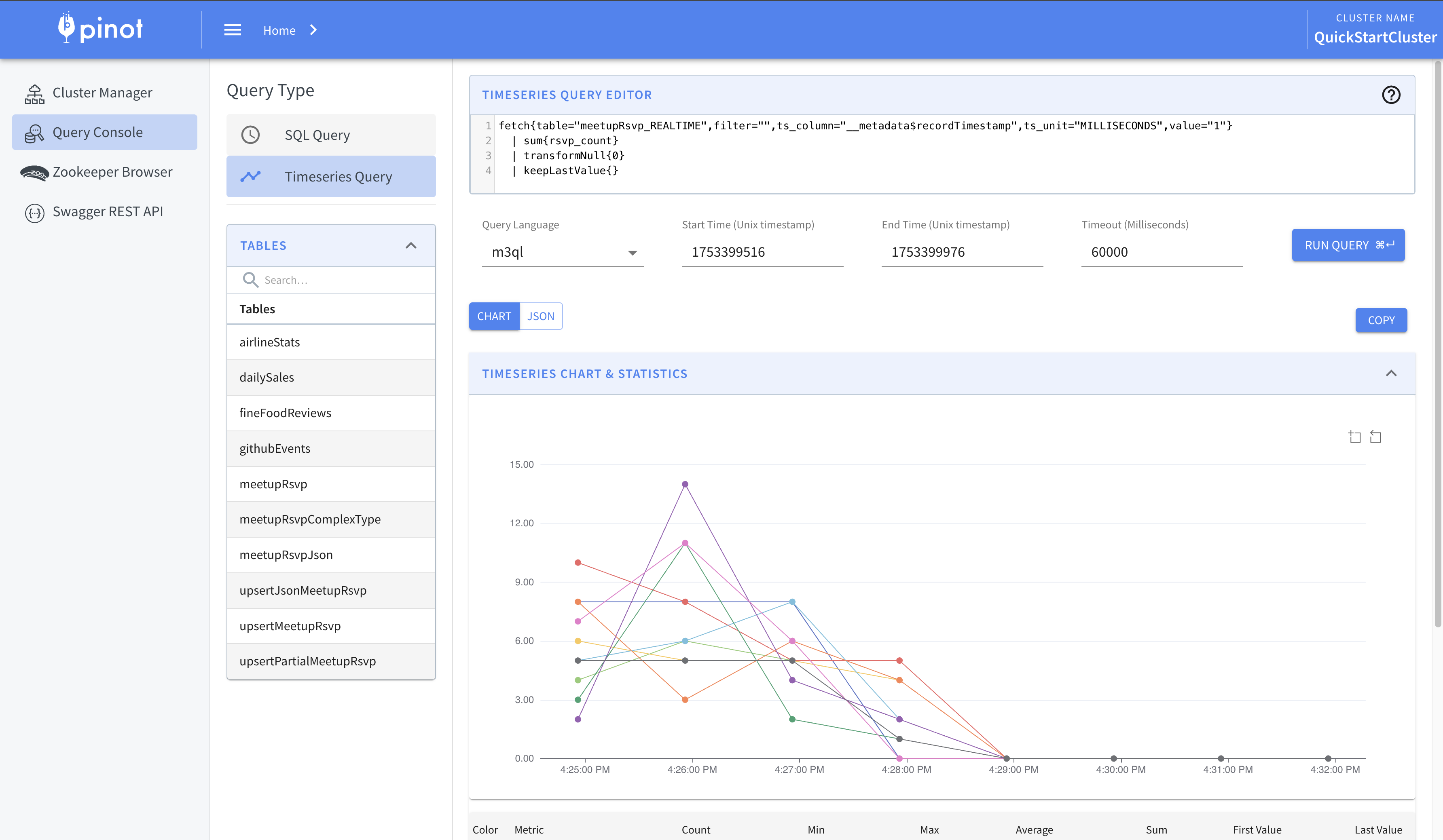
시계열 (Time Series)
💡 프로덕션에서는 이상적으로 자신만의 Time Series Language Plugin을 직접 구현해야 해요. Pinot 배포판에 포함된 것은 단지 데모 목적이에요.
이 예제는 Pinot의 Time Series Engine을 보여줘요. Language Plugin 아키텍처를 통해 플러그인 가능한 Time Series Query Language를 실행하는 것을 지원하죠. 기본 Pinot 바이너리에는 Uber의 언어와 같은 이름인 "m3ql"을 사용하는 토이(toy) Time Series Query Language가 포함돼요. 예시로 다음 쿼리를 시도해 볼 수 있어요:
fetch{table="meetupRsvp_REALTIME",filter="",ts_column="__metadata$recordTimestamp",ts_unit="MILLISECONDS",value="1"}
| sum{rsvp_count}
| transformNull{0}
| keepLastValue{}
docker run -p 9000:9000 apachepinot/pinot:latest QuickStart -type time_series
./bin/pinot-admin.sh QuickStart -type time_series
pinot-admin QuickStart -type time_series