
콜 대본→PRD→티켓 에이전트: Mistral AI LLM으로 회의 대본을 Linear 티켓으로 변환하기
콜 대본→PRD→티켓 에이전트: Mistral AI LLM으로 회의 대본을 Linear 티켓으로 변환하기 (Call Transcript-to-PRD-to-Ticket Agent)
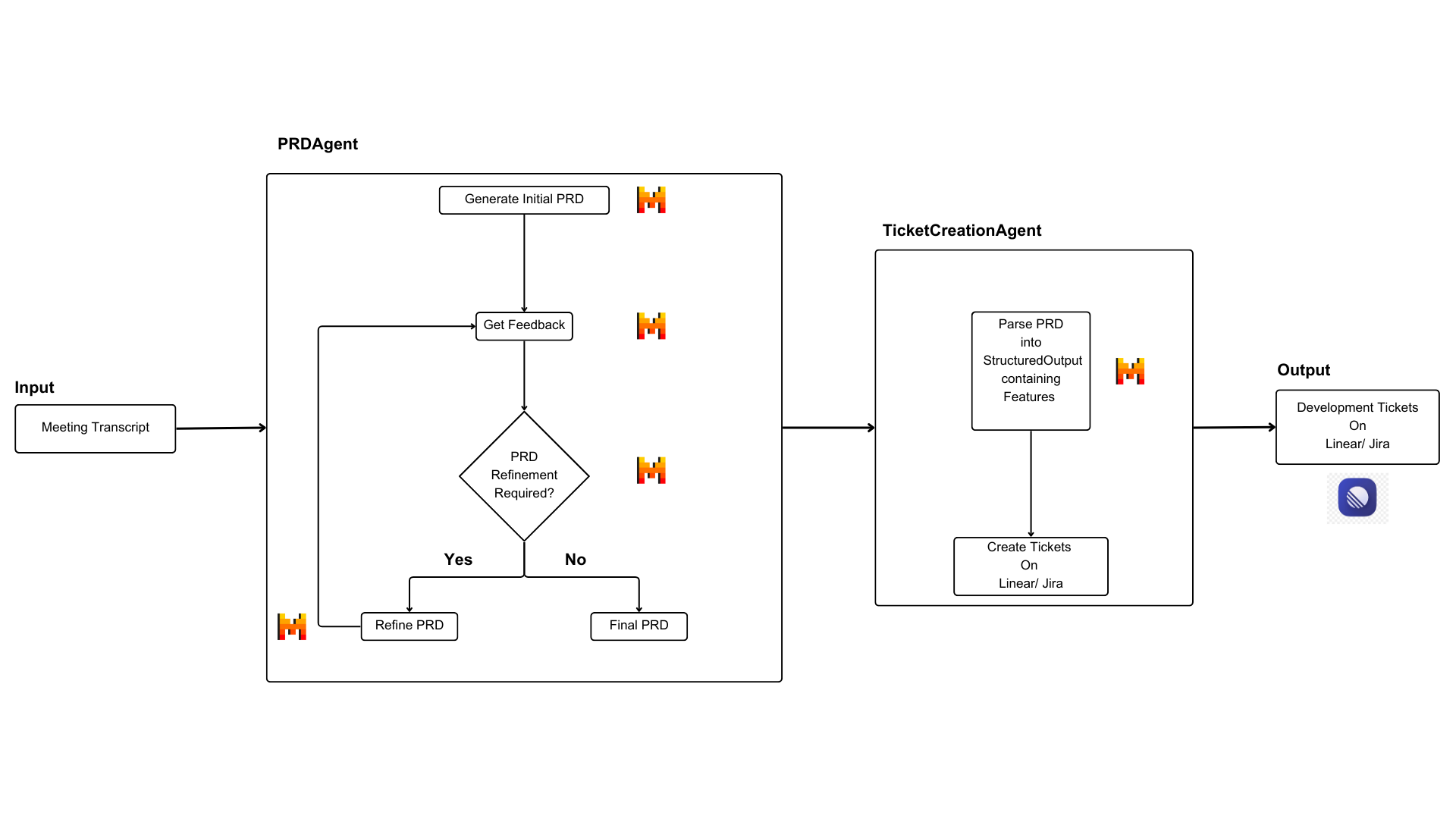
현대 소프트웨어 개발에서 고객 콜과 회의를 실행 가능한 개발 티켓으로 효율적으로 변환하는 것은 큰 과제예요. 이 쿡북에서는 Mistral의 LLM과 OCR 모델을 활용해서 이 과정을 자동화하는 파이프라인을 만들어 볼 거예요. 콜 대본을 PRD로 만들고, 이를 다시 Linear의 개발 티켓까지 자동 연결하는 흐름이죠.
출처: 문서
본문
문제 정의 (Problem Statement)
현대 소프트웨어 개발에서, 고객 콜과 회의를 실행 가능한 개발 티켓으로 효율적으로 변환하는 것은 중요한 과제예요. 이 과정은 보통 다음을 포함합니다.
- 콜 중 수동 메모 작성
- 메모를 PRD(제품 요구사항 문서)로 변환
- PRD를 실행 가능한 티켓으로 분해
- 프로젝트 관리 도구(예: Linear)에서 티켓 생성 및 관리
이 수동 프로세스는:
- 시간이 많이 들고
- 정보 손실에 취약하며
- 비일관성이 따르고
- 확장하기 어려워요.
우리의 솔루션 (Our Solution)
우리는 Mistral의 LLM과 OCR 모델을 활용해서 이 과정을 간소화하는 자동화 파이프라인을 만들었어요.
1단계: PRD 생성 (Stage 1: PRD Generation)
- 원시 콜 대본을 입력으로 받아요(Mistral OCR로 파싱).
- Mistral AI LLM을 사용해 구조화된 PRD를 생성해요.
- 정확성을 위해 반복적 개선(refinement)을 구현해요.
- 원래 논의(대본)와의 일치를 보장해요.
2단계: 기능·기술 요구사항 추출 (Stage 2: Feature & Technical requirements Extraction)
- PRD를 분석해서 개별 기능을 식별해요.
- 기술 요구사항을 추출해요.
- 제약 조건과 성공 지표를 포착해요.
- 원본 콘텐츠(콜/대본)에 대한 추적성을 유지해요.
Mistral LLM 통합 (Mistral LLM Integration)
이 솔루션은 몇 가지 Mistral AI LLM 기능을 사용해요.
- Chat Completion API: PRD 생성을 위해 사용되고, 반복적인 개선을 처리하며, 피드백과 개선 사항을 처리해요.
- Structured Output: PRD 콘텐츠를 포맷하고, 기능 목록을 추출하며, 티켓 설명을 생성해요.
- Context Management: 반복 간 일관성을 유지하고, 원래 대본 컨텍스트를 보존하며, 정확한 정보 흐름을 보장해요.
이 노트북은 이 파이프라인의 구현을 안내하면서, 콜 대본에서 PRD 생성, Linear의 실행 가능한 개발 티켓까지의 여정을 자동화하는 방법을 보여줘요.
설치 (Installation)
Python Output
!pip install mistralai==1.5.1 # MistralAI
!pip install gql==3.5.0 # GraphQL
!pip install pydantic==2.10.6 # Data validation
!pip install pypdf==5.3.0  # PDF processing
임포트 (Imports)
from mistralai.client import Mistral
from gql import gql, Client
from gql.transport.requests import RequestsHTTPTransport
from pydantic import BaseModel
from typing import List, Dict, Optional, Any
from dataclasses import dataclass
from pypdf import PdfReader
import json
콜 대본 다운로드 (Download Call Transcript)
이 데모에서는 LeChat에 관한 제품 콜을 사용할 거예요.
참고(Note): 대본은 데모 목적으로 합성 생성된 것이에요.
Python
!wget 'https://raw.githubusercontent.com/mistralai/cookbook/main/mistral/agents/non_framework/transcript_linearticket_agent/lechat_product_call_trascript.pdf' -O './lechat_product_call_trascript.pdf'
구성 및 설정 (Configuration and Setup)
우리 파이프라인은 PRD 생성을 위해 Mistral AI LLM을, 티켓 관리를 위해 Linear를 통합해요. 필요한 구성을 설정해 봅시다.
API 설정 (API Setup)
Linear 설정 (Linear Configuration)
- Linear에서 API 키 가져오기 (Settings → API)
- 팀 ID(Team ID) 가져오기
- GraphQL 엔드포인트: https://api.linear.app/graphql
Mistral AI 설정 (Mistral AI Configuration)
- Mistral AI에서 API 키 가져오기
- "mistral-large-latest" 모델 사용
@dataclass
class Config:
    """Configuration settings for the application."""
    LINEAR_API_KEY: str # OAuth token for Linear API authentication
    LINEAR_TEAM_ID: str # Unique identifier for your Linear team/project
    LINEAR_GRAPHQL_URL: str # Linear's GraphQL API endpoint (usually "https://api.linear.app/graphql")
    MISTRAL_API_KEY: str # API Key for accessing Mistral LLMs
    MISTRAL_MODEL: str # Specific Mistral model to use (e.g., "mistral-large-latest")

config = Config(
    LINEAR_API_KEY = "YOUR API KEY ON LINEAR",
    LINEAR_TEAM_ID = "YOUR TEAM ID ON LINEAR",
    LINEAR_GRAPHQL_URL = "https://api.linear.app/graphql",
    MISTRAL_API_KEY = "YOUR MISTRAL API KEY", # Get your API key from https://console.mistral.ai/api-keys/
    MISTRAL_MODEL = "ministral-large-latest",
)
데이터 모델 (Data Models)
또한 PRD를 바탕으로 Linear에 만드는 기능과 설명을 위한 데이터 구조를 정의해요.
class FeaturesList(BaseModel):
    """Pydantic model for structured feature data."""
    Features: List[str]
    DescriptionOfFeatures: List[str]
PRD 생성 에이전트 (PRD Generation Agent)
PRD 생성 에이전트(PRDAgent)는 콜 대본을 반복적인 과정을 통해 정확한 PRD로 변환하는 역할을 해요.
- 먼저 초기 PRD를 생성해요(
generate_initial_prd). - 그다음 피드백을 받아요(
get_feedback). - 피드백을 바탕으로 개선해요(
refine_prd). - 품질이 만족스러울 때까지 반복해요(최대 3회)(
run).
class PRDAgent:
    """Agent responsible for generating and refining PRD from transcripts."""

    def __init__(self, transcript: str, mistral_client: Mistral, model: str = "mistral-large-latest"):
        """
        Initialize PRD agent.

        Args:
            transcript (str): Call transcript text
            mistral_client (Mistral): Initialized Mistral client
            model (str): Model name to use
        """
        self.transcript: str = transcript
        self.prd: Optional[str] = None
        self.feedback: Optional[str] = None
        self.client: Mistral = mistral_client
        self.model: str = model

    def generate_initial_prd(self) -> str:
        """
        Generate initial PRD from transcript.

        Returns:
            str: Generated PRD text
        """
        prompt = f"""
        Based on the following call transcript, create an initial Product Requirements Document (PRD) with some or all of these sections:
        1. Title
        2. Purpose
        3. Scope
        4. Features and Requirements
        5. User Personas
        6. Technical Requirements
        7. Constraints
        8. Success Metrics
        9. Timeline and Milestones

        Transcript:
        {self.transcript}

        Align everything only with the information provided in the transcript. If any section is not present in the transcript, you can skip it in the PRD.

        PRD:
        """
        response = self.client.chat.complete(
            model=self.model,
            messages=[{"role": "user", "content": prompt}],
            temperature=0.1
        )
        self.prd = response.choices[0].message.content
        return self.prd

    def get_feedback(self) -> str:
        """
        Get feedback on current PRD.

        Returns:
            str: Feedback text
        """
        prompt = f"""
            Review the following Product Requirements Document (PRD) based on the original call transcript. Provide feedback on:
            - Missing information in PRD that are present in the transcript.
            - Inconsistencies in the PRD that are not aligned with the transcript.

            Transcript:
            {self.transcript}

            Current PRD:
            {self.prd}

            Align the feedback only with the information provided in the transcript. We are not looking for additional information based on your knowledge.

            If no feedback is required, respond with "None." and don't provide any further feedback. Your task is only to review the alignment between the PRD and the transcript and provide feedback based on that. Don't refine the PRD at this stage.

            Feedback:
            """
        response = self.client.chat.complete(
            model=self.model,
            messages=[{"role": "user", "content": prompt}],
            temperature=0.1
        )
        self.feedback = response.choices[0].message.content
        return self.feedback

    def refine_prd(self) -> str:
        """
        Refine PRD based on feedback.

        Returns:
            str: Refined PRD text
        """
        prompt = f"""
        Refine the PRD based on the provided feedback and aligning it with the transcript:

        Current PRD:
        {self.prd}

        Feedback:
        {self.feedback}

        Transcript:
        {self.transcript}
        """
        response = self.client.chat.complete(
            model=self.model,
            messages=[{"role": "user", "content": prompt}],
            temperature=0.1
        )
        self.prd = response.choices[0].message.content
        return self.prd

    def run(self, max_iterations: int = 3) -> str:
        """
        Run the PRD generation and refinement process.

        Args:
            max_iterations (int): Maximum number of refinement iterations

        Returns:
            str: Final PRD text
        """
        print("Generating initial PRD...")
        self.generate_initial_prd()
        print(f"Initial PRD:\n{self.prd}")

        for iteration in range(max_iterations):
            print(f"\nIteration {iteration}: Requesting feedback...")
            feedback = self.get_feedback()
            print(f"Feedback:\n{feedback}")

            if "none" in feedback.strip().lower():
                print("\nNo further feedback. Finalizing PRD...")
                break

            print("\nRefining PRD...")
            self.refine_prd()
            print(f"Refined PRD:\n{self.prd}")

        return self.prd
티켓 생성 에이전트 (Ticket Creation Agent)
티켓 생성 에이전트는 PRD를 세 가지 주요 단계를 통해 Linear의 실행 가능한 티켓으로 변환해요.
- PRD를 구조화된 기능과 설명으로 파싱해요(
parse_prd). - 각 기능을 티켓 형식으로 변환해요(
create_ticket). - GraphQL API를 통해 Linear에 티켓을 생성해요(
create_tickets_from_prd).
class TicketCreationAgent:
    """Agent responsible for creating Linear tickets from PRD."""

    def __init__(self, api_key: str, team_id: str, mistral_client: Mistral, graphql_url: str):
        """
        Initialize Linear ticket agent.

        Args:
            api_key (str): Linear API key
            team_id (str): Linear team ID
            mistral_client (Mistral): Initialized Mistral client
            graphql_url (str): Linear GraphQL API URL
        """
        self.client = Client(
            transport=RequestsHTTPTransport(
                url=graphql_url,
                headers={'Authorization': api_key},
                verify=True,
                retries=3
            ),
            fetch_schema_from_transport=True
        )
        self.team_id = team_id
        self.mistral_client = mistral_client

    def parse_prd(self, prd_text: str) -> Dict[str, List[str]]:
        """
        Parse PRD into structured feature data.

        Args:
            prd_text (str): PRD text to parse

        Returns:
            Dict[str, List[str]]: Structured feature data
        """
        messages = [
            {
                "role": "system",
                "content": (
                    "You are an AI assistant helping to create Features list and their descriptions from a Product Requirements Document (PRD)."
                    "The description should contain a brief explanation of the feature that includes Technical requirements (if any), Constraints (if any), Success metrics (if any), User personas (if any), and Timeline and Milestones (if any)."
                )
            },
            {
                "role": "user",
                "content": f"PRD:\n\n{prd_text}"
            }
        ]

        chat_response = self.mistral_client.chat.parse(
            model="mistral-large-latest",
            messages=messages,
            response_format=FeaturesList,
            max_tokens=2048,
            temperature=0.1
        )

        return json.loads(chat_response.choices[0].message.content)

    def create_ticket(self, title: str, description: str) -> Dict[str, Any]:
        """
        Create a single Linear ticket.

        Args:
            title (str): Ticket title
            description (str): Ticket description

        Returns:
            Dict[str, Any]: Creation result from Linear API
        """
        mutation = gql("""
        mutation CreateIssue($title: String!, $description: String!, $teamId: String!) {
            issueCreate(
                input: {
                    title: $title,
                    description: $description,
                    teamId: $teamId
                }
            ) {
                success
                issue {
                    id
                    url
                }
            }
        }
        """)

        variables = {
            "title": title,
            "description": description,
            "teamId": self.team_id
        }

        result = self.client.execute(mutation, variable_values=variables)
        print(f"Created ticket: {result['issueCreate']['issue']['url']}")
        return result

    def create_tickets_from_prd(self, parsed_items: Dict[str, List[str]]) -> List[Dict[str, Any]]:
        """
        Create Linear tickets from parsed PRD items.

        Args:
            parsed_items (Dict[str, List[str]]): Parsed feature data

        Returns:
            List[Dict[str, Any]]: List of ticket creation results
        """
        results = []
        for title, description in zip(
            parsed_items['Features'],
            parsed_items['DescriptionOfFeatures']
        ):
            result = self.create_ticket(title, description)
            results.append(result)
        return results
워크플로우 오케스트레이터 (Workflow Orchestrator)
워크플로우 오케스트레이터는:
- 전체 프로세스를 조정하고
- 에이전트 간 커뮤니케이션을 관리하며
- 전체 워크플로우를 처리해요.
class WorkflowOrchestrator:
    """Orchestrates the entire workflow from transcript to Linear tickets."""

    def __init__(self, config: Config, transcript: str):
        """
        Initialize workflow orchestrator.

        Args:
            config (Config): Application configuration
            transcript (str): Call transcript text
        """
        mistral_client = Mistral(api_key=config.MISTRAL_API_KEY)
        self.prd_agent = PRDAgent(
            transcript=transcript,
            mistral_client=mistral_client
        )
        self.linear_agent = TicketCreationAgent(
            api_key=config.LINEAR_API_KEY,
            team_id=config.LINEAR_TEAM_ID,
            mistral_client=mistral_client,
            graphql_url=config.LINEAR_GRAPHQL_URL
        )

    def run(self) -> Dict[str, Any]:
        """
        Run the complete workflow.

        Returns:
            Dict[str, Any]: Workflow results including PRD and ticket data
        """
        print("Generating and finalizing PRD...")
        prd = self.prd_agent.run()

        print("\nParsing PRD into actionable items...")
        parsed_items = self.linear_agent.parse_prd(prd)

        print("\nCreating Linear tickets...")
        ticket_results = self.linear_agent.create_tickets_from_prd(parsed_items)

        return {
            "prd": prd,
            "parsed_items": parsed_items,
            "ticket_results": ticket_results
        }
콜 대본 파싱 (Parse The Call Transcript)
다운로드한 콜 대본 파일을 파싱하기 위해 Mistral OCR 모델을 사용할 거예요.
def parse_transcript(config: Config, file_path: str) -> str:
  """Parse a transcriot PDF file and extract text from all pages using Mistral OCR."""

  mistral_client = Mistral(api_key=config.MISTRAL_API_KEY)

  uploaded_pdf = mistral_client.files.upload(
      file={
          "file_name": file_path,
          "content": open(file_path, "rb"),
      },
      purpose="ocr"
  )

  signed_url = mistral_client.files.get_signed_url(file_id=uploaded_pdf.id)

  ocr_response = mistral_client.ocr.process(
      model="mistral-ocr-latest",
      document={
          "type": "document_url",
          "document_url": signed_url.url,
      }
  )

  text = "\n".join([x.markdown for x in (ocr_response.pages)])

  return text
transcript = parse_transcript(config, "./lechat_product_call_trascript.pdf")
파이프라인 실행 (Running the Pipeline)
LeChat 제품 콜에 대해 논의하는 샘플 대본으로 파이프라인을 테스트해 볼게요.
Python
orchestrator = WorkflowOrchestrator(config, transcript)
results = orchestrator.run()
출력 이해하기 (Understanding the Output)
파이프라인은 다음을 생성해요.
- 구조화된 PRD
- 기능과 설명의 목록
- URL이 포함된 Linear 티켓
PRD
Python Output
print(results["prd"])
기능 (Features)
Python Output
for feature, desc in zip(
    results["parsed_items"]["Features"],
    results["parsed_items"]["DescriptionOfFeatures"]
):
    print(f"\nFeature: {feature}")
    print(f"Description: {desc}")
생성된 Linear 티켓 (Linear Tickets Created)
Python Output
for result in results["ticket_results"]:
    print(result)
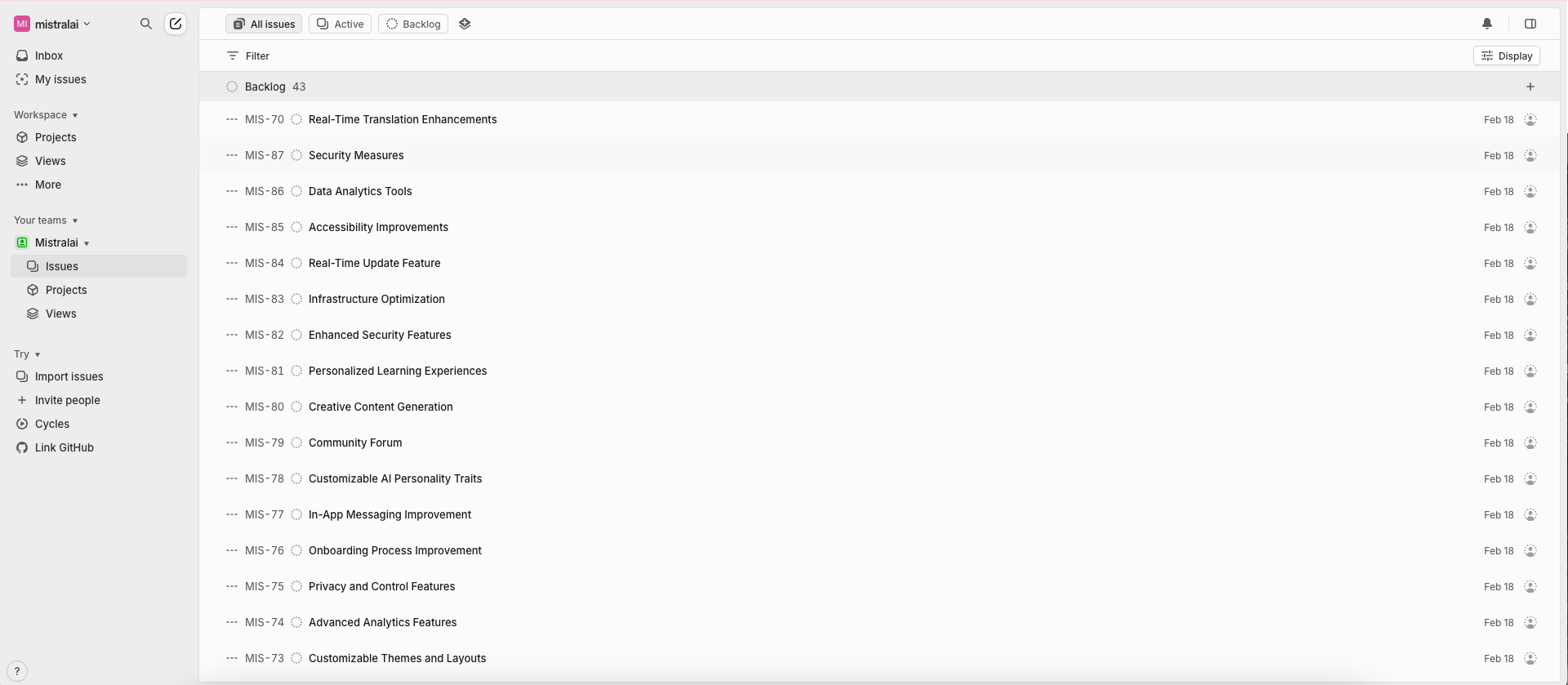
Linear UI에서 티켓이 어떻게 생성되는지 보여주는 샘플 이미지예요. (티켓은 대본에 따라 달라져요.)
다음 단계 (Next Steps)
이 파이프라인을 다음과 같이 확장할 수 있어요.
- 티켓에 우선순위 수준을 추가하기.
- Linear 티켓에 사용자 정의 필드 포함하기.
- Jira에도 비슷한 파이프라인 적용하기.