
도구 사용과 OCR로 어떤 모델이든 문서 이해시키기
도구 사용과 OCR로 어떤 모델이든 문서 이해시키기 (Document Comprehension with Any Model via Tool Usage and OCR)
Mistral OCR과 도구 사용(Tool Usage)을 결합해, 사용자가 요청한 URL의 문서(PDF, 사진, 스크린샷)를 열고 그 내용을 바탕으로 답하는 파이프라인을 만드는 문서예요.
출처: 문서
본문
광학 문자 인식(OCR, Optical Character Recognition)은 텍스트 기반 문서와 이미지를 순수한 텍스트 출력과 마크다운으로 변환해요. 이 기능을 활용하면 어떤 LLM이든 문서를 효율적이고 비용 효과적으로 안정적으로 이해하도록 만들 수 있습니다.
이 가이드에서는 URL을 통해 PDF, 사진, 스크린샷 같은 텍스트 기반 문서에 대해 모델과 대화하는 방법을 보여드릴게요.
Method
[도구 사용(Tool Usage)]을 활용해 사용자가 요청할 때마다 URL을 열도록 할 거예요. 참고로, URL을 열어 OCR을 적용하고 내용을 가져오는 open_urls 도구를 이용하는 방식이에요.
다른 방법 (Other Methods)
우리 모델 기반의 문서 이해 내장 기능도 있어요. 자세한 내용은 [Document Understanding 문서]를 참고하세요.
도구 사용 (Tool Usage)
이를 위해 먼저 문서를 가리키는 URL을 포함할 수도, 포함하지 않을 수도 있는 질문을 보내요. Mistral Small은 open_urls 도구(URL을 직접 추출)를 사용해 OCR을 수행해야 하는지, 아니면 질문에 바로 답할 수 있는지 결정할 겁니다.
설정 (Setup)
먼저 mistralai를 설치해요.
!pip install mistralai
이제 클라이언트를 설정해요. API 키는 [Studio]에서 만들 수 있어요.
from mistralai.client import Mistral

api_key = "API_KEY"
client = Mistral(api_key=api_key)
text_model = "mistral-small-latest"
ocr_model = "mistral-ocr-latest"
시스템 프롬프트와 도구 (System and Tool)
모델이 자신의 목적과 수행 가능한 일을 인식하려면, 지침과 접근 가능한 도구 설명이 포함된 명확한 시스템 프롬프트를 제공하는 게 중요해요.
여기서는 시스템 프롬프트와 모델이 접근할 도구(open_urls)를 정의해요. (open_urls는 예를 들어 요약용으로 다른 리소스·모델과 쉽게 커스터마이즈할 수 있어요. 데모에서는 더 간단한 접근을 사용할게요.)
system = """You are an AI Assistant with document understanding via URLs. You will be provided with URLs, and you must answer any questions related to those documents.

# OPEN URLS INSTRUCTIONS
You can open URLs by using the `open_urls` tool. It will open webpages and apply OCR to them, retrieving the contents. Use those contents to answer the user.
Only URLs pointing to PDFs and images are supported; you may encounter an error if they are not; provide that information to the user if required."""
_perform_ocr 함수는 PDF OCR을 시도하고, 실패하면 이미지 OCR로 폴백하는 구조예요.
def _perform_ocr(url: str) -> str:
    try: # Apply OCR to the PDF URL
        response = client.ocr.process(
            model=ocr_model,
            document={
                "type": "document_url",
                "document_url": url
            }
        )
    except Exception:
        try: # IF PDF OCR fails, try Image OCR
            response = client.ocr.process(
                model=ocr_model,
                document={
                    "type": "image_url",
                    "image_url": url
                }
            )
        except Exception as e:
            return e # Return the error to the model if it fails, otherwise return the contents
    return "\n\n".join([f"### Page {i+1}\n{response.pages[i].markdown}" for i in range(len(response.pages))])
def open_urls(urls: list) -> str:
    contents = "# Documents"
    for url in urls:
        contents += f"\n\n## URL: {url}\n{_perform_ocr(url)}"
    return contents
API와 모델에 제공할 도구 스키마(Tool Schema)도 정의해야 해요. [문서]를 따라 다음과 같이 만들 수 있어요.
tools = [
    {
        "type": "function",
        "function": {
            "name": "open_urls",
            "description": "Open URLs websites (PDFs and Images) and perform OCR on them.",
            "parameters": {
                "type": "object",
                "properties": {
                    "urls": {
                        "type": "array",
                        "description": "The URLs list.",
                    }
                },
                "required": ["urls"],
            },
        },
    },
]
names_to_functions = {
    'open_urls': open_urls
}
테스트 (Test)
모든 게 준비됐으니 콘솔에서 모델과 직접 대화하는 while 루프를 만들어 볼게요. 모델은 URL이 언급될 때마다 open_urls를 사용하고, PDF나 사진이라면 OCR을 수행해 원본 텍스트 내용을 모델에 제공하고, 모델은 이를 사용해 답변합니다.
예시 프롬프트 (PDF & Image):
- Could you summarize what this research paper talks about? [https://arxiv.org/pdf/2410.07073]
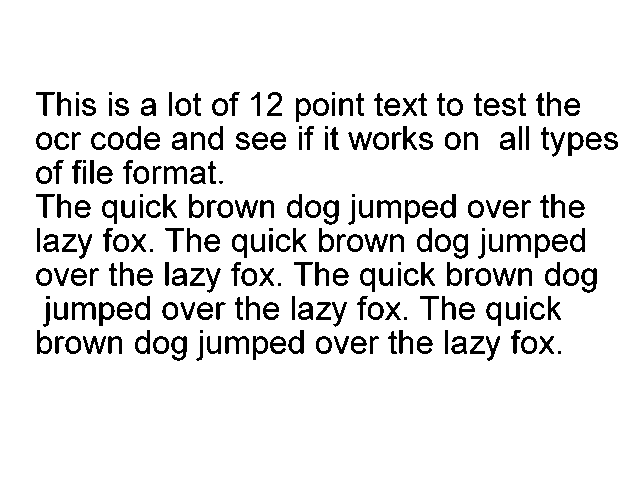
- What is written here: [https://jeroen.github.io/images/testocr.png]
import json

messages = [{"role": "system", "content": system}]
while True:
    # Insert user input, quit if desired
    user_input = input("User > ")
    if user_input == "quit":
        break
    messages.append({"role": "user", "content": user_input})

    # Loop Mistral Small tool use until no tool called
    while True:
        response = client.chat.complete(
            model = text_model,
            messages = messages,
            temperature = 0,
            tools = tools
        )
        messages.append({"role":"assistant", "content": response.choices[0].message.content, "tool_calls": response.choices[0].message.tool_calls})

        # If tool called, run tool and continue, else break loop and reply
        if response.choices[0].message.tool_calls:
            tool_call = response.choices[0].message.tool_calls[0]
            function_name = tool_call.function.name
            function_params = json.loads(tool_call.function.arguments)
            function_result = names_to_functions[function_name](**function_params)
            messages.append({"role":"tool", "name":function_name, "content":function_result, "tool_call_id":tool_call.id})
        else:
            break

    print("Assistant >", response.choices[0].message.content)
모델이 도구를 호출하면 그 결과(OCR 텍스트)를 tool 메시지로 다시 주입하고, 도구 호출이 없을 때까지 반복하다가 최종 답변을 출력하는 구조예요.