
도구 정의하기
도구 정의하기 (Define tools)
이 가이드에서는 도구 스키마를 지정하고, 효과적인 설명을 작성하고, Claude가 언제 여러분의 도구를 호출할지를 제어하는 방법을 다뤄요.
출처: 문서
본문
준비 사항 (Prerequisites)
- 도구 사용 개요에 익숙하기
- Claude API 키와 동작하는 SDK 또는 cURL 설정
팁 (Tip) 도구 사용과 thinking으로 Claude를 쓴다면 Thinking을 참고하세요.
클라이언트 도구 지정하기 (Specifying client tools)
클라이언트 도구는 API 요청의 tools 최상위 파라미터에 지정해요. bash와 text editor 도구 같은 Anthropic 스키마 클라이언트 도구는 날짜 버전이 붙은 type으로 선언돼요. 각 도구가 받는 필드는 도구 레퍼런스에서 링크된 각 도구 페이지를 참고하세요. computer use와 browser use 도구는 클라이언트 도구셋이에요. 고정된 멤버 도구 집합을 선언하는, name이 없는 단일 항목이에요. 사용자 정의 도구 정의에는 다음이 포함돼요:
| 파라미터 | 설명 |
|---|---|
name |
도구의 이름. 정규식 ^[a-zA-Z0-9_-]{1,128}$와 일치해야 해요. |
description |
도구가 무엇을 하는지, 언제 사용해야 하는지, 어떻게 동작하는지에 대한 자세한 평문 설명. |
input_schema |
도구의 예상 파라미터를 정의하는 JSON Schema 객체. |
input_examples |
(선택) Claude가 도구를 어떻게 쓰는지 이해하도록 돕는 예시 입력 객체 배열. 도구 사용 예시 제공을 참고하세요. |
단일 도구 정의에서 사용 가능한 선택 속성의 전체 목록(cache_control, strict, defer_loading, allowed_callers 포함)은 도구 레퍼런스를 참고하세요. 클라이언트 도구셋 항목은 항목에 cache_control과 allowed_callers를 받고 멤버별로 defer_loading을 설정해요. 클라이언트 도구셋을 참고하세요.
간단한 도구 정의 예시
{
  "name": "get_weather",
  "description": "Get the current weather in a given location",
  "input_schema": {
    "type": "object",
    "properties": {
      "location": {
        "type": "string",
        "description": "The city and state, e.g. San Francisco, CA"
      },
      "unit": {
        "type": "string",
        "enum": ["celsius", "fahrenheit"],
        "description": "The unit of temperature, either 'celsius' or 'fahrenheit'"
      }
    },
    "required": ["location"]
  }
}
get_weather라는 이 도구는 필수 location 문자열과, "celsius"나 "fahrenheit" 중 하나여야 하는 선택 unit 문자열을 가진 입력 객체를 기대해요.
도구 사용 시스템 프롬프트 (Tool use system prompt)
tools 파라미터로 Claude API를 호출하면 API가 도구 정의, 도구 구성, 그리고 사용자가 지정한 시스템 프롬프트에서 특별한 시스템 프롬프트를 구성해요. 구성된 프롬프트는 모델이 지정된 도구를 사용하도록 지시하고 도구가 제대로 작동하는 데 필요한 컨텍스트를 제공하도록 설계돼요:
In this environment you have access to a set of tools you can use to answer the user's question.
{{ FORMATTING INSTRUCTIONS }}
String and scalar parameters should be specified as is, while lists and objects should use JSON format. Note that spaces for string values are not stripped. The output is not expected to be valid XML and is parsed with regular expressions.
Here are the functions available in JSONSchema format:
{{ TOOL DEFINITIONS IN JSON SCHEMA }}
{{ USER SYSTEM PROMPT }}
{{ TOOL CONFIGURATION }}
도구 정의 모범 사례 (Best practices for tool definitions)
도구를 사용할 때 Claude의 최고 성능을 얻으려면 다음 지침을 따르세요:
-
매우 상세한 설명을 제공하세요. 이것이 도구 성능에서 압도적으로 가장 중요한 요소예요. 설명은 도구에 대한 모든 세부 사항을 다뤄야 해요:
- 도구가 무엇을 하는지
- 언제 사용해야 하는지(그리고 언제 사용하면 안 되는지)
- 각 파라미터가 무엇을 의미하고 도구 동작에 어떻게 영향을 주는지
- 도구 이름이 분명하지 않을 때 도구가 반환하지 않는 정보 같은 중요한 주의사항이나 한계. 도구에 대해 Claude에게 더 많은 컨텍스트를 줄수록 언제 어떻게 사용할지 판단을 더 잘 하게 돼요. 각 도구 설명은 최소 3-4문장을 목표로 하고, 복잡한 도구라면 더 많이 써요.
-
설명을 우선시하되, 복잡한 도구에는
input_examples사용을 고려하세요. 명확한 설명이 가장 중요하지만, 복잡한 입력, 중첩 객체, 형식에 민감한 파라미터가 있는 도구는input_examples필드로 스키마 검증된 예시를 제공할 수 있어요. 자세한 내용은 도구 사용 예시 제공을 참고하세요. -
관련 작업을 더 적은 도구로 통합하세요. 모든 행동마다 별도 도구를 만드는 대신(
create_pr,review_pr,merge_pr),action파라미터가 있는 단일 도구로 묶으세요. 더 적고 더 유능한 도구는 선택 모호성을 줄이고 Claude가 도구 표면을 더 쉽게 탐색하게 해요. -
도구 이름에 의미 있는 네임스페이스를 사용하세요. 도구가 여러 서비스나 리소스에 걸쳐 있다면 이름에 서비스를 접두사로 붙여요(예:
github_list_prs,slack_send_message). 이렇게 하면 라이브러리가 커질 때 도구 선택이 명확해지고 도구 검색을 쓸 때 특히 중요해요. -
도구 응답이 고신호(signal) 정보만 반환하도록 설계하세요. 불투명한 내부 참조 대신 의미론적이고 안정적인 식별자(예: 슬러그나 UUID)를 반환하고, Claude가 다음 단계를 추론하는 데 필요한 필드만 포함하세요. 부풀린 응답은 컨텍스트를 낭비하고 Claude가 중요한 것을 추출하기 어렵게 해요.
좋은 도구 설명 예시
{
  "name": "get_stock_price",
  "description": "Retrieves the current stock price for a given ticker symbol. The ticker symbol must be a valid symbol for a publicly traded company on a major US stock exchange like NYSE or NASDAQ. The tool will return the latest trade price in USD. It should be used when the user asks about the current or most recent price of a specific stock. It will not provide any other information about the stock or company.",
  "input_schema": {
    "type": "object",
    "properties": {
      "ticker": {
        "type": "string",
        "description": "The stock ticker symbol, e.g. AAPL for Apple Inc."
      }
    },
    "required": ["ticker"]
  }
}
나쁜 도구 설명 예시
{
  "name": "get_stock_price",
  "description": "Gets the stock price for a ticker.",
  "input_schema": {
    "type": "object",
    "properties": {
      "ticker": {
        "type": "string"
      }
    },
    "required": ["ticker"]
  }
}
좋은 설명은 도구가 무엇을 하는지, 언제 쓰는지, 어떤 데이터를 반환하는지, ticker 파라미터가 무엇을 의미하는지 명확히 설명해요. 나쁜 설명은 너무 짧아서 도구의 동작과 사용법에 대해 Claude에게 많은 미해결 질문을 남겨요.
팁 (Tip) 도구 설계(통합, 명명, 응답 형성)에 대한 더 깊은 지침은 Writing tools for agents를 참고하세요.
도구 사용 예시 제공하기 (Providing tool use examples)
유효한 도구 입력의 구체적인 예시를 제공해서 Claude가 도구를 더 효과적으로 쓰는 법을 이해하도록 도울 수 있어요. 중첩 객체, 선택 파라미터, 형식에 민감한 입력을 가진 복잡한 도구에 특히 유용해요.
기본 사용법 (Basic usage)
도구 정의에 예시 입력 객체 배열과 함께 선택 input_examples 필드를 추가해요. 각 예시는 도구의 input_schema에 따라 유효해야 해요:
ant messages create <<'YAML'
model: claude-opus-5-5
max_tokens: 1024
tools:
  - name: get_weather
    description: Get the current weather in a given location
    input_schema:
      type: object
      properties:
        location:
          type: string
          description: The city and state, e.g. San Francisco, CA
        unit:
          type: string
          enum: [celsius, fahrenheit]
          description: The unit of temperature
      required: [location]
    input_examples:
      - location: San Francisco, CA
        unit: fahrenheit
      - location: Tokyo, Japan
        unit: celsius
      - location: New York, NY  # 'unit' is optional
messages:
  - role: user
    content: What's the weather like in San Francisco?
YAML
client = anthropic.Anthropic()

response = client.messages.create(
    model="claude-opus-5-5",
    max_tokens=1024,
    tools=[
        {
            "name": "get_weather",
            "description": "Get the current weather in a given location",
            "input_schema": {
                "type": "object",
                "properties": {
                    "location": {
                        "type": "string",
                        "description": "The city and state, e.g. San Francisco, CA",
                    },
                    "unit": {
                        "type": "string",
                        "enum": ["celsius", "fahrenheit"],
                        "description": "The unit of temperature",
                    },
                },
                "required": ["location"],
            },
            "input_examples": [
                {"location": "San Francisco, CA", "unit": "fahrenheit"},
                {"location": "Tokyo, Japan", "unit": "celsius"},
                {
                    "location": "New York, NY"  # 'unit' is optional
                },
            ],
        }
    ],
    messages=[{"role": "user", "content": "What's the weather like in San Francisco?"}],
)

print(response)
const client = new Anthropic();

const response = await client.messages.create({
  model: "claude-opus-5-5",
  max_tokens: 1024,
  tools: [
    {
      name: "get_weather",
      description: "Get the current weather in a given location",
      input_schema: {
        type: "object",
        properties: {
          location: {
            type: "string",
            description: "The city and state, e.g. San Francisco, CA"
          },
          unit: {
            type: "string",
            enum: ["celsius", "fahrenheit"],
            description: "The unit of temperature"
          }
        },
        required: ["location"]
      },
      input_examples: [
        {
          location: "San Francisco, CA",
          unit: "fahrenheit"
        },
        {
          location: "Tokyo, Japan",
          unit: "celsius"
        },
        {
          location: "New York, NY"
          // Demonstrates that 'unit' is optional
        }
      ]
    }
  ],
  messages: [{ role: "user", content: "What's the weather like in San Francisco?" }]
});

console.log(response);
AnthropicClient client = new();

var parameters = new MessageCreateParams
{
    Model = Model.ClaudeOpus5_5,
    MaxTokens = 1024,
    Tools = [
        new ToolUnion(new Tool()
        {
            Name = "get_weather",
            Description = "Get the current weather in a given location",
            InputSchema = new InputSchema()
            {
                Properties = new Dictionary<string, JsonElement>
                {
                    ["location"] = JsonSerializer.SerializeToElement(new { type = "string", description = "The city and state, e.g. San Francisco, CA" }),
                    ["unit"] = JsonSerializer.SerializeToElement(new { type = "string", @enum = new[] { "celsius", "fahrenheit" }, description = "The unit of temperature" }),
                },
                Required = ["location"],
            },
            InputExamples =
            [
                new Dictionary<string, JsonElement>()
                {
                    { "location", JsonSerializer.SerializeToElement("San Francisco, CA") },
                    { "unit", JsonSerializer.SerializeToElement("fahrenheit") },
                },
                new Dictionary<string, JsonElement>()
                {
                    { "location", JsonSerializer.SerializeToElement("Tokyo, Japan") },
                    { "unit", JsonSerializer.SerializeToElement("celsius") },
                },
                new Dictionary<string, JsonElement>()
                {
                    { "location", JsonSerializer.SerializeToElement("New York, NY") },
                },
            ],
        }),
    ],
    Messages = [
        new() { Role = Role.User, Content = "What's the weather like in San Francisco?" }
    ]
};

var message = await client.Messages.Create(parameters);
Console.WriteLine(message);
client := anthropic.NewClient()

response, err := client.Messages.New(context.TODO(), anthropic.MessageNewParams{
	Model:     anthropic.ModelClaudeOpus5_5,
	MaxTokens: 1024,
	Tools: []anthropic.ToolUnionParam{
		{OfTool: &anthropic.ToolParam{
			Name:        "get_weather",
			Description: anthropic.String("Get the current weather in a given location"),
			InputSchema: anthropic.ToolInputSchemaParam{
				Properties: map[string]any{
					"location": map[string]any{
						"type":        "string",
						"description": "The city and state, e.g. San Francisco, CA",
					},
					"unit": map[string]any{
						"type":        "string",
						"enum":        []string{"celsius", "fahrenheit"},
						"description": "The unit of temperature",
					},
				},
				Required: []string{"location"},
			},
			InputExamples: []map[string]any{
				{
					"location": "San Francisco, CA",
					"unit":     "fahrenheit",
				},
				{
					"location": "Tokyo, Japan",
					"unit":     "celsius",
				},
				{
					"location": "New York, NY",
					// Demonstrates that 'unit' is optional
				},
			},
		}},
	},
	Messages: []anthropic.MessageParam{
		anthropic.NewUserMessage(anthropic.NewTextBlock("What's the weather like in San Francisco?")),
	},
})
if err != nil {
	log.Fatal(err)
}
fmt.Println(response.RawJSON())
import com.anthropic.models.messages.Tool;
import com.anthropic.models.messages.Tool.InputSchema;
// ...
void main() {
    AnthropicClient client = AnthropicOkHttpClient.fromEnv();

    MessageCreateParams params = MessageCreateParams.builder()
        .model(Model.CLAUDE_OPUS_5_5)
        .maxTokens(1024L)
        .addTool(Tool.builder()
            .name("get_weather")
            .description("Get the current weather in a given location")
            .inputSchema(InputSchema.builder()
                .properties(JsonValue.from(Map.of(
                    "location", Map.of(
                        "type", "string",
                        "description", "The city and state, e.g. San Francisco, CA"
                    ),
                    "unit", Map.of(
                        "type", "string",
                        "enum", List.of("celsius", "fahrenheit"),
                        "description", "The unit of temperature"
                    )
                )))
                .required(List.of("location"))
                .build())
            .putAdditionalProperty("input_examples", JsonValue.from(List.of(
                Map.of(
                    "location", "San Francisco, CA",
                    "unit", "fahrenheit"
                ),
                Map.of(
                    "location", "Tokyo, Japan",
                    "unit", "celsius"
                ),
                Map.of(
                    "location", "New York, NY"
                )
            )))
            .build())
        .addUserMessage("What's the weather like in San Francisco?")
        .build();

    Message response = client.messages().create(params);
    IO.println(response);
}
$client = new Client();

$message = $client->messages->create(
    maxTokens: 1024,
    messages: [
        ['role' => 'user', 'content' => "What's the weather like in San Francisco?"]
    ],
    model: 'claude-opus-5-5',
    tools: [
        [
            'name' => 'get_weather',
            'description' => 'Get the current weather in a given location',
            'input_schema' => [
                'type' => 'object',
                'properties' => [
                    'location' => [
                        'type' => 'string',
                        'description' => 'The city and state, e.g. San Francisco, CA'
                    ],
                    'unit' => [
                        'type' => 'string',
                        'enum' => ['celsius', 'fahrenheit'],
                        'description' => 'The unit of temperature'
                    ]
                ],
                'required' => ['location']
            ],
            'input_examples' => [
                [
                    'location' => 'San Francisco, CA',
                    'unit' => 'fahrenheit'
                ],
                [
                    'location' => 'Tokyo, Japan',
                    'unit' => 'celsius'
                ],
                [
                    'location' => 'New York, NY'
                ]
            ]
        ]
    ],
);
client = Anthropic::Client.new

message = client.messages.create(
  model: "claude-opus-5-5",
  max_tokens: 1024,
  tools: [
    {
      name: "get_weather",
      description: "Get the current weather in a given location",
      input_schema: {
        type: "object",
        properties: {
          location: {
            type: "string",
            description: "The city and state, e.g. San Francisco, CA"
          },
          unit: {
            type: "string",
            enum: ["celsius", "fahrenheit"],
            description: "The unit of temperature"
          }
        },
        required: ["location"]
      },
      input_examples: [
        {
          location: "San Francisco, CA",
          unit: "fahrenheit"
        },
        {
          location: "Tokyo, Japan",
          unit: "celsius"
        },
        {
          location: "New York, NY"
        }
      ]
    }
  ],
  messages: [
    { role: "user", content: "What's the weather like in San Francisco?" }
  ]
)
puts message
예시는 도구 스키마와 함께 프롬프트에 포함되어 Claude에게 잘 짜인 도구 호출의 구체적인 패턴을 보여줘요. 이렇게 하면 Claude가 선택 파라미터를 언제 포함할지, 어떤 형식을 쓸지, 복잡한 입력을 어떻게 구성할지 이해하는 데 도움이 돼요.
요구 사항과 한계 (Requirements and limitations)
- 스키마 검증 — 각 예시는 도구의
input_schema에 따라 유효해야 해요. 유효하지 않은 예시는 400 오류를 반환해요. - 서버 측 도구나 클라이언트 도구셋에는 미지원 — 입력 예시는 computer use와 browser use 도구셋을 제외한 사용자 정의 및 Anthropic 스키마 클라이언트 도구에서 동작하지만, 웹 검색이나 코드 실행 같은 서버 도구에는 동작하지 않아요.
- 토큰 비용 — 예시는 프롬프트 토큰에 추가돼요. 간단한 예시는 약 20-50 토큰, 복잡한 중첩 객체는 약 100-200 토큰이에요.
Claude의 출력 제어하기 (Controlling Claude's output)
도구 사용 강제하기 (Forcing tool use)
경우에 따라 Claude가 도구를 호출하지 않고 직접 답할 수도 있는데도, 사용자 질문에 답하기 위해 Claude가 특정 도구를 쓰게 하고 싶을 수 있어요. 요청의 tool_choice 필드에서 도구를 지정하면 돼요.
모든 모델과 설정이 강제 도구 사용을 지원하는 건 아니에요. 지원되지 않는 곳에서 tool_choice: {"type": "any"}와 tool_choice: {"type": "tool", "name": "..."}은 실패하지만, tool_choice: {"type": "auto"}(기본값)와 tool_choice: {"type": "none"}은 계속 동작해요:
| 모델 또는 설정 | 제한 | 대신 쓸 것 |
|---|---|---|
수동 확장 사고 (thinking: {type: "enabled"}) |
any와 tool은 지원되지 않으며 오류가 발생해요 |
auto 또는 none. 적응형 사고 자체는 강제 도구 사용을 막지 않아요 (Claude Opus 5는 thinking을 켠 채 지원해요). 아래 행의 모델들은 thinking 설정과 무관하게 강제 도구 사용을 거부해요 |
| Claude Opus 5.5, Claude Fable 5.1, Claude Mythos 5.1 | any와 tool은 400 오류를 반환해요 |
스키마 검증을 보장하려면 strict tool use를 쓴 auto, 또는 고정된 JSON 형태의 응답이 필요할 때 구조화된 출력. 프롬프트는 여전히 auto가 어떤 도구를 고르는지에 영향을 줘요. none도 지원돼요 |
지원하는 모델에서는 강조된 줄만 표준 도구 사용 요청과 다릅니다:
ant messages create <<'YAML'
model: claude-opus-5
max_tokens: 1024
tools:
  - name: get_weather
    description: Get the current weather in a given location
    input_schema:
      type: object
      properties:
        location:
          type: string
          description: The city and state, e.g. San Francisco, CA
      required: [location]
tool_choice:
  type: tool
  name: get_weather
messages:
  - role: user
    content: What's the weather like in San Francisco?
YAML
client = anthropic.Anthropic()

tools = [
    {
        "name": "get_weather",
        "description": "Get the current weather in a given location",
        "input_schema": {
            "type": "object",
            "properties": {
                "location": {
                    "type": "string",
                    "description": "The city and state, e.g. San Francisco, CA",
                }
            },
            "required": ["location"],
        },
    }
]

response = client.messages.create(
    model="claude-opus-5",
    max_tokens=1024,
    tools=tools,
    tool_choice={"type": "tool", "name": "get_weather"},
    messages=[{"role": "user", "content": "What's the weather like in San Francisco?"}],
)

print(response)
const client = new Anthropic();

const response = await client.messages.create({
  model: "claude-opus-5",
  max_tokens: 1024,
  tools: [
    {
      name: "get_weather",
      description: "Get the current weather in a given location",
      input_schema: {
        type: "object",
        properties: {
          location: {
            type: "string",
            description: "The city and state, e.g. San Francisco, CA"
          }
        },
        required: ["location"]
      }
    }
  ],
  tool_choice: { type: "tool", name: "get_weather" },
  messages: [{ role: "user", content: "What's the weather like in San Francisco?" }]
});

console.log(response);
AnthropicClient client = new();

var parameters = new MessageCreateParams
{
    Model = Model.ClaudeOpus5,
    MaxTokens = 1024,
    Tools = [
        new ToolUnion(new Tool()
        {
            Name = "get_weather",
            Description = "Get the current weather in a given location",
            InputSchema = new InputSchema()
            {
                Properties = new Dictionary<string, JsonElement>
                {
                    ["location"] = JsonSerializer.SerializeToElement(new { type = "string", description = "The city and state, e.g. San Francisco, CA" }),
                },
                Required = ["location"],
            },
        }),
    ],
    ToolChoice = new ToolChoiceTool { Name = "get_weather" },
    Messages = [
        new() { Role = Role.User, Content = "What's the weather like in San Francisco?" }
    ]
};

var message = await client.Messages.Create(parameters);
Console.WriteLine(message);
client := anthropic.NewClient()

response, err := client.Messages.New(context.TODO(), anthropic.MessageNewParams{
	Model:     anthropic.ModelClaudeOpus5,
	MaxTokens: 1024,
	Tools: []anthropic.ToolUnionParam{
		{OfTool: &anthropic.ToolParam{
			Name:        "get_weather",
			Description: anthropic.String("Get the current weather in a given location"),
			InputSchema: anthropic.ToolInputSchemaParam{
				Properties: map[string]any{
					"location": map[string]any{
						"type":        "string",
						"description": "The city and state, e.g. San Francisco, CA",
					},
				},
				Required: []string{"location"},
			},
		}},
	},
	ToolChoice: anthropic.ToolChoiceUnionParam{OfTool: &anthropic.ToolChoiceToolParam{Name: "get_weather"}},
	Messages: []anthropic.MessageParam{
		anthropic.NewUserMessage(anthropic.NewTextBlock("What's the weather like in San Francisco?")),
	},
})
if err != nil {
	log.Fatal(err)
}
fmt.Println(response.RawJSON())
import com.anthropic.models.messages.Tool;
import com.anthropic.models.messages.Tool.InputSchema;
import com.anthropic.models.messages.ToolChoice;
import com.anthropic.models.messages.ToolChoiceTool;
// ...
void main() {
    AnthropicClient client = AnthropicOkHttpClient.fromEnv();

    MessageCreateParams params = MessageCreateParams.builder()
        .model(Model.CLAUDE_OPUS_5)
        .maxTokens(1024L)
        .addTool(Tool.builder()
            .name("get_weather")
            .description("Get the current weather in a given location")
            .inputSchema(InputSchema.builder()
                .properties(JsonValue.from(Map.of(
                    "location", Map.of(
                        "type", "string",
                        "description", "The city and state, e.g. San Francisco, CA"
                    )
                )))
                .required(List.of("location"))
                .build())
            .build())
        .toolChoice(ToolChoice.ofTool(ToolChoiceTool.builder()
            .name("get_weather")
            .build()))
        .addUserMessage("What's the weather like in San Francisco?")
        .build();

    Message response = client.messages().create(params);
    IO.println(response);
}
$client = new Client();

$message = $client->messages->create(
    maxTokens: 1024,
    messages: [
        ['role' => 'user', 'content' => "What's the weather like in San Francisco?"]
    ],
    model: 'claude-opus-5',
    toolChoice: ['type' => 'tool', 'name' => 'get_weather'],
    tools: [
        [
            'name' => 'get_weather',
            'description' => 'Get the current weather in a given location',
            'input_schema' => [
                'type' => 'object',
                'properties' => [
                    'location' => [
                        'type' => 'string',
                        'description' => 'The city and state, e.g. San Francisco, CA'
                    ]
                ],
                'required' => ['location']
            ]
        ]
    ],
);
client = Anthropic::Client.new

message = client.messages.create(
  model: "claude-opus-5",
  max_tokens: 1024,
  tools: [
    {
      name: "get_weather",
      description: "Get the current weather in a given location",
      input_schema: {
        type: "object",
        properties: {
          location: {
            type: "string",
            description: "The city and state, e.g. San Francisco, CA"
          }
        },
        required: ["location"]
      }
    }
  ],
  tool_choice: { type: "tool", name: "get_weather" },
  messages: [
    { role: "user", content: "What's the weather like in San Francisco?" }
  ]
)
puts message
tool_choice 파라미터로 작업할 때 네 가지 옵션이 있어요:
auto: Claude가 제공된 도구를 호출할지 말지를 스스로 결정하게 해요.tools가 제공될 때의 기본값이에요.any: Claude가 제공된 도구 중 하나를 반드시 쓰게 하지만 특정 도구를 강제하지는 않아요.tool: Claude가 항상 특정 도구를 쓰게 해요.none: Claude가 어떤 도구도 쓰지 못하게 해요.tools를 제공하지 않을 때의 기본값이에요.
참고 (Note) 프롬프트 캐싱을 쓸 때
tool_choice파라미터를 변경하면 캐시된 메시지 블록이 무효화돼요. 도구 정의와 시스템 프롬프트는 캐시된 채로 남지만 메시지 콘텐츠는 재처리해야 해요.
이 다이어그램은 각 옵션이 어떻게 작동하는지 보여줘요:
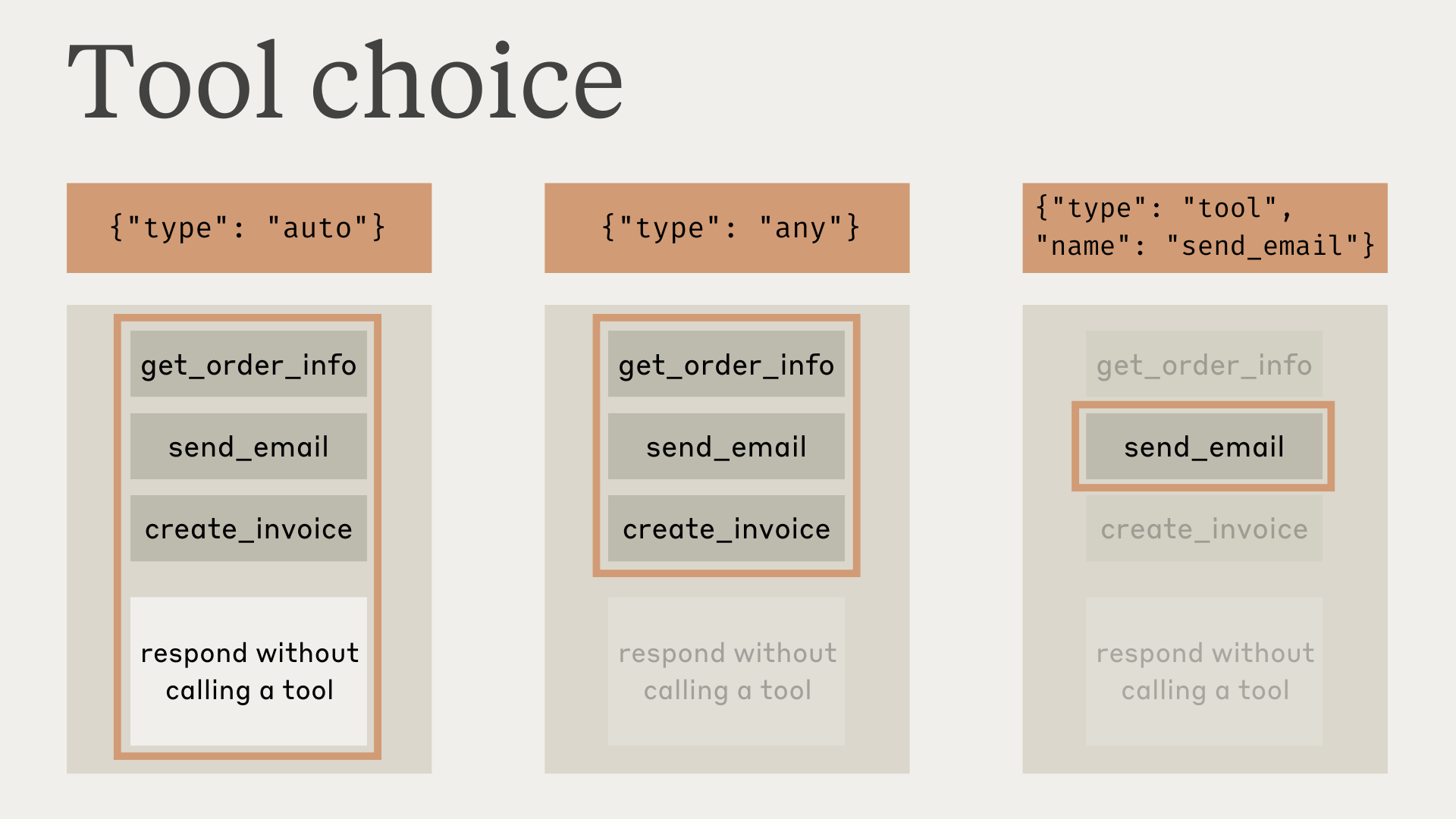
tool_choice가 any나 tool일 때 API는 어시스턴트 메시지를 프리필해서 도구가 쓰이도록 강제하는 점에 주의하세요. 즉 모델은 명시적으로 요청해도 tool_use 콘텐츠 블록 이전에 자연어 응답이나 설명을 만들지 않아요.
테스트에 따르면 이것이 성능을 떨어뜨리지는 않아야 해요. 모델이 특정 도구를 쓰도록 요청하면서도 자연어 컨텍스트나 설명을 제공하게 하려면 tool_choice에 {"type": "auto"}(기본값)를 쓰고 user 메시지에 명시적 지침을 추가하세요. 예: What's the weather like in London? Use the get_weather tool in your response.
팁 (Tip) strict 도구로 보장되는 도구 호출
강제 도구 사용을 지원하는 모델에서
tool_choice: {"type": "any"}를 strict tool use와 결합하면 도구 중 하나가 호출되는 것과 도구 입력이 스키마를 엄격히 따르는 것 모두를 보장할 수 있어요. 도구 정의에strict: true를 설정해서 스키마 검증을 활성화하세요.
도구가 있는 모델 응답 (Model responses with tools)
도구를 쓸 때 Claude는 도구를 호출하기 전에 자주 자신이 무엇을 하는지 언급하거나 사용자에게 자연스럽게 응답해요.
예를 들어 "샌프란시스코 지금 날씨가 어때, 그리고 거기 시간은 몇 시야?"라는 프롬프트에 Claude는 이렇게 응답할 수 있어요:
{
  "role": "assistant",
  "content": [
    {
      "type": "text",
      "text": "I'll help you check the current weather and time in San Francisco."
    },
    {
      "type": "tool_use",
      "id": "toolu_01A09q90qw90lq917835lq9",
      "name": "get_weather",
      "input": { "location": "San Francisco, CA" }
    }
  ]
}
이 자연스러운 응답 스타일은 사용자가 Claude가 무엇을 하는지 이해하도록 돕고 더 대화적인 상호작용을 만들어요. 시스템 프롬프트와 프롬프트에 <examples>를 제공해서 이런 응답의 스타일과 내용을 안내할 수 있어요.
Claude는 자신의 행동을 설명할 때 다양한 표현과 접근 방식을 쓸 수 있다는 점을 기억하세요. 여러분의 코드는 어떤 다른 어시스턴트 생성 텍스트처럼 이 응답을 처리해야 하며, 특정 형식 규약에 의존하면 안 돼요.
더 알아보기 (Learn more)
- 도구 호출 처리하기 (Handle tool calls) — tool_use 블록 파싱과 tool_result 응답 형식화
- Tool Runner (SDK) — SDK가 에이전트 루프를 자동으로 처리하게 하기
- 도구 레퍼런스 (Tool reference) — Anthropic 제공 도구와 선택 속성 디렉터리