
Deep Agents에서의 컨텍스트 엔지니어링
Deep Agents에서의 컨텍스트 엔지니어링 (Context engineering in Deep Agents)
deep agent가 접근할 수 있는 컨텍스트를 제어하고, 오래 걸리는 작업에서 그것을 어떻게 관리할지 결정하세요.
컨텍스트 엔지니어링은 deep agent가 작업을 안정적으로 완수할 수 있도록 올바른 정보와 도구를 올바른 형식으로 제공하는 것입니다.
deep agent는 여러 종류의 컨텍스트에 접근할 수 있습니다. 일부 소스는 시작 시 에이전트에 제공되고, 다른 소스(사용자 입력 같은)는 런타임 중에 사용할 수 있게 됩니다. deep agent에는 오래 지속되는 세션에서 컨텍스트를 관리하는 내장 메커니즘이 포함되어 있습니다.
이 페이지는 deep agent가 접근하고 관리하는 서로 다른 종류의 컨텍스트에 대한 개요를 제공합니다.
컨텍스트 유형 (Types of context)
| 컨텍스트 유형 | 여러분이 제어하는 것 | 범위 |
|---|---|---|
| 입력 컨텍스트 | 에이전트의 시작 프롬프트에 들어가는 것(시스템 프롬프트, 메모리, 스킬) | 정적, 매 실행마다 적용 |
| 런타임 컨텍스트 | invoke 시점에 전달되는 정적 구성(사용자 메타데이터, API 키, 연결) | 실행마다, 서브에이전트로 전파 |
| 컨텍스트 압축 | 컨텍스트를 창 한도 내로 유지하기 위한 내장 오프로딩 및 요약 | 자동, 한도에 다가갈 때 |
| 컨텍스트 격리 | 서브에이전트를 사용해 무거운 작업을 격리하고 결과만 주 에이전트에 반환 | 위임될 때, 서브에이전트마다 |
| 장기 메모리 | 가상 파일 시스템을 사용한 스레드 간 영구 저장 | 대화를 넘어 지속 |
입력 컨텍스트 (Input context)
입력 컨텍스트는 시작 시 deep agent에 제공되어 시스템 프롬프트의 일부가 되는 정보입니다. 최종 프롬프트는 여러 소스로 구성됩니다:
시스템 프롬프트 (System prompt)
여러분의 커스텀 시스템 프롬프트는 파일 시스템 도구와 서브에이전트에 대한 안내를 포함하는 내장 시스템 프롬프트 앞에 붙습니다. 그것을 사용해 에이전트의 역할, 행동, 지식을 정의하세요:
const agent = await createDeepAgent({
model: "google-genai:gemini-3.6-flash",
systemPrompt: You are a research assistant specializing in scientific literature. Always cite sources. Use subagents for parallel research on different topics.,
});
```ts OpenAI theme={"theme":{"light":"catppuccin-latte","dark":"catppuccin-mocha"}}
import { createDeepAgent } from "deepagents";

const agent = await createDeepAgent({
  model: "openai:gpt-5.5",
  systemPrompt: `You are a research assistant specializing in scientific literature.
  Always cite sources. Use subagents for parallel research on different topics.`,
});
import { createDeepAgent } from "deepagents";

const agent = await createDeepAgent({
  model: "anthropic:claude-sonnet-5",
  systemPrompt: `You are a research assistant specializing in scientific literature.
  Always cite sources. Use subagents for parallel research on different topics.`,
});
import { createDeepAgent } from "deepagents";

const agent = await createDeepAgent({
  model: "openrouter:z-ai/glm-5.2",
  systemPrompt: `You are a research assistant specializing in scientific literature.
  Always cite sources. Use subagents for parallel research on different topics.`,
});
import { createDeepAgent } from "deepagents";

const agent = await createDeepAgent({
  model: "fireworks:accounts/fireworks/models/glm-5p2",
  systemPrompt: `You are a research assistant specializing in scientific literature.
  Always cite sources. Use subagents for parallel research on different topics.`,
});
import { createDeepAgent } from "deepagents";

const agent = await createDeepAgent({
  model: "baseten:zai-org/GLM-5.2",
  systemPrompt: `You are a research assistant specializing in scientific literature.
  Always cite sources. Use subagents for parallel research on different topics.`,
});
import { createDeepAgent } from "deepagents";

const agent = await createDeepAgent({
  model: "ollama:north-mini-code-1.0",
  systemPrompt: `You are a research assistant specializing in scientific literature.
  Always cite sources. Use subagents for parallel research on different topics.`,
});
systemPrompt 파라미터는 정적이므로 호출마다 변하지 않습니다.
일부 사용 사례에서는 동적 프롬프트가 필요할 수 있습니다. 예를 들어 모델에게 "You have admin access"라고 할지 "You have read-only access"라고 할지, 또는 장기 메모리에서 "User prefers concise responses" 같은 사용자 선호도를 주입할지 등이 있습니다.
프롬프트가 context나 runtime.store에 의존한다면 dynamicSystemPromptMiddleware를 사용해 컨텍스트를 인식하는 지침을 구성하세요.
미들웨어는 request.runtime.context와 request.runtime.store를 읽을 수 있습니다.
Deep Agents 스택과 커스텀 미들웨어 추가는 Customization을, 예시는 LangChain 컨텍스트 엔지니어링 가이드를 참조하세요.
도구만 context나 runtime.store를 사용한다면 미들웨어가 필요하지 않습니다. 도구는 runtime 객체(runtime.context와 runtime.store 포함)를 직접 받습니다. 시스템 프롬프트 자체가 요청마다 달라져야 할 때만 미들웨어를 추가하세요.
메모리 (Memory)
메모리 파일(AGENTS.md)은 시스템 프롬프트에 항상 로드되는 영구 컨텍스트를 제공합니다. 모든 대화에 적용되어야 하는 프로젝트 관례, 사용자 선호도, 핵심 지침에 메모리를 사용하세요:
const agent = await createDeepAgent({ model: "google-genai:gemini-3.6-flash", memory: ["/project/AGENTS.md", "~/.deepagents/preferences.md"], });
```ts OpenAI theme={"theme":{"light":"catppuccin-latte","dark":"catppuccin-mocha"}}
import { createDeepAgent } from "deepagents";

const agent = await createDeepAgent({
  model: "openai:gpt-5.5",
  memory: ["/project/AGENTS.md", "~/.deepagents/preferences.md"],
});
import { createDeepAgent } from "deepagents";

const agent = await createDeepAgent({
  model: "anthropic:claude-sonnet-5",
  memory: ["/project/AGENTS.md", "~/.deepagents/preferences.md"],
});
import { createDeepAgent } from "deepagents";

const agent = await createDeepAgent({
  model: "openrouter:z-ai/glm-5.2",
  memory: ["/project/AGENTS.md", "~/.deepagents/preferences.md"],
});
import { createDeepAgent } from "deepagents";

const agent = await createDeepAgent({
  model: "fireworks:accounts/fireworks/models/glm-5p2",
  memory: ["/project/AGENTS.md", "~/.deepagents/preferences.md"],
});
import { createDeepAgent } from "deepagents";

const agent = await createDeepAgent({
  model: "baseten:zai-org/GLM-5.2",
  memory: ["/project/AGENTS.md", "~/.deepagents/preferences.md"],
});
import { createDeepAgent } from "deepagents";

const agent = await createDeepAgent({
  model: "ollama:north-mini-code-1.0",
  memory: ["/project/AGENTS.md", "~/.deepagents/preferences.md"],
});
스킬과 달리 메모리는 항상 주입됩니다. 점진적 공개가 없습니다. 컨텍스트 과부하를 피하려면 메모리를 최소로 유지하세요. 상세한 워크플로와 도메인별 콘텐츠에는 스킬을 사용하세요. 구성 세부 사항은 Memory를 참조하세요.
코딩 에이전트가 AGENTS.md를 통해 발견하는 저장소 위키를 생성하려면 OpenWiki를 참조하세요.
스킬 (Skills)
스킬은 온디맨드 기능을 제공합니다. 에이전트는 시작 시 각 SKILL.md의 frontmatter를 읽고, 스킬이 관련 있다고 판단할 때만 전체 스킬 콘텐츠를 로드합니다. 이렇게 하면 토큰 사용을 줄이면서도 특화된 워크플로를 제공합니다:
const agent = await createDeepAgent({ model: "google-genai:gemini-3.6-flash", skills: ["/skills/research/", "/skills/web-search/"], });
```ts OpenAI theme={"theme":{"light":"catppuccin-latte","dark":"catppuccin-mocha"}}
import { createDeepAgent } from "deepagents";

const agent = await createDeepAgent({
  model: "openai:gpt-5.5",
  skills: ["/skills/research/", "/skills/web-search/"],
});
import { createDeepAgent } from "deepagents";

const agent = await createDeepAgent({
  model: "anthropic:claude-sonnet-5",
  skills: ["/skills/research/", "/skills/web-search/"],
});
import { createDeepAgent } from "deepagents";

const agent = await createDeepAgent({
  model: "openrouter:z-ai/glm-5.2",
  skills: ["/skills/research/", "/skills/web-search/"],
});
import { createDeepAgent } from "deepagents";

const agent = await createDeepAgent({
  model: "fireworks:accounts/fireworks/models/glm-5p2",
  skills: ["/skills/research/", "/skills/web-search/"],
});
import { createDeepAgent } from "deepagents";

const agent = await createDeepAgent({
  model: "baseten:zai-org/GLM-5.2",
  skills: ["/skills/research/", "/skills/web-search/"],
});
import { createDeepAgent } from "deepagents";

const agent = await createDeepAgent({
  model: "ollama:north-mini-code-1.0",
  skills: ["/skills/research/", "/skills/web-search/"],
});
각 스킬을 단일 워크플로나 도메인에 집중시키세요. 광범위하거나 중복되는 스킬은 로드될 때 관련성을 희석하고 컨텍스트를 부풀립니다. 스킬 안에서는 핵심 콘텐츠를 간결하게 유지하고 상세한 참고 자료는 스킬 파일에서 참조되는 별도 파일로 옮기세요. 항상 관련 있는 관례는 메모리에 두세요. 작성과 구성은 Skills를 참조하세요.
도구 프롬프트 (Tool prompts)
도구 프롬프트는 모델이 도구를 어떻게 사용하는지 형성하는 지침입니다. 모든 도구는 모델이 프롬프트에서 보는 메타데이터(보통 스키마와 설명)를 노출합니다. tools 파라미터로 전달한 도구는 그 도구 메타데이터(스키마와 설명)를 모델에 표시합니다. deep agent의 내장 도구는 Deep Agents 스택에 패키징되어 있으며, 보통 시스템 프롬프트에 그 도구들에 대한 추가 안내를 업데이트합니다.
내장 도구: harness 기능(파일 시스템, 서브에이전트, 선택적 계획)을 추가하는 미들웨어는 시스템 프롬프트에 도구별 지침을 자동으로 덧붙여, 그 도구들을 효과적으로 사용하는 방법을 설명하는 도구 프롬프트를 만듭니다. 전체 목록은 Customization을 참조하세요:
-
파일 시스템 프롬프트:
ls,read_file,write_file,edit_file,glob,grep에 대한 문서(샌드박스 백엔드를 사용할 때는execute포함) -
서브에이전트 프롬프트:
task도구로 작업을 위임하는 방법에 대한 안내 -
Human-in-the-loop 프롬프트: 지정된 도구 호출에서 일시 중지하는 사용법(
interrupt_on이 설정된 경우) -
로컬 컨텍스트 프롬프트: 현재 디렉터리와 프로젝트 정보(CLI 전용)
여러분이 제공하는 도구: tools 파라미터로 전달된 도구는 그 설명(도구 스키마에서)이 모델에 전송됩니다. 도구를 추가하고 자체 시스템 프롬프트 지침을 덧붙이는 커스텀 미들웨어를 추가할 수도 있습니다.
제공하는 도구에는 명확한 이름, 설명, 인자 설명을 꼭 제공하세요. 이들은 모델이 도구를 언제, 어떻게 사용할지 추론하도록 안내합니다. 설명에 도구를 언제 사용할지 포함하고 각 인자가 무엇을 하는지 설명하세요.
import { tool } from "langchain";
import * as z from "zod";

const searchOrders = tool(
  async ({ userId, status, limit }) =>
    `orders for ${userId} with status ${status} (limit ${limit})`,
  {
    name: "search_orders",
    description: `Search for user orders by status.

Use this when the user asks about order history or wants to check
order status. Always filter by the provided status.`,
    schema: z.object({
      userId: z.string().describe("Unique identifier for the user"),
      status: z
        .enum(["pending", "shipped", "delivered"])
        .describe("Order status to filter by"),
      limit: z
        .number()
        .default(10)
        .describe("Maximum number of results to return"),
    }),
  },
);
사용되지 않는 내장 도구도 매 턴마다 전체 스키마를 전송합니다. excluded_tools를 사용해 에이전트가 절대 호출하면 안 되는 도구(예: 읽기 전용 에이전트의 write_file 또는 execute)를 제거하세요. 그러면 전체 실행에 대한 기본 프롬프트 크기가 줄어듭니다. 이것은 컨텍스트 압축의 자동 오프로딩이나 자동 요약이 아니라 구성입니다.
Harness profiles와 기본 파일 시스템 도구 없이 실행하기를 참조하세요.
내장 기능은 Overview를, 도구 직접 전달은 Customization을 참조하세요.
완전한 시스템 프롬프트 (Complete system prompt)
deep agent의 시스템 메시지 — 실행 시작 시 모델이 받는 조합된 시스템 프롬프트 — 는 다음 부분으로 구성됩니다:
- 커스텀
system_prompt(제공된 경우) - 기본 에이전트 프롬프트
- 메모리 프롬프트:
AGENTS.md+ 메모리 사용 지침(memory가 제공된 경우에만) - 스킬 프롬프트: 스킬 위치 + frontmatter 정보가 있는 스킬 목록 + 사용법(스킬이 제공된 경우에만)
- 가상 파일 시스템 프롬프트(파일 시스템 + 해당 시
execute도구 문서) - 서브에이전트 프롬프트: task 도구 사용법
- 사용자 제공 미들웨어 프롬프트(커스텀 미들웨어가 제공된 경우)
- Human-in-the-loop 프롬프트(
interrupt_on이 설정된 경우)
런타임 컨텍스트 (Runtime context)
런타임 컨텍스트는 에이전트를 호출할 때 전달하는 실행별 구성입니다. 모델 프롬프트에 자동으로 포함되지 않습니다. 도구, 미들웨어, 또는 다른 로직이 그것을 읽고 메시지나 시스템 프롬프트에 추가할 때만 모델이 봅니다. 런타임 컨텍스트를 사용자 메타데이터(ID, 선호도, 역할), API 키, 데이터베이스 연결, 기능 플래그, 또는 도구와 harness가 필요한 다른 값에 사용하세요.
contextSchema로 그 데이터의 형태를 정의하세요. 보통 Zod 객체 스키마입니다(예: z.object({ ... })). invoke / ainvoke에 전달하는 옵션 객체의 context 필드에 런타임 값을 전달하세요. 전체 세부 사항은 Runtime과 LangGraph 런타임 컨텍스트를 참조하세요.
도구 안에서는 도구 핸들러의 runtime 인자로 제공되는 ToolRuntime 인스턴스에서 runtime.context를 읽으세요:
const contextSchema = z.object({ userId: z.string(), apiKey: *** });
const fetchUserData = tool(
async (input, runtime: ToolRuntime<unknown, typeof contextSchema>) => {
const userId = runtime.context?.userId;
return Data for user ${userId}: ${input.query};
},
{
name: "fetch_user_data",
description: "Fetch data for the current user",
schema: z.object({ query: z.string() }),
},
);
const agent = await createDeepAgent({ model: "google-genai:gemini-3.6-flash", tools: [fetchUserData], contextSchema, });
const result = await agent.invoke( { messages: [{ role: "user", content: "Get my recent activity" }] }, { context: { userId: "user-123", apiKey: *** } }, );
```ts OpenAI theme={"theme":{"light":"catppuccin-latte","dark":"catppuccin-mocha"}}
import { createDeepAgent } from "deepagents";
import { tool } from "langchain";
import type { ToolRuntime } from "@langchain/core/tools";
import * as z from "zod";

const contextSchema = z.object({
  userId: z.string(),
  apiKey: ***
});

const fetchUserData = tool(
  async (input, runtime: ToolRuntime<unknown, typeof contextSchema>) => {
    const userId = runtime.context?.userId;
    return `Data for user ${userId}: ${input.query}`;
  },
  {
    name: "fetch_user_data",
    description: "Fetch data for the current user",
    schema: z.object({ query: z.string() }),
  },
);

const agent = await createDeepAgent({
  model: "openai:gpt-5.5",
  tools: [fetchUserData],
  contextSchema,
});

const result = await agent.invoke(
  { messages: [{ role: "user", content: "Get my recent activity" }] },
  { context: { userId: "user-123", apiKey: *** } },
);
import { createDeepAgent } from "deepagents";
import { tool } from "langchain";
import type { ToolRuntime } from "@langchain/core/tools";
import * as z from "zod";

const contextSchema = z.object({
  userId: z.string(),
  apiKey: ***
});

const fetchUserData = tool(
  async (input, runtime: ToolRuntime<unknown, typeof contextSchema>) => {
    const userId = runtime.context?.userId;
    return `Data for user ${userId}: ${input.query}`;
  },
  {
    name: "fetch_user_data",
    description: "Fetch data for the current user",
    schema: z.object({ query: z.string() }),
  },
);

const agent = await createDeepAgent({
  model: "anthropic:claude-sonnet-5",
  tools: [fetchUserData],
  contextSchema,
});

const result = await agent.invoke(
  { messages: [{ role: "user", content: "Get my recent activity" }] },
  { context: { userId: "user-123", apiKey: *** } },
);
import { createDeepAgent } from "deepagents";
import { tool } from "langchain";
import type { ToolRuntime } from "@langchain/core/tools";
import * as z from "zod";

const contextSchema = z.object({
  userId: z.string(),
  apiKey: ***
});

const fetchUserData = tool(
  async (input, runtime: ToolRuntime<unknown, typeof contextSchema>) => {
    const userId = runtime.context?.userId;
    return `Data for user ${userId}: ${input.query}`;
  },
  {
    name: "fetch_user_data",
    description: "Fetch data for the current user",
    schema: z.object({ query: z.string() }),
  },
);

const agent = await createDeepAgent({
  model: "openrouter:z-ai/glm-5.2",
  tools: [fetchUserData],
  contextSchema,
});

const result = await agent.invoke(
  { messages: [{ role: "user", content: "Get my recent activity" }] },
  { context: { userId: "user-123", apiKey: *** } },
);
import { createDeepAgent } from "deepagents";
import { tool } from "langchain";
import type { ToolRuntime } from "@langchain/core/tools";
import * as z from "zod";

const contextSchema = z.object({
  userId: z.string(),
  apiKey: ***
});

const fetchUserData = tool(
  async (input, runtime: ToolRuntime<unknown, typeof contextSchema>) => {
    const userId = runtime.context?.userId;
    return `Data for user ${userId}: ${input.query}`;
  },
  {
    name: "fetch_user_data",
    description: "Fetch data for the current user",
    schema: z.object({ query: z.string() }),
  },
);

const agent = await createDeepAgent({
  model: "fireworks:accounts/fireworks/models/glm-5p2",
  tools: [fetchUserData],
  contextSchema,
});

const result = await agent.invoke(
  { messages: [{ role: "user", content: "Get my recent activity" }] },
  { context: { userId: "user-123", apiKey: *** } },
);
import { createDeepAgent } from "deepagents";
import { tool } from "langchain";
import type { ToolRuntime } from "@langchain/core/tools";
import * as z from "zod";

const contextSchema = z.object({
  userId: z.string(),
  apiKey: ***
});

const fetchUserData = tool(
  async (input, runtime: ToolRuntime<unknown, typeof contextSchema>) => {
    const userId = runtime.context?.userId;
    return `Data for user ${userId}: ${input.query}`;
  },
  {
    name: "fetch_user_data",
    description: "Fetch data for the current user",
    schema: z.object({ query: z.string() }),
  },
);

const agent = await createDeepAgent({
  model: "baseten:zai-org/GLM-5.2",
  tools: [fetchUserData],
  contextSchema,
});

const result = await agent.invoke(
  { messages: [{ role: "user", content: "Get my recent activity" }] },
  { context: { userId: "user-123", apiKey: *** } },
);
import { createDeepAgent } from "deepagents";
import { tool } from "langchain";
import type { ToolRuntime } from "@langchain/core/tools";
import * as z from "zod";

const contextSchema = z.object({
  userId: z.string(),
  apiKey: ***
});

const fetchUserData = tool(
  async (input, runtime: ToolRuntime<unknown, typeof contextSchema>) => {
    const userId = runtime.context?.userId;
    return `Data for user ${userId}: ${input.query}`;
  },
  {
    name: "fetch_user_data",
    description: "Fetch data for the current user",
    schema: z.object({ query: z.string() }),
  },
);

const agent = await createDeepAgent({
  model: "ollama:north-mini-code-1.0",
  tools: [fetchUserData],
  contextSchema,
});

const result = await agent.invoke(
  { messages: [{ role: "user", content: "Get my recent activity" }] },
  { context: { userId: "user-123", apiKey: *** } },
);
런타임 컨텍스트는 모든 서브에이전트로 전파됩니다. 서브에이전트가 실행되면 부모와 같은 런타임 컨텍스트를 받습니다. 서브에이전트별 컨텍스트(네임스페이스 키)는 Subagents를 참조하세요.
컨텍스트 압축 (Context compression)
모든 create_deep_agent 호출에는 내장 컨텍스트 압축이 포함됩니다. 오프로딩이나 요약이 작동하도록 미들웨어를 추가할 필요가 없습니다.
오래 걸리는 작업은 큰 도구 출력과 긴 대화 기록을 만듭니다. 컨텍스트 압축은 작업과 관련된 세부 사항을 보존하면서 에이전트의 작업 메모리에 있는 정보의 크기를 줄입니다. 다음 기법들은 LLM에 전달되는 컨텍스트가 컨텍스트 창 한도 내에 머무르도록 보장하는 내장 메커니즘입니다:
압축이 실행되기 전에 매 턴 전송되는 도구 스키마를 줄이려면 harness profile(excluded_tools)로 사용되지 않는 내장 도구를 제외하세요. 도구 프롬프트를 참조하세요.
오프로딩 (Offloading)
Deep Agents는 내장 파일 시스템 도구를 사용해 콘텐츠를 자동으로 오프로드하고, 필요할 때 그 오프로드된 콘텐츠를 검색하고 검색합니다. 콘텐츠 오프로딩은 도구 호출 입력이나 결과가 토큰 임계값(기본 20,000)을 초과할 때 발생합니다:
-
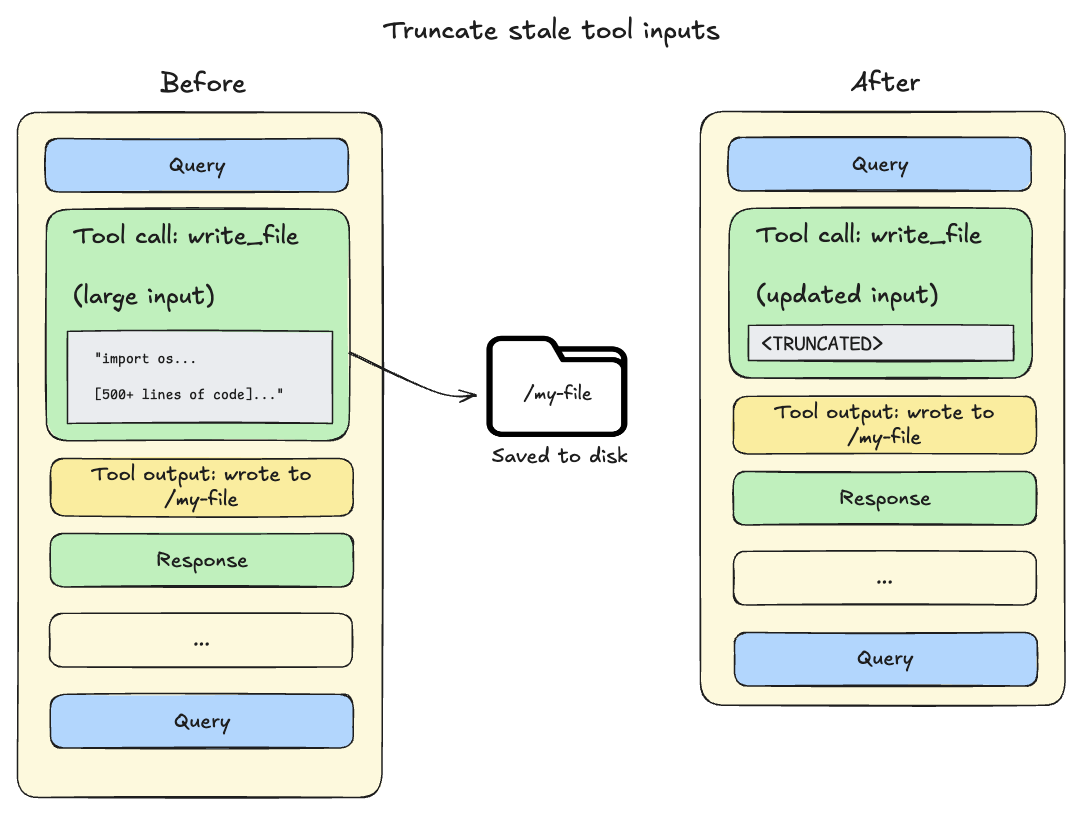
도구 호출 입력이 20,000 토큰을 초과: 파일 쓰기와 편집 연산은 에이전트의 대화 기록에 완전한 파일 콘텐츠를 포함한 도구 호출을 남깁니다. 이 콘텐츠는 이미 파일 시스템에 저장되어 있으므로 종종 중복됩니다. 세션 컨텍스트가 모델의 사용 가능한 창의 85%를 넘으면 deep agent는 오래된 도구 호출을 잘라내고 디스크의 파일에 대한 포인터로 대체해 활성 컨텍스트의 크기를 줄입니다.
-
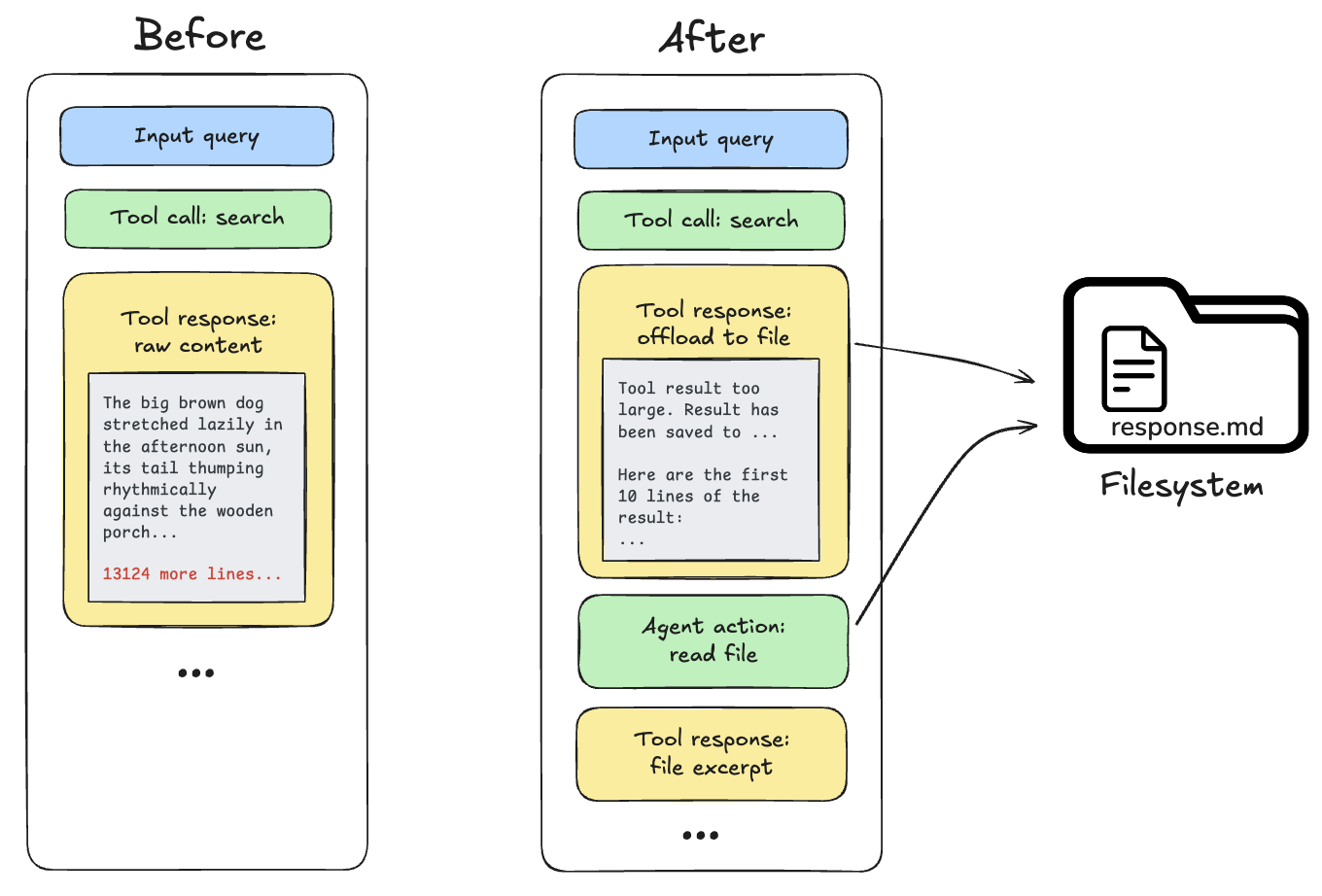
도구 호출 결과가 20,000 토큰을 초과: 이 경우 deep agent는 응답을 구성된 백엔드에 오프로드하고 파일 경로 참조와 처음 10줄 미리보기로 대체합니다. 그러면 에이전트는 필요할 때 콘텐츠를 다시 읽거나 검색할 수 있습니다.
요약 (Summarization)
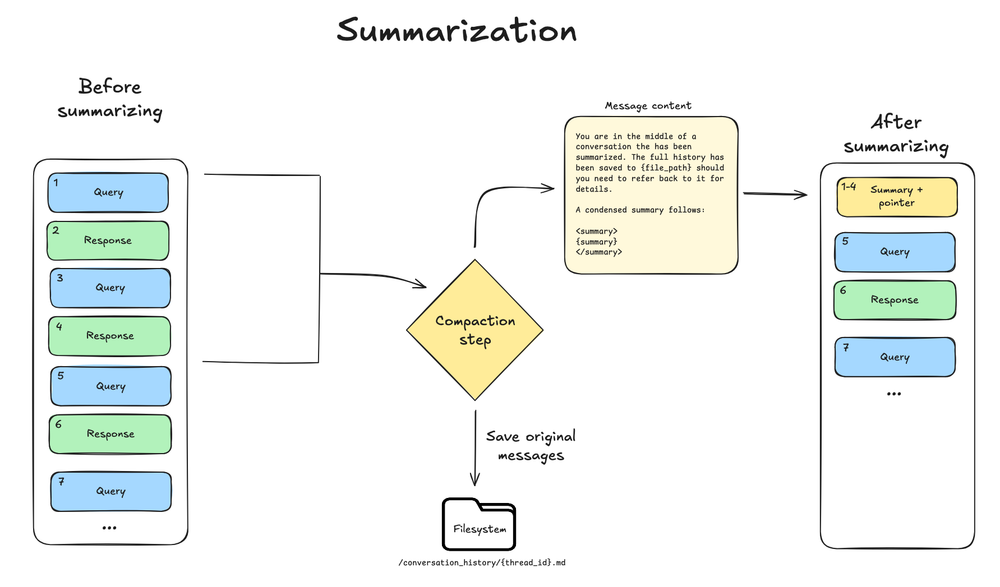
모든 create_deep_agent 호출에는 bare 스택에 SummarizationMiddleware가 포함됩니다. 컨텍스트 크기가 모델의 컨텍스트 창 한도(예: max_input_tokens의 85%)를 넘고, 더 이상 오프로딩 자격이 있는 컨텍스트가 없으면 deep agent가 메시지 기록을 자동으로 요약합니다.
이 프로세스에는 두 가지 구성 요소가 있습니다:
- 컨텍스트 내 요약: LLM이 세션 의도, 생성된 산출물, 다음 단계를 포함한 대화의 구조화된 요약을 생성합니다. 이는 에이전트의 작업 메모리에 있는 전체 대화 기록을 대체합니다.
- 파일 시스템 보존: 원래 대화 메시지의 텍스트 렌더링이 표준 기록으로 파일 시스템에 기록됩니다.
이 이중 접근 방식은 에이전트가 (요약을 통해) 목표와 진행 상황에 대한 인식을 유지하면서도 (파일 시스템 검색을 통해) 필요할 때 텍스트 세부 사항을 복구할 수 있는 능력을 보존하도록 보장합니다.
구성:
- 모델 프로파일의
max_input_tokens의 85%에서 트리거 - 최근 컨텍스트로 토큰의 10% 유지
- 모델 프로파일을 사용할 수 없으면 170,000토큰 트리거 / 유지되는 메시지 6개로 폴백
- 어떤 모델 호출이 표준 ContextOverflowError를 발생시키면 deep agent가 즉시 요약으로 폴백하고 요약 + 최근 보존 메시지로 재시도
- 오래된 메시지는 모델이 요약
for await (const [namespace, chunk] of await agent.stream(
  { messages: [...] },
  { streamMode: "messages" },
)) {
  const [message, metadata] = chunk;
  if (metadata?.lcSource === "summarization") {  // [!code highlight]
    continue;
  } else {
    ...
  }
}
서브에이전트로 컨텍스트 격리 (Context isolation with subagents)
서브에이전트는 컨텍스트 비대 문제를 해결합니다. 주 에이전트가 큰 출력을 가진 도구(웹 검색, 파일 읽기, 데이터베이스 쿼리)를 사용하면 컨텍스트 창이 빨리 채워집니다. 서브에이전트는 이 작업을 격리합니다. 주 에이전트는 그것을 만들어낸 수십 개의 도구 호출이 아니라 최종 결과만 받습니다. 또한 각 서브에이전트를 주 에이전트와 별도로 구성할 수 있습니다(예: 모델, 도구, 시스템 프롬프트, 스킬).
작동 방식:
- 주 에이전트는 작업을 위임하는
task도구를 가짐 - 서브에이전트는 자체의 새로운 컨텍스트로 실행
- 서브에이전트는 완료될 때까지 자율적으로 실행
- 서브에이전트는 단일 최종 보고서를 주 에이전트에 반환
- 주 에이전트의 컨텍스트는 깨끗하게 유지
모범 사례:
-
복잡한 작업 위임: 주 에이전트의 컨텍스트를 어지럽힐 다단계 작업에는 서브에이전트를 사용하세요.
-
서브에이전트 응답을 간결하게 유지: 서브에이전트에게 원시 데이터가 아닌 요약을 반환하라고 지시하세요:
const researchSubagent = {
  name: "researcher",
  description: "Conducts research on a topic",
  systemPrompt: `You are a research assistant.
    IMPORTANT: Return only the essential summary (under 500 words).
    Do NOT include raw search results or detailed tool outputs.`,
  tools: [webSearch],
};
이 예시의 공개 LangSmith 실행을 엽니다. -
큰 데이터에는 파일 시스템 사용: 서브에이전트는 결과를 파일에 쓸 수 있고, 주 에이전트는 필요한 것을 읽습니다.
구성은 Subagents를, 런타임 컨텍스트 전파와 서브에이전트별 네임스페이싱은 컨텍스트 관리를 참조하세요.
장기 메모리 (Long-term memory)
기본 파일 시스템을 사용할 때 deep agent는 작업 메모리 파일을 에이전트 상태에 저장하며, 이것은 단일 스레드 내에서만 지속됩니다. 장기 메모리는 deep agent가 서로 다른 스레드와 대화에 걸쳐 정보를 지속할 수 있게 해줍니다. deep agent는 사용자 선호도, 축적된 지식, 리서치 진행 상황, 또는 단일 세션을 넘어 지속되어야 하는 모든 정보를 저장하기 위해 장기 메모리를 사용할 수 있습니다.
장기 메모리를 사용하려면 특정 경로(보통 /memories/)를 지속적인 크로스 스레드 지속성을 제공하는 LangGraph Store로 라우팅하는 CompositeBackend를 사용해야 합니다.
CompositeBackend는 일부 파일은 무기한 지속되고 다른 파일은 단일 스레드에 한정되는 하이브리드 저장 시스템입니다.
const agent = await createDeepAgent({
model: "google-genai:gemini-3.6-flash",
store: new InMemoryStore(),
backend: new CompositeBackend(new StateBackend(), {
"/memories/": new StoreBackend({
namespace: () => ["memories"],
}),
}),
systemPrompt: When users tell you their preferences, save them to /memories/user_preferences.txt so you remember them in future conversations.,
});
```ts OpenAI theme={"theme":{"light":"catppuccin-latte","dark":"catppuccin-mocha"}}
import {
  CompositeBackend,
  createDeepAgent,
  StateBackend,
  StoreBackend,
} from "deepagents";
import { InMemoryStore } from "@langchain/langgraph";

const agent = await createDeepAgent({
  model: "openai:gpt-5.5",
  store: new InMemoryStore(),
  backend: new CompositeBackend(new StateBackend(), {
    "/memories/": new StoreBackend({
      namespace: () => ["memories"],
    }),
  }),
  systemPrompt: `When users tell you their preferences, save them to /memories/user_preferences.txt so you remember them in future conversations.`,
});
import {
  CompositeBackend,
  createDeepAgent,
  StateBackend,
  StoreBackend,
} from "deepagents";
import { InMemoryStore } from "@langchain/langgraph";

const agent = await createDeepAgent({
  model: "anthropic:claude-sonnet-5",
  store: new InMemoryStore(),
  backend: new CompositeBackend(new StateBackend(), {
    "/memories/": new StoreBackend({
      namespace: () => ["memories"],
    }),
  }),
  systemPrompt: `When users tell you their preferences, save them to /memories/user_preferences.txt so you remember them in future conversations.`,
});
import {
  CompositeBackend,
  createDeepAgent,
  StateBackend,
  StoreBackend,
} from "deepagents";
import { InMemoryStore } from "@langchain/langgraph";

const agent = await createDeepAgent({
  model: "openrouter:z-ai/glm-5.2",
  store: new InMemoryStore(),
  backend: new CompositeBackend(new StateBackend(), {
    "/memories/": new StoreBackend({
      namespace: () => ["memories"],
    }),
  }),
  systemPrompt: `When users tell you their preferences, save them to /memories/user_preferences.txt so you remember them in future conversations.`,
});
import {
  CompositeBackend,
  createDeepAgent,
  StateBackend,
  StoreBackend,
} from "deepagents";
import { InMemoryStore } from "@langchain/langgraph";

const agent = await createDeepAgent({
  model: "fireworks:accounts/fireworks/models/glm-5p2",
  store: new InMemoryStore(),
  backend: new CompositeBackend(new StateBackend(), {
    "/memories/": new StoreBackend({
      namespace: () => ["memories"],
    }),
  }),
  systemPrompt: `When users tell you their preferences, save them to /memories/user_preferences.txt so you remember them in future conversations.`,
});
import {
  CompositeBackend,
  createDeepAgent,
  StateBackend,
  StoreBackend,
} from "deepagents";
import { InMemoryStore } from "@langchain/langgraph";

const agent = await createDeepAgent({
  model: "baseten:zai-org/GLM-5.2",
  store: new InMemoryStore(),
  backend: new CompositeBackend(new StateBackend(), {
    "/memories/": new StoreBackend({
      namespace: () => ["memories"],
    }),
  }),
  systemPrompt: `When users tell you their preferences, save them to /memories/user_preferences.txt so you remember them in future conversations.`,
});
import {
  CompositeBackend,
  createDeepAgent,
  StateBackend,
  StoreBackend,
} from "deepagents";
import { InMemoryStore } from "@langchain/langgraph";

const agent = await createDeepAgent({
  model: "ollama:north-mini-code-1.0",
  store: new InMemoryStore(),
  backend: new CompositeBackend(new StateBackend(), {
    "/memories/": new StoreBackend({
      namespace: () => ["memories"],
    }),
  }),
  systemPrompt: `When users tell you their preferences, save them to /memories/user_preferences.txt so you remember them in future conversations.`,
});
/memories/를 파일로 미리 채울 필요는 없습니다.
백엔드 구성, 스토어, 그리고 에이전트에게 무엇을 어디에 저장할지 알려주는 시스템 프롬프트 지침을 제공하면 됩니다.
예를 들어 에이전트에게 선호도를 /memories/preferences.txt에 저장하라고 프롬프트할 수 있습니다.
경로는 빈 상태로 시작하고, 에이전트는 사용자가 기억할 가치가 있는 정보를 공유할 때 파일 시스템 도구(write_file, edit_file)로 온디맨드로 파일을 만듭니다.
메모리를 미리 시드하려면 LangSmith에 배포할 때 Store API를 사용하세요. 설정과 사용 사례는 장기 메모리를 참조하세요.
모범 사례 (Best practices)
- 올바른 입력 컨텍스트로 시작: 항상 관련 있는 관례에는 메모리를 최소로 유지하고, 작업별 기능에는 집중된 스킬을 사용하세요.
- 무거운 작업에는 서브에이전트 활용: 다단계, 출력이 많은 작업을 위임해 주 에이전트의 컨텍스트를 깨끗하게 유지하세요.
- 구성에서 서브에이전트 출력 조정: 디버깅할 때 서브에이전트가 긴 출력을 생성한다는 것을 알게 되면 서브에이전트의
system_prompt에 요약과 종합된 발견을 만들라는 안내를 추가할 수 있습니다. - 파일 시스템 사용: 큰 출력을 파일로 지속하세요(예: 서브에이전트 쓰기 또는 자동 오프로딩). 그러면 활성 컨텍스트가 작게 유지됩니다. 모델은 세부 사항이 필요할 때
read_file과grep으로 조각을 가져올 수 있습니다. - 장기 메모리 구조 문서화: 에이전트에게
/memories/에 무엇이 있는지, 어떻게 사용하는지 알려주세요. - 도구용 런타임 컨텍스트 전달: 사용자 메타데이터, API 키, 도구가 필요로 하는 다른 정적 구성에
context를 사용하세요.
관련 리소스 (Related resources)
- Harness: 컨텍스트 관리 개요, 오프로딩, 요약
- Multimodal: 이미지, 오디오, 비디오, 멀티모달 도구 출력
- Subagents: 컨텍스트 격리, 런타임 컨텍스트 전파
- 장기 메모리: 크로스 스레드 지속성
-
- OpenWiki: 코딩 에이전트가
AGENTS.md로 찾는 저장소 위키
- OpenWiki: 코딩 에이전트가
- Skills: 점진적 공개와 스킬 작성
- Backends: 파일 시스템 백엔드와 CompositeBackend
- 컨텍스트 개념적 개요: 컨텍스트 유형과 수명 주기
더 알아보기
- 이 문서를 MCP로 연결하면 Claude, VSCode 등에서 실시간 답변을 받을 수 있어요.
- GitHub에서 이 페이지 편집하기 또는 이슈 제출하기.