
Cloud
Cloud (SaaS)
Cloud 호스팅 옵션은 LangChain이 모든 LangSmith 인프라와 서비스를 호스팅하고 운영하는 완전 관리형 모델이에요. 완전 관리형 인프라부터 GitHub에서 Agent Server 배포, 자동 CI/CD까지 모두 LangChain이 처리합니다.
출처: 문서
본문
Cloud 호스팅 옵션은 LangChain이 모든 LangSmith 인프라와 서비스를 호스팅하고 운영하는 완전 관리형 모델입니다:
- 완전 관리형 인프라: LangChain이 모든 인프라, 업데이트, 스케일링, 유지보수를 처리합니다.
- LangSmith UI: 관측성, 평가, 에이전트 배포 관리, Studio에 대한 전체 접근.
- GitHub에서 Agent Server 배포: 저장소를 연결하고 몇 번의 클릭으로 Agent Server를 Cloud에 배포합니다.
- Agent Server용 자동 CI/CD: Agent Server의 빌드 및 배포 과정이 플랫폼에서 자동으로 처리됩니다.
| 누가 관리하나 | 어디서 실행되나 | |
|---|---|---|
| LangSmith 플랫폼 (UI, API, 데이터 저장소) | LangChain | LangChain의 클라우드 (AWS 및 GCP) |
| 여러분의 Agent Server | LangChain | LangChain의 클라우드 (AWS 및 GCP) |
| 앱용 CI/CD | LangChain | LangChain의 클라우드 (AWS 및 GCP) |
로켓: 앱을 LangSmith Cloud(AWS 또는 GCP)에 배포할 준비가 되었다면 Cloud 배포 빠른 시작 또는 전체 설정 가이드를 따르세요. 이 페이지는 참고용으로 Cloud 관리형 아키텍처를 설명합니다.
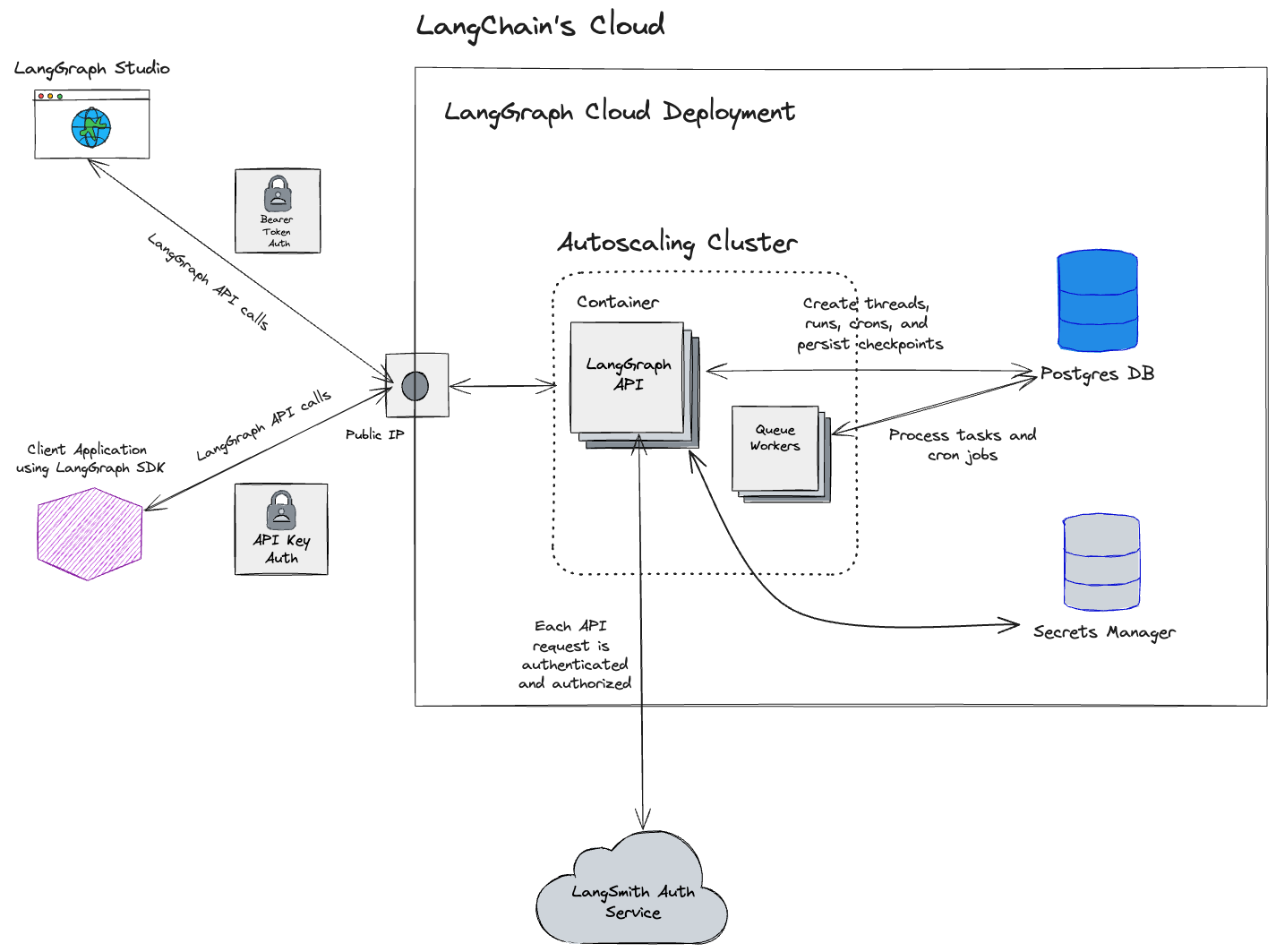
Cloud 아키텍처 및 확장성
참고: 이 섹션은 https://smith.langchain.com, https://eu.smith.langchain.com, https://apac.smith.langchain.com, https://aws.smith.langchain.com의 클라우드 관리형 LangSmith에만 관련됩니다.
자체 호스팅 LangSmith 솔루션에 대한 정보는 자체 호스팅 문서를 참고하세요.
LangSmith는 US, EU, APAC SaaS 지역에서는 Google Cloud Platform(GCP)에, AWS 호스팅 US SaaS 지역에서는 Amazon Web Services(AWS)에 호스팅됩니다. 플랫폼은 고도로 확장 가능하도록 설계되었습니다. 많은 고객이 LLM 애플리케이션 관측성, 평가, 에이전트 배포를 위해 LangSmith에서 프로덕션 워크로드를 실행합니다.
US 기반 LangSmith 서비스(기본 GCP 지역)는 GCP의 us-central1(아이오와) 지역에 호스팅됩니다.
참고: EU 기반 LangSmith 서비스는 GCP의
europe-west4(네덜란드) 지역에 호스팅되고 있습니다. 이 지역의 Enterprise 요금제에 관심이 있다면 영업팀에 문의하세요.
참고: 2026년 4월 기준 LangSmith SaaS는 AWS의
us-east-2(오하이오)에서 제공됩니다.
참고: 2026년 5월 기준 LangSmith SaaS는 GCP의 APAC
australia-southeast1(시드니) 지역에서 제공됩니다.
지역별 저장소
이 표의 리소스와 서비스는 가입이 발생한 URL에 해당하는 위치(GCP US, GCP EU, GCP APAC, 또는 AWS US)에 저장됩니다. 클라우드 관리형 LangSmith는 인증/권한 부여에 Supabase, 데이터 웨어하우스에 ClickHouse Cloud를 사용합니다.
| GCP US | GCP EU | GCP APAC | AWS US | |
|---|---|---|---|---|
| URL | https://smith.langchain.com | https://eu.smith.langchain.com | https://apac.smith.langchain.com | https://aws.smith.langchain.com |
| API URL | https://api.smith.langchain.com | https://eu.api.smith.langchain.com | https://apac.api.smith.langchain.com | https://aws.api.smith.langchain.com |
| 클라우드 | GCP us-central1 (아이오와) | GCP europe-west4 (네덜란드) | GCP australia-southeast1 (시드니) | AWS us-east-2 (오하이오) |
| Supabase | AWS us-east-1 (N. 버지니아) | AWS eu-central-1 (독일) | AWS ap-southeast-2 (시드니) | AWS us-east-2 (오하이오) |
| ClickHouse Cloud | us-central1 (아이오와) | europe-west4 (네덜란드) | australia-southeast1 (시드니) | us-east-2 (오하이오) |
| LangSmith deployment | GCP us-central1 (아이오와); *.us.langgraph.app |
GCP europe-west4 (네덜란드); *.eu.langgraph.app |
GCP australia-southeast1 (시드니); *.apac.langgraph.app |
AWS us-east-2 (오하이오); *.aws.us.langgraph.app |
자세한 내용은 Regions FAQ를 참고하세요.
지역과 무관한 저장소
여기에 나열된 데이터는 US에만 저장됩니다:
- Stripe 및 Metronome이 있는 결제 및 청구 정보
GCP 서비스
다음은 GCP의 US, EU, APAC SaaS 지역에 적용됩니다.
LangSmith는 모두 Google Kubernetes Engine(GKE)에 호스팅되는 다음 서비스로 구성됩니다:
- LangSmith Frontend: LangSmith UI를 제공합니다.
- LangSmith Backend: LangSmith API를 제공합니다.
- LangSmith Platform Backend: 인증 및 기타 고용량 작업을 처리합니다. (내부 서비스)
- LangSmith Playground: Playground 기능을 위한 다양한 LLM 제공자로의 요청 전달을 처리합니다.
- LangSmith Queue: 비동기 작업 처리를 다룹니다. (내부 서비스)
LangSmith는 다음 GCP 저장소 서비스를 사용합니다:
- 런 입력과 출력용 Google Cloud Storage(GCS).
- 트랜잭션 워크로드용 Google Cloud SQL PostgreSQL.
- 큐잉과 캐싱용 Google Cloud Memorystore for Redis.
- 트레이스 수집과 분석용 GCP의 Clickhouse Cloud. 서비스는 같은 GCP 지역에 호스팅된 Clickhouse Cloud에 프라이빗 엔드포인트로 연결됩니다.
사용하는 추가 GCP 서비스:
- LangSmith 서비스로 트래픽을 라우팅하는 Google Cloud Load Balancer.
- 정적 자산 캐싱용 Google Cloud CDN.
- 보안 및 속도 제한용 Google Cloud Armor. 적용하는 속도 제한에 대한 자세한 내용은 속도 제한을 참고하세요.
AWS 서비스
다음은 us-east-2(오하이오)의 AWS US SaaS 지역에 적용됩니다. 동일한 논리적 LangSmith 구성 요소가 GKE 대신 Amazon EKS에서 실행됩니다.
LangSmith는 모두 Amazon EKS에 호스팅되는 다음 서비스로 구성됩니다:
- LangSmith Frontend: LangSmith UI를 제공합니다.
- LangSmith Backend: LangSmith API를 제공합니다.
- LangSmith Platform Backend: 인증 및 기타 고용량 작업을 처리합니다. (내부 서비스)
- LangSmith Playground: Playground 기능을 위한 다양한 LLM 제공자로의 요청 전달을 처리합니다.
- LangSmith Queue: 비동기 작업 처리를 다룹니다. (내부 서비스)
LangSmith는 다음 AWS 저장소 및 데이터 서비스를 사용합니다:
- 런 입력과 출력용 Amazon S3.
- 트랜잭션 워크로드용 Amazon RDS for PostgreSQL.
- 큐잉과 캐싱용 Amazon ElastiCache for Redis.
- 위의 지역별 저장소 표와 일치하는 트레이스 수집 및 분석용
us-east-2의 AWS PrivateLink를 통한 ClickHouse Cloud.
사용하는 추가 AWS 서비스:
- LangSmith 서비스로 트래픽을 라우팅하는 Elastic Load Balancing(Network Load Balancers) 및 Istio 수신. 문서화된 API 속도 제한은 Istio 수신 게이트웨이에서 적용됩니다. 자세한 내용은 속도 제한을 참고하세요.
- 정적 자산 캐싱용 Amazon CloudFront(웹 UI 호스트 이름
aws.smith.langchain.com포함). - 엣지에서 관리형 규칙 그룹용 CloudFront의 AWS WAF(예: AWS Managed Rules common protections 및 Bot Control).
IP 주소 허용 목록
LangChain SaaS에서의 Egress
LangSmith 서비스에서 나가는 모든 트래픽은 NAT 게이트웨이를 통해 라우팅됩니다. 모든 트래픽은 다음 IP 주소에서 시작된 것처럼 보입니다:
| GCP US | GCP EU | GCP APAC | AWS US |
|---|---|---|---|
| 34.59.65.97 | 34.13.192.67 | 34.151.89.217 | 18.188.147.158 |
| 34.67.51.221 | 34.147.105.64 | 34.116.97.4 | 18.219.86.202 |
| 34.46.212.37 | 34.90.22.166 | 34.151.162.199 | 3.21.57.192 |
| 34.132.150.88 | 34.147.36.213 | 34.116.66.129 | |
| 35.188.222.201 | 34.32.137.113 | 35.189.8.125 | |
| 34.58.194.127 | 34.91.238.184 | 35.201.9.237 | |
| 34.59.97.173 | 35.204.101.241 | 35.189.57.29 | |
| 104.198.162.55 | 35.204.48.32 | 34.40.198.11 |
자체 AzureOpenAI 서비스나 Playground 또는 Online Evaluation이 필요로 할 수 있는 다른 엔드포인트에 연결할 때 이 IP 주소를 허용 목록으로 지정하면 유용할 수 있습니다.
참고: LangSmith Deployment에 배포된 에이전트의 트래픽은 별도의 NAT IP 세트를 통해 이그레스합니다. 해당 목록은 Cloud 플랫폼 기능 레퍼런스의 Allowlist IP addresses를 참고하세요.
LangChain SaaS로의 Ingress
LangChain 엔드포인트는 GCP 로드 밸런서(US/EU/APAC) 또는 AWS US의 경우 us-east-2의 Network Load Balancer(API 및 게이트웨이 호스트 이름)에서 종료되는 트래픽에 대해 다음 고정 IP 주소로 매핑됩니다:
| GCP US | GCP EU | GCP APAC | AWS US |
|---|---|---|---|
| 34.8.121.39 | 34.95.92.214 | 34.149.149.213 | 3.129.27.169 |
| 34.107.251.234 | 34.13.73.122 | 13.58.107.119 | |
| 16.59.151.49 | |||
| 16.59.98.147 | |||
| 3.134.146.243 | |||
| 3.150.87.246 |
사설 네트워크에서 LangSmith SaaS 엔드포인트(api.smith.langchain.com, smith.langchain.com, beacon.langchain.com, eu.api.smith.langchain.com, eu.smith.langchain.com, eu.beacon.langchain.com, apac.api.smith.langchain.com, apac.smith.langchain.com, apac.beacon.langchain.com, aws.api.smith.langchain.com, aws.smith.langchain.com)로의 트래픽을 활성화하려면 이들을 허용 목록으로 지정해야 할 수 있습니다.
프라이빗 연결 (Enterprise)
자물쇠: Enterprise 전용. 프라이빗 연결은 Enterprise 고객에게만 제공됩니다. 이 기능을 활성화하려면 계정 담당자 또는 [email protected]에 문의하세요.
Enterprise 고객은 AWS PrivateLink 또는 **GCP Private Service Connect(PSC)**를 사용하여 공개 인터넷에 트래픽을 노출하지 않고 LangSmith에 연결할 수 있습니다.
AWS PrivateLink
AWS 고객은 AWS PrivateLink를 통해 LangSmith에 연결할 수 있으며, 모든 VPC에서 프라이빗 연결을 제공합니다. 교차 지역 연결이 기본적으로 지원됩니다.
엔드포인트 서비스 이름
| 지역 | 서비스 이름 |
|---|---|
US (us-east-2) |
com.amazonaws.vpce.us-east-2.vpce-svc-054f37092752bff6b |
설정
1. 접근 요청: AWS 계정 ID와 함께 계정 담당자 또는 [email protected]에 문의하세요. LangChain이 엔드포인트 서비스의 허용 principal 목록에 계정을 추가합니다.
2. AWS 계정에 Interface VPC Endpoint를 만듭니다. VPC CIDR(또는 LangSmith에 도달해야 하는 인스턴스)에서 TCP 443 인바운드를 허용하는 보안 그룹을 연결합니다:
aws ec2 create-vpc-endpoint \
  --vpc-id <YOUR_VPC_ID> \
  --service-name <SERVICE_NAME_FROM_TABLE_ABOVE> \
  --vpc-endpoint-type Interface \
  --subnet-ids <YOUR_SUBNET_IDS> \
  --security-group-ids <YOUR_SECURITY_GROUP_ID> \
  --region <YOUR_REGION>
resource "aws_vpc_endpoint" "langsmith" {
  vpc_id              = "<YOUR_VPC_ID>"
  service_name        = "<SERVICE_NAME_FROM_TABLE_ABOVE>"
  vpc_endpoint_type   = "Interface"
  subnet_ids          = ["<YOUR_SUBNET_IDS>"]
  security_group_ids  = ["<YOUR_SECURITY_GROUP_ID>"]
}
3. 승인을 기다립니다. LangChain이 연결을 수락합니다. 엔드포인트 상태가 pendingAcceptance에서 available로 변경됩니다. 연결 테스트 전에 변경이 완전히 전파되도록 수락 후 몇 분을 기다리세요.
DNS 구성
aws.api.smith.langchain.com이 VPC 내에서 VPC 엔드포인트의 프라이빗 DNS 이름으로 해석되도록 DNS를 구성합니다. Route 53 프라이빗 호스팅 영역, 기업 DNS 라우터, 또는 VPC에서 도달 가능한 어떤 DNS 서버든 사용할 수 있습니다.
먼저 엔드포인트의 DNS 이름을 가져옵니다:
aws ec2 describe-vpc-endpoints \
  --vpc-endpoint-ids <YOUR_ENDPOINT_ID> \
  --query 'VpcEndpoints[0].DnsEntries[0].DnsName' \
  --output text --region <YOUR_REGION>
그런 다음 aws.api.smith.langchain.com에 대한 CNAME 레코드를 그 DNS 이름을 가리키도록 만듭니다. Route 53을 사용한 예:
aws route53 create-hosted-zone \
  --name aws.api.smith.langchain.com \
  --vpc VPCRegion=<YOUR_REGION>,VPCId=<YOUR_VPC_ID> \
  --caller-reference langsmith-privatelink-$(date +%s) \
  --hosted-zone-config PrivateZone=true

aws route53 change-resource-record-sets \
  --hosted-zone-id <HOSTED_ZONE_ID> \
  --change-batch '{
    "Changes": [{
      "Action": "CREATE",
      "ResourceRecordSet": {
        "Name": "aws.api.smith.langchain.com",
        "Type": "CNAME",
        "TTL": 300,
        "ResourceRecords": [{"Value": "<ENDPOINT_DNS_NAME>"}]
      }
    }]
  }'
resource "aws_route53_zone" "langsmith_privatelink" {
  name = "aws.api.smith.langchain.com"

  vpc {
    vpc_id = "<YOUR_VPC_ID>"
  }
}

resource "aws_route53_record" "langsmith_privatelink" {
  zone_id = aws_route53_zone.langsmith_privatelink.zone_id
  name    = "aws.api.smith.langchain.com"
  type    = "CNAME"
  ttl     = 300
  records = [aws_vpc_endpoint.langsmith.dns_entry[0]["dns_name"]]
}
연결 확인
VPC의 EC2 인스턴스 또는 컨테이너에서:
curl https://aws.api.smith.langchain.com/ok
GCP Private Service Connect
GCP의 Enterprise 고객은 Private Service Connect(PSC)를 통해 LangSmith에 연결할 수 있으며, 공개 인터넷에 트래픽을 노출하지 않고 프라이빗 연결을 제공합니다.
Service attachment URI
VPC에서 PSC 엔드포인트를 만들려면 다음 service attachment URI를 사용하세요:
| 지역 | Service Attachment URI |
|---|---|
US (us-central1) |
projects/langchain-prod/regions/us-central1/serviceAttachments/gateway-psc-publish |
EU (europe-west4) |
projects/langchain-prod/regions/europe-west4/serviceAttachments/gateway-psc-publish |
APAC (australia-southeast1) |
projects/langchain-apac-prod/regions/australia-southeast1/serviceAttachments/gateway-psc-publish |
PSC 도메인
설정 후 다음 도메인을 사용해 PSC 연결로 LangSmith에 연결합니다:
| 지역 | 도메인 |
|---|---|
| US | us-central1.p.api.smith.langchain.com |
| EU | europe-west4.p.api.smith.langchain.com |
| APAC | australia-southeast1.p.api.smith.langchain.com |
설정
접근 요청: GCP 프로젝트 ID와 함께 계정 담당자 또는 [email protected]에 문의하세요. LangChain이 서비스 연결의 허용 소비자 목록에 프로젝트를 추가합니다.
접근이 부여된 후 gcloud CLI 또는 Terraform을 사용해 PSC 엔드포인트를 만들고 DNS를 구성합니다.
PSC 엔드포인트 만들기
VPC에서 service attachment를 대상으로 하는 포워딩 규칙을 만듭니다:
# Create the PSC endpoint
gcloud compute forwarding-rules create langsmith-psc-endpoint \
  --region=<REGION> \
  --network=<YOUR_VPC_NETWORK> \
  --subnet=<YOUR_SUBNET> \
  --target-service-attachment=projects/langchain-prod/regions/<REGION>/serviceAttachments/gateway-psc-publish \
  --load-balancing-scheme=""

# Get the assigned IP address
gcloud compute forwarding-rules describe langsmith-psc-endpoint \
  --region=<REGION> \
  --format="value(IPAddress)"
resource "google_compute_forwarding_rule" "langsmith_psc" {
  name                  = "langsmith-psc-endpoint"
  project               = "<YOUR_PROJECT_ID>"
  region                = "<REGION>"
  network               = "<YOUR_VPC_NETWORK>"
  subnetwork            = "<YOUR_SUBNET>"
  target                = "projects/langchain-prod/regions/<REGION>/serviceAttachments/gateway-psc-publish"
  load_balancing_scheme = ""
}
DNS 구성
VPC에 프라이빗 DNS 영역을 만들고 PSC 엔드포인트 IP를 가리키는 A 레코드를 추가합니다:
# Create a private DNS zone
gcloud dns managed-zones create langsmith-psc \
  --dns-name="<REGION>.p.api.smith.langchain.com." \
  --visibility=private \
  --networks=<YOUR_VPC_NETWORK>

# Add an A record pointing to the PSC endpoint IP
gcloud dns record-sets create "<REGION>.p.api.smith.langchain.com." \
  --zone=langsmith-psc \
  --type=A \
  --rrdatas=<PSC_ENDPOINT_IP>
resource "google_dns_managed_zone" "langsmith_psc" {
  name        = "langsmith-psc"
  project     = "<YOUR_PROJECT_ID>"
  dns_name    = "<REGION>.p.api.smith.langchain.com."
  visibility  = "private"

  private_visibility_config {
    networks {
      network_url = "<YOUR_VPC_NETWORK_SELF_LINK>"
    }
  }
}

resource "google_dns_record_set" "langsmith_psc" {
  name         = "<REGION>.p.api.smith.langchain.com."
  project      = "<YOUR_PROJECT_ID>"
  managed_zone = google_dns_managed_zone.langsmith_psc.name
  type         = "A"
  ttl          = 300
  rrdatas      = [google_compute_forwarding_rule.langsmith_psc.ip_address]
}
연결 확인
VPC의 VM에서:
curl https://<REGION>.p.api.smith.langchain.com/ok
API 속도 제한
LangSmith는 서비스 안정성과 공정한 사용을 보장하기 위해 API 엔드포인트에 속도 제한을 적용합니다. 다음 표는 GCP US 및 GCP EU 지역의 서로 다른 엔드포인트에 대한 속도 제한을 보여줍니다. GCP APAC 및 AWS US는 유사한 서비스별 제한을 적용합니다. 조직의 정확한 제한이 필요하면 지원팀에 문의하세요. 다음에 유의하세요:
- 속도 제한은
count / interval로 표현되며, count는 간격(초) 내에 허용되는 요청 수입니다. 예를 들어2000 / 10은 10초당 2000 요청을 의미합니다. - 엔드포인트 열에 HTTP 메서드가 지정되지 않으면 해당 엔드포인트의 모든 HTTP 메서드에 속도 제한이 적용됩니다.
- 특정 메서드(예:
POST,GET)가 나열되면 해당 메서드에만 속도 제한이 적용됩니다.
| 일치 / 엔드포인트 (메서드) | ID 키 | US prod 제한 | EU prod 제한 | 카테고리 |
|---|---|---|---|---|
OPTIONS, /info, */v1/metadata/submit |
IP | 2000 / 10 | 2000 / 10 | High throughput |
/auth |
x-api-key |
2000 / 10 | 2000 / 10 | High throughput |
/auth |
x-user-id + IP |
2000 / 10 | 2000 / 10 | High throughput |
/v1/beacon |
IP | 2000 / 10 | 2000 / 10 | High throughput |
/repos |
x-api-key |
100 / 60 | 100 / 60 | Repository |
/repos |
x-user-id + IP |
100 / 60 | 100 / 60 | Repository |
POST /runs/batch |
x-api-key |
2000 / 10 | 2000 / 10 | High throughput |
POST /otel/v1/traces |
x-api-key |
2000 / 10 | 2000 / 10 | Run ingest |
POST containing /charts |
x-api-key |
750 / 600 | 750 / 600 | Charts |
POST containing /charts |
x-user-id + IP |
750 / 600 | 750 / 600 | Charts |
POST /runs/multipart |
x-api-key |
6000 / 10 | 6000 / 10 | Multipart ingest |
POST /runs/query |
x-api-key |
15 / 10 | 15 / 10 | Run query (API) |
POST /runs/query |
x-user-id + IP |
300 / 10 | 300 / 10 | Run query (User) |
/generate |
x-api-key |
30 / 3600 | 30 / 3600 | Generation |
/generate |
x-user-id + IP |
30 / 3600 | 30 / 3600 | Generation |
/commits |
x-api-key |
10000 / 60 | 2000 / 60 | Commits |
/commits |
x-user-id + IP |
10000 / 60 | 2000 / 60 | Commits |
DELETE /sessions or */trigger |
x-api-key |
10 / 60 | 10 / 60 | Deletion |
DELETE /sessions or */trigger |
x-user-id + IP |
30 / 60 | 30 / 60 | Deletion |
POST /runs (single run ingest) |
x-api-key |
2000 / 10 | 2000 / 10 | Run ingest |
PATCH containing /runs |
x-api-key |
2000 / 10 | 2000 / 10 | Run ingest |
POST /feedback |
x-api-key |
2000 / 10 | 2000 / 10 | High throughput |
GET /runs/{uuid} or /api/v1/runs/{uuid} |
x-api-key |
30 / 60 | 30 / 60 | Run lookup |
GET containing /examples |
x-api-key |
5000 / 60 | 5000 / 60 | Examples |
Any request with x-api-key |
x-api-key |
1000 / 10 | 1000 / 10 | Default (API key) |
Any request with x-user-id |
x-user-id + IP |
1000 / 10 | 1000 / 10 | Default (User) |
/public/download |
IP | 5000 / 60 | 5000 / 60 | Public download |
/runs/stats |
x-api-key |
1 / 10 | 20 / 10 | Stats |
| All other IPs (catch-all) | IP | 100 / 60 | 100 / 60 | Public (catch-all) |
속도 제한 카테고리
- High throughput: 인증, 메타데이터, 피드백 같은 핵심 작업을 위한 일반 대용량 엔드포인트.
- Repository: 저장소 및 프롬프트 관리 작업.
- Run ingest: 관측성을 위한 개별 트레이스/런 수집 엔드포인트.
- Charts: 차트 생성 및 시각화 엔드포인트.
- Multipart ingest: 고용량 트레이싱을 위한 multipart 업로드를 통한 벌크 런 수집.
- Run query (API): 복잡한 쿼리에 대해 더 엄격한 제한이 있는 API 키 기반 런 쿼리 작업.
- Run query (User): 대화형 사용을 위해 더 높은 제한이 있는 사용자 기반 런 쿼리 작업.
- Generation: AI 기반 코드 및 콘텐츠 생성 엔드포인트(남용 방지를 위해 제한됨).
- Commits: 프롬프트 버전 관리 및 커밋 작업.
- Deletion: 세션 삭제 및 워크플로우 트리거 작업.
- Run lookup: UUID로 특정 런 검색.
- Examples: few-shot 프롬프트를 위한 데이터셋 예제 가져오기.
- Default (API key): 특정 패턴과 일치하지 않는 인증된 API 요청에 대한 폴백 속도 제한.
- Default (User): 특정 패턴과 일치하지 않는 인증된 사용자 요청에 대한 폴백 속도 제한.
- Public download: 공유 리소스용 대용량 공개 다운로드 엔드포인트.
- Stats: 런 통계 및 분석 엔드포인트(지역별 제한 적용).
- Public (catch-all): 인증되지 않은 공개 접근의 기본 속도 제한.
속도 제한 및 기타 서비스 제한에 대한 자세한 내용은 관리 개요를 참고하세요.
더 알아보기
- Cloud 배포 전용 기능은 Cloud platform features 문서를 참고하세요.
- 자체 호스팅 배포는 Self-hosted 문서를 확인해 보세요.