
LLM 애플리케이션 평가하기
LLM 애플리케이션 평가하기
이 가이드는 LangSmith SDK를 사용해 에이전트에 대한 평가를 실행하는 방법을 보여줘요.
이 가이드에서는 LangSmith SDK의 evaluate() 메서드를 사용해 애플리케이션을 평가하는 방법을 다룰 거예요.
확인: Python에서 더 큰 평가 작업에는 evaluate()의 비동기 버전인 aevaluate()를 사용할 것을 권장해요. 두 메서드는 인터페이스가 동일하므로, 평가 비동기 실행 how-to 가이드를 읽기 전에 이 가이드를 먼저 읽는 것이 여전히 유용해요.
JS/TS에서는
evaluate()가 이미 비동기이므로 별도의 메서드가 필요 없어요.또한 대규모 작업을 실행할 때
max_concurrency/maxConcurrency인자를 구성하는 것이 중요해요. 이는 데이터셋을 스레드에 분할해 평가를 병렬화해요.
출처: 문서
본문
애플리케이션 정의
먼저 평가할 애플리케이션이 필요해요. 이 예시를 위해 간단한 유해성(독성) 분류기를 만들어 볼게요.
Optionally wrap the OpenAI client to trace all model calls.
oai_client = wrappers.wrap_openai(OpenAI())
Optionally add the 'traceable' decorator to trace the inputs/outputs of this function.
@traceable def toxicity_classifier(inputs: dict) -> dict: instructions = ( "Please review the user query below and determine if it contains any form of toxic behavior, " "such as insults, threats, or highly negative comments. Respond with 'Toxic' if it does " "and 'Not toxic' if it doesn't." ) messages = [ {"role": "system", "content": instructions}, {"role": "user", "content": inputs["text"]}, ] result = oai_client.chat.completions.create( messages=messages, model="gpt-5.4-mini", temperature=0 ) return {"class": result.choices[0].message.content}
```typescript TypeScript
import { OpenAI } from "openai";
import { wrapOpenAI } from "langsmith/wrappers";
import { traceable } from "langsmith/traceable";

// Optionally wrap the OpenAI client to trace all model calls.
const oaiClient = wrapOpenAI(new OpenAI());

// Optionally add the 'traceable' wrapper to trace the inputs/outputs of this function.
const toxicityClassifier = traceable(
  async (text: string) => {
    const result = await oaiClient.chat.completions.create({
      messages: [
        {
           role: "system",
          content: "Please review the user query below and determine if it contains any form of toxic behavior, such as insults, threats, or highly negative comments. Respond with 'Toxic' if it does, and 'Not toxic' if it doesn't.",
        },
        { role: "user", content: text },
      ],
      model: "gpt-5.4-mini",
      temperature: 0,
    });

    return result.choices[0].message.content;
  },
  { name: "toxicityClassifier" }
);
트레이싱을 선택적으로 활성화해 파이프라인 각 단계의 입출력을 캡처했어요. 트레이싱을 위해 코드를 어노테이션하는 방법을 이해하려면 커스텀 계측을 참조해요.
데이터셋 생성 또는 선택
애플리케이션을 평가하려면 데이터셋이 필요해요. 우리 데이터셋에는 유해 및 비유해 텍스트의 라벨링된 예제가 포함돼요.
langsmith>=0.3.13 필요
examples = [ { "inputs": {"text": "Shut up, idiot"}, "outputs": {"label": "Toxic"}, }, { "inputs": {"text": "You're a wonderful person"}, "outputs": {"label": "Not toxic"}, }, { "inputs": {"text": "This is the worst thing ever"}, "outputs": {"label": "Toxic"}, }, { "inputs": {"text": "I had a great day today"}, "outputs": {"label": "Not toxic"}, }, { "inputs": {"text": "Nobody likes you"}, "outputs": {"label": "Toxic"}, }, { "inputs": {"text": "This is unacceptable. I want to speak to the manager."}, "outputs": {"label": "Not toxic"}, }, ]
dataset = ls_client.create_dataset(dataset_name="Toxic Queries") ls_client.create_examples( dataset_id=dataset.id, examples=examples, )
```typescript TypeScript
import { Client } from "langsmith";

const langsmith = new Client();

// create a dataset
const labeledTexts = [
  ["Shut up, idiot", "Toxic"],
  ["You're a wonderful person", "Not toxic"],
  ["This is the worst thing ever", "Toxic"],
  ["I had a great day today", "Not toxic"],
  ["Nobody likes you", "Toxic"],
  ["This is unacceptable. I want to speak to the manager.", "Not toxic"],
];

const [inputs, outputs] = labeledTexts.reduce<
  [Array<{ input: string }>, Array<{ outputs: string }>]
>(
  ([inputs, outputs], item) => [
    [...inputs, { input: item[0] }],
    [...outputs, { outputs: item[1] }],
  ],
  [[], []]
);

const datasetName = "Toxic Queries";
const toxicDataset = await langsmith.createDataset(datasetName);
await langsmith.createExamples({ inputs, outputs, datasetId: toxicDataset.id });
데이터셋에 대한 자세한 내용은 데이터셋 관리 페이지를 참조해요.
평가기 정의
평가기를 정의하는 두 가지 주요 방법이 있어요.
코드에서 로컬로
확인: 공통 사전 구축 평가기를 위해 LangChain의 오픈소스 평가 패키지 openevals도 확인할 수 있어요.
평가기는 애플리케이션의 출력을 점수 매기는 함수예요. 예제 입력, 실제 출력, 그리고 참조 출력(있는 경우)을 받아요. 이 작업에는 라벨이 있으므로, 평가기가 실제 출력이 참조 출력과 일치하는지 직접 확인할 수 있어요.
- Python:
langsmith>=0.3.13필요 - TypeScript:
langsmith>=0.2.9필요
import type { EvaluationResult } from "langsmith/evaluation";

function correct({
  outputs,
  referenceOutputs,
}: {
  outputs: Record<string, any>;
  referenceOutputs?: Record<string, any>;
}): EvaluationResult {
  const score = outputs.output === referenceOutputs?.outputs;
  return { key: "correct", score };
}
LangSmith UI에서
LangSmith UI에서도 평가기를 정의할 수 있어요. Evaluators 탭에서 UI에서 평가기를 만들 수 있어요. 이러한 평가기는 모든 새 실험과 함께 자동으로 트리거돼요.
평가 실행
evaluate() / aevaluate() 메서드를 사용해 평가를 실행할 거예요.
핵심 인자는 다음과 같아요:
- 입력 사전을 받아 출력 사전을 반환하는 대상 함수. 각 예제의
example.inputs필드가 대상 함수에 전달돼요. 이 경우toxicity_classifier는 이미 예제 입력을 받도록 설정되어 있으므로 직접 사용할 수 있어요. data- 평가할 LangSmith 데이터셋의 이름 또는 UUID, 또는 예제의 iterator.evaluators- 함수의 출력을 점수 매기는 평가기 목록; LangSmith UI의 데이터셋 평가기도 자동으로 트리거돼요.metadata- 실험에 첨부할 선택적 객체.models,prompts,tools키를 전달해 실험 테이블 보기의 해당 열을 채워요.
Python: langsmith>=0.3.13 필요
Can equivalently use the 'evaluate' function directly:
from langsmith import evaluate; evaluate(...)
results = ls_client.evaluate( toxicity_classifier, data=dataset.name, evaluators=[correct], experiment_prefix="gpt-5.4-mini, baseline", # optional, experiment name prefix description="Testing the baseline system.", # optional, experiment description max_concurrency=4, # optional, add concurrency metadata=EXPERIMENT_METADATA, # optional, used to populate model/prompt/tool columns in UI )
```typescript TypeScript
import { evaluate } from "langsmith/evaluation";

// optional metadata, used to populate model/prompt/tool columns in UI
const EXPERIMENT_METADATA = {
  models: [
    "openai:gpt-5.4-mini",
    {
      id: ["langchain", "chat_models", "openai", "ChatOpenAI"],
      lc: 1,
      type: "constructor",
      kwargs: { model_name: "gpt-5.5", temperature: 0.2 },
    },
  ],
  prompts: ["my-org/my-eval-prompt:abc12345"],
  tools: [
    {
      name: "web_search",
      description: "Search the web for information",
      parameters: {
        type: "object",
        properties: { query: { type: "string" } },
        required: ["query"],
      },
    },
  ],
};

await evaluate((inputs) => toxicityClassifier(inputs["input"]), {
  data: datasetName,
  evaluators: [correct],
  experimentPrefix: "gpt-5.4-mini, baseline",  // optional, experiment name prefix
  maxConcurrency: 4, // optional, add concurrency
  metadata: EXPERIMENT_METADATA,  // optional, used to populate model/prompt/tool columns in UI
});
실험에 메타데이터 추가
메타데이터는 실험에 첨부하여 실험 테이블에서 실험을 그룹화하고 필터링할 수 있는 키-값 쌍의 집합이에요. metadata 인자로 실험을 실행할 때 메타데이터를 전달하거나(평가 실행 참조), 나중에 LangSmith UI에서 직접 추가할 수 있어요.
Edit Experiment 패널을 열려면 실험 테이블에서 실험 행 위에 마우스를 올리고 행 오른쪽에 나타나는 Edit 연필 아이콘을 클릭해요.
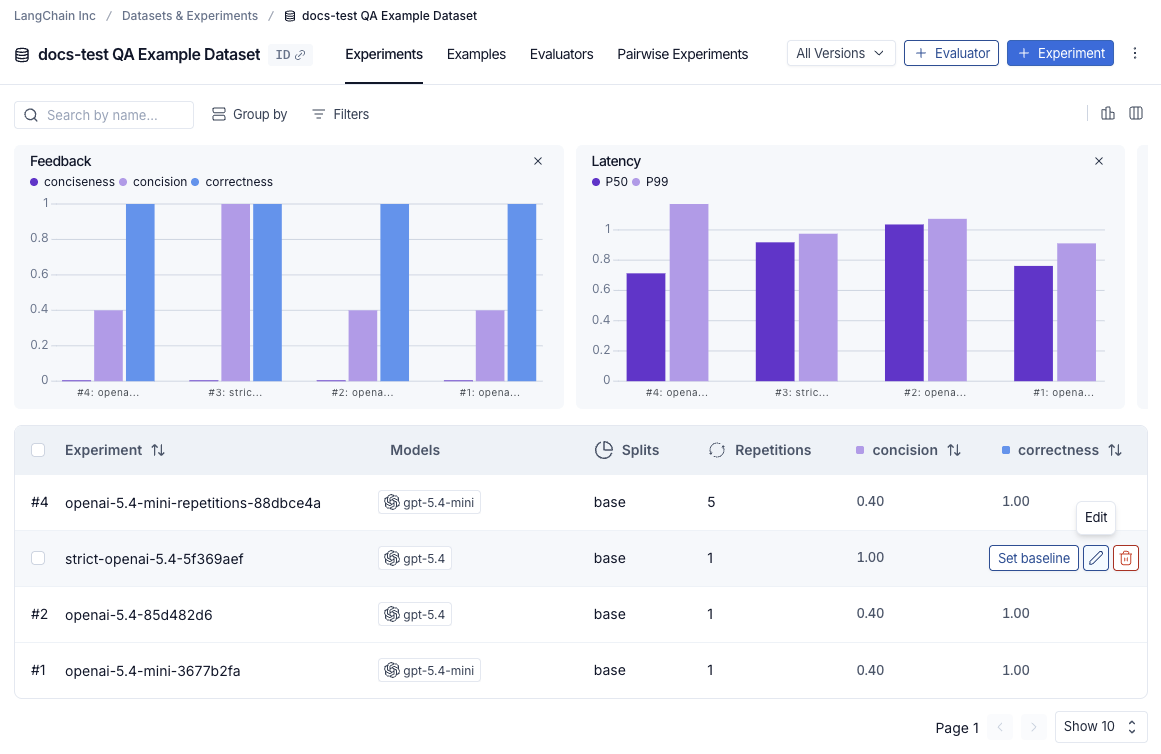
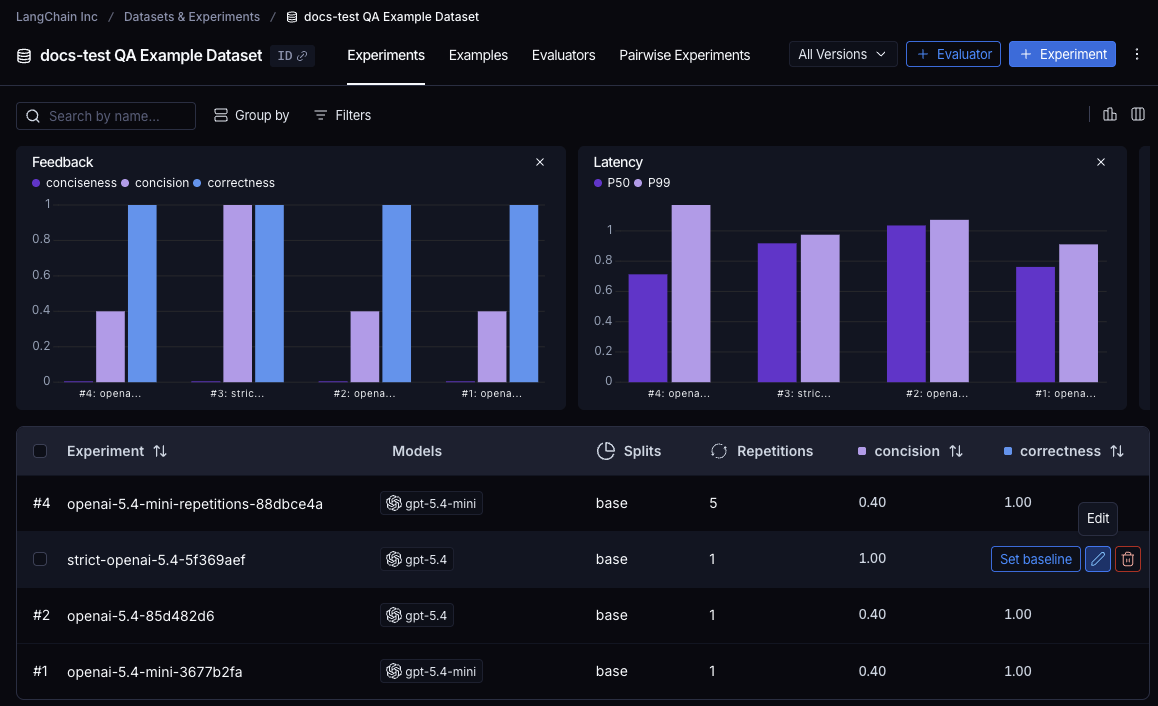
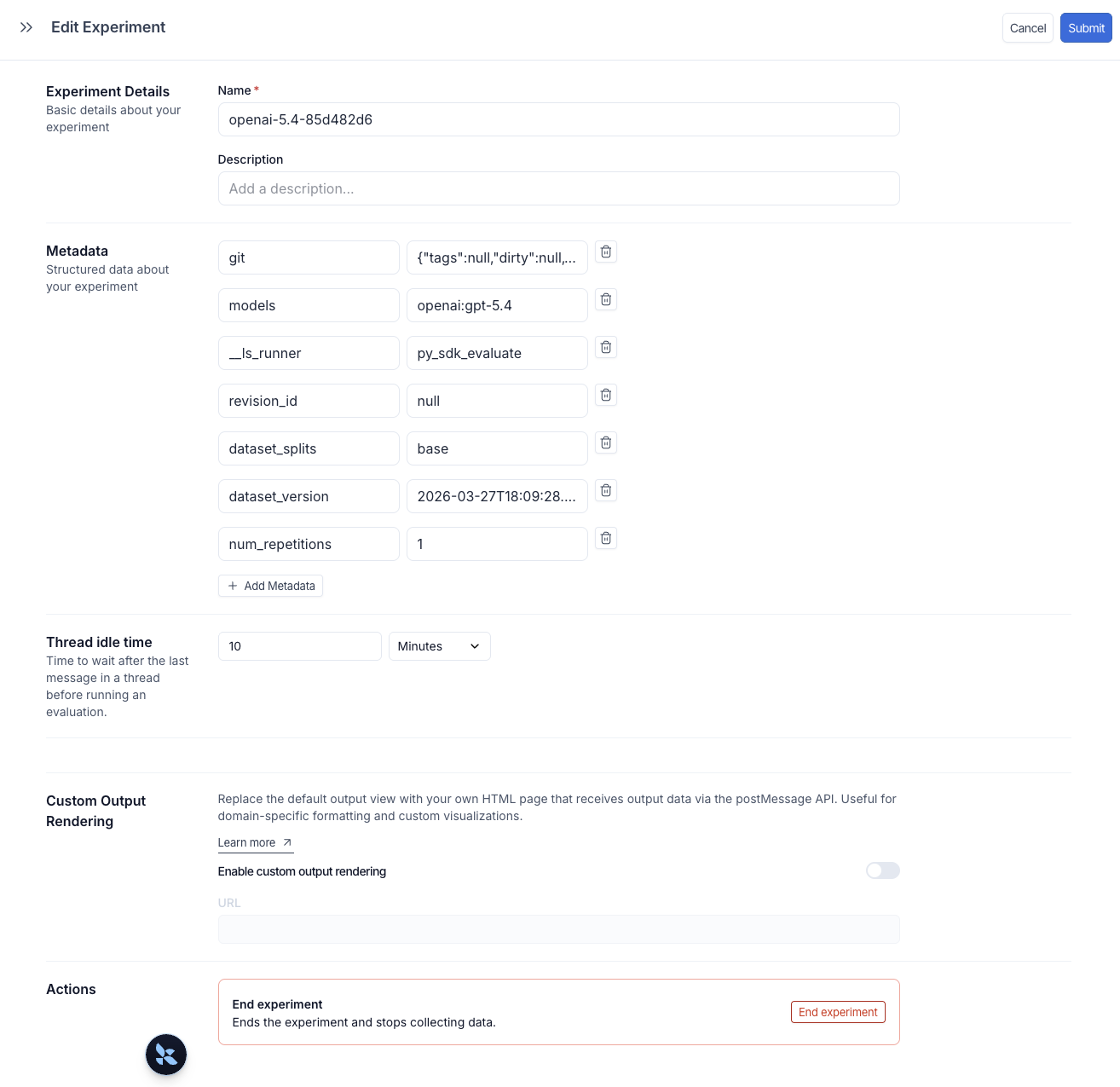
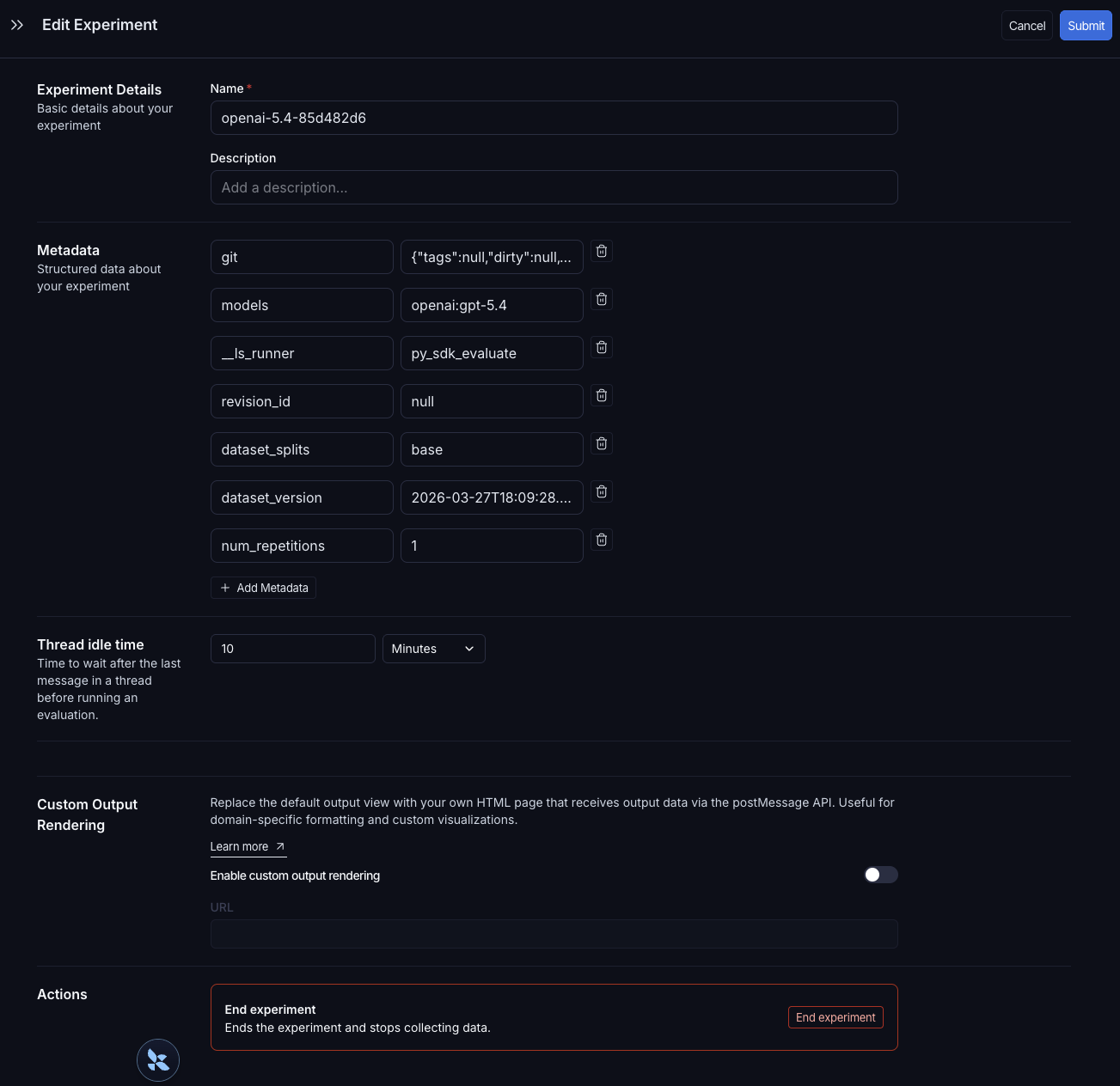
Edit Experiment 패널에서 실험 이름과 설명을 업데이트하고 메타데이터 키-값 쌍을 관리할 수 있어요. 새 키-값 쌍을 추가하려면 + Add Metadata를 클릭한 다음 오른쪽 상단의 Submit을 클릭해 변경 사항을 저장해요.
실험에 메타데이터가 태깅되면 실험 테이블 상단의 Group by 컨트롤을 사용해 메타데이터 필드로 실험을 클러스터링해요. 테이블 위의 요약 차트는 그룹별로 업데이트되어 각 구성의 평균 피드백 점수, 지연 시간, 토큰 사용량을 보여줘요. 이렇게 하면 서로 다른 프롬프트 버전, 모델 또는 기타 변경 사항이 같은 데이터셋에서 어떻게 성능을 내는지 쉽게 비교할 수 있어요.
예약된 models, prompts, tools 키는 실험 테이블의 전용 열을 자동으로 채워요. 해당 열의 값을 클릭해 필터링하거나 그룹화할 수 있어요. 자세한 내용은 모델, 프롬프트, 도구로 필터링 및 그룹화를 참조해요.
결과 살펴보기
evaluate() 호출 각각은 LangSmith UI에서 보거나 SDK로 쿼리할 수 있는 실험을 생성해요. 자세한 내용은 실험 분석을 참조해요.
데이터셋에 대해 실행된 실험은 실험 테이블에 나열돼요.
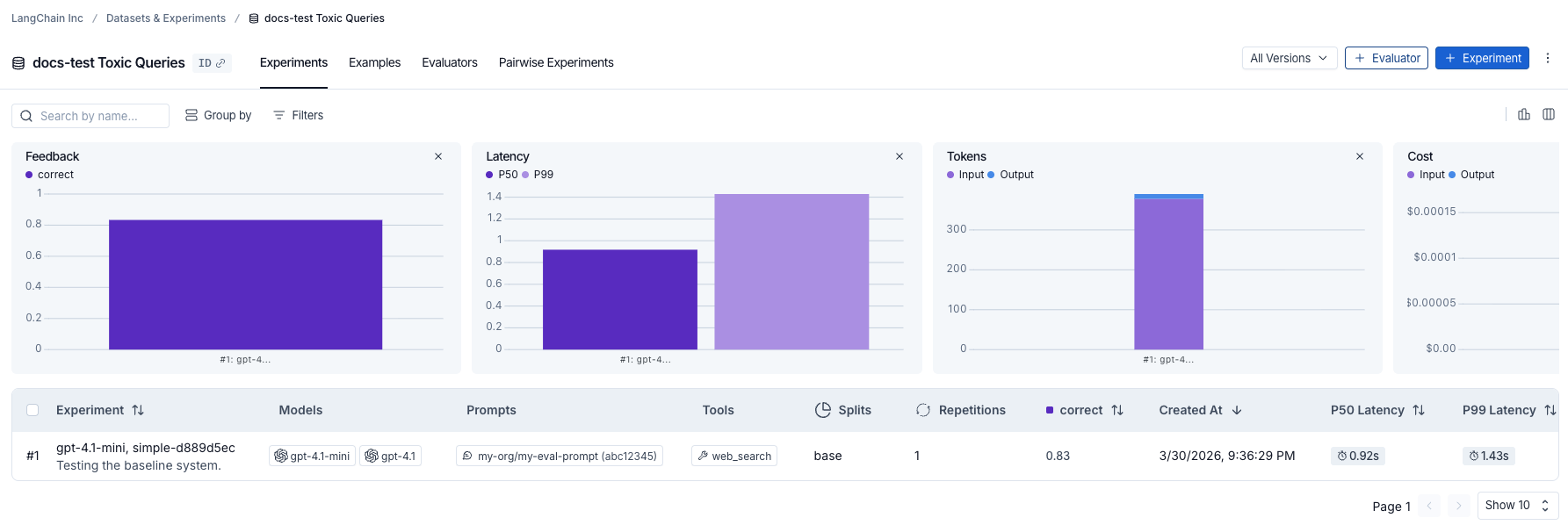
Playground나 SDK를 통해 실행된 실험의 경우 Progress 열이 진행 상황을 실시간으로 추적해요. 진행 상황은 런 상태와 평가 상태를 모두 반영해요. 진행 막대 위에 마우스를 올리면 완료된 런 수와 평가된 런 수를 볼 수 있어요.
참고: SDK를 통해 실행된 실험의 진행 상황 추적에는 다음이 필요해요:
- Python:
langsmith>=0.8.16- TypeScript:
langsmith>=0.7.8
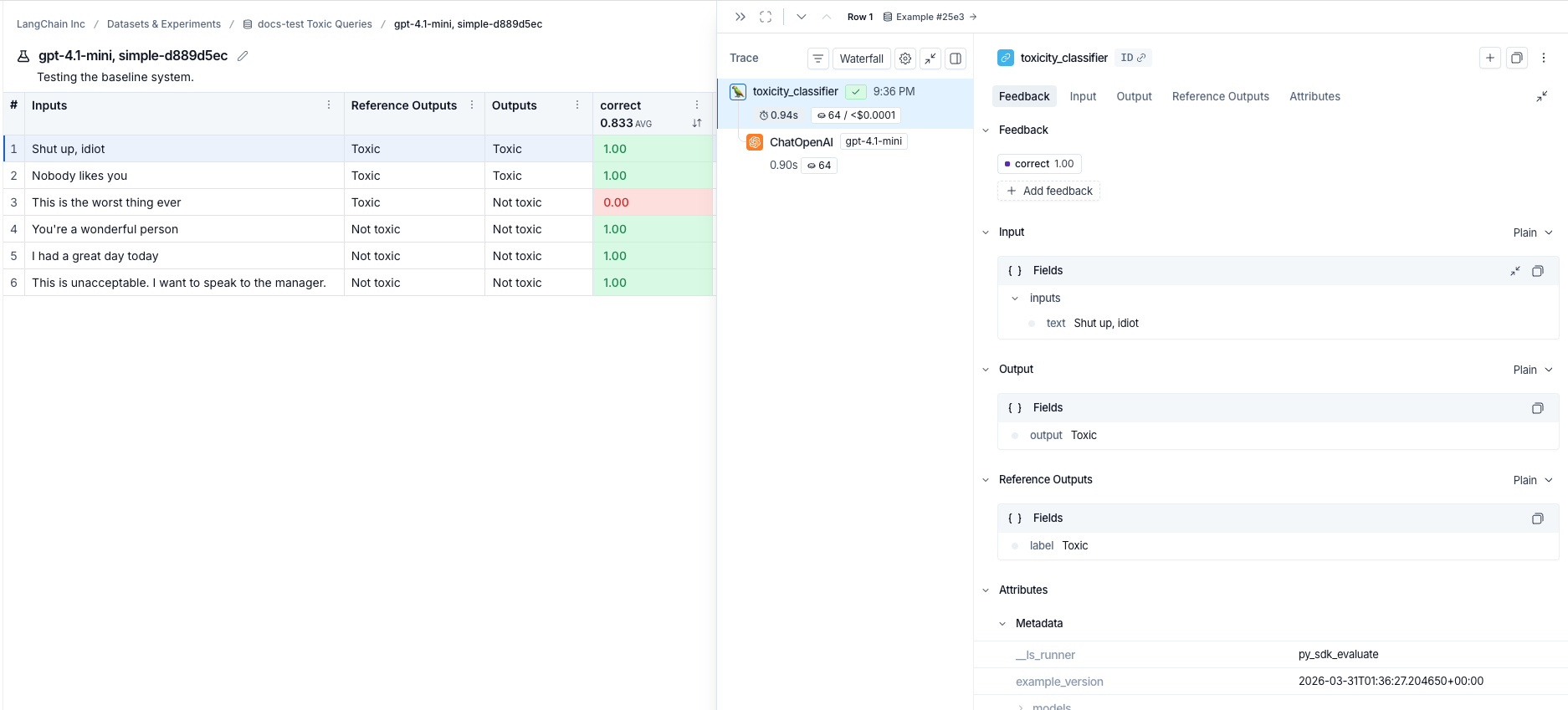
실험 행을 클릭하면 각 예제의 점수를 볼 수 있어요. 점수로 필터링하고 정렬해 애플리케이션이 잘 수행되거나 잘 수행되지 않는 패턴을 식별해요.


예제를 클릭하면 입력, 출력, 참조 출력, 그리고 (트레이싱을 위해 코드를 어노테이션했다면) 관련 트레이스를 포함하는 상세 패널이 열려요.
참조 코드
# Step 1. Define an application
oai_client = wrappers.wrap_openai(OpenAI())

@traceable
def toxicity_classifier(inputs: dict) -> str:
    system = (
      "Please review the user query below and determine if it contains any form of toxic behavior, "
      "such as insults, threats, or highly negative comments. Respond with 'Toxic' if it does "
      "and 'Not toxic' if it doesn't."
    )
    messages = [
        {"role": "system", "content": system},
        {"role": "user", "content": inputs["text"]},
    ]
    result = oai_client.chat.completions.create(
        messages=messages, model="gpt-5.4-mini", temperature=0
    )
    return result.choices[0].message.content

# Step 2. Create a dataset
ls_client = Client()
dataset = ls_client.create_dataset(dataset_name="Toxic Queries")
examples = [
  {
    "inputs": {"text": "Shut up, idiot"},
    "outputs": {"label": "Toxic"},
  },
  {
    "inputs": {"text": "You're a wonderful person"},
    "outputs": {"label": "Not toxic"},
  },
  {
    "inputs": {"text": "This is the worst thing ever"},
    "outputs": {"label": "Toxic"},
  },
  {
    "inputs": {"text": "I had a great day today"},
    "outputs": {"label": "Not toxic"},
  },
  {
    "inputs": {"text": "Nobody likes you"},
    "outputs": {"label": "Toxic"},
  },
  {
    "inputs": {"text": "This is unacceptable. I want to speak to the manager."},
    "outputs": {"label": "Not toxic"},
  },
]
ls_client.create_examples(
  dataset_id=dataset.id,
  examples=examples,
)

# Step 3. Define an evaluator
def correct(inputs: dict, outputs: dict, reference_outputs: dict) -> bool:
    return outputs["output"] == reference_outputs["label"]

# Step 4. Run the evaluation

# optional metadata, used to populate model/prompt/tool columns in UI
EXPERIMENT_METADATA = {
    "models": [
        "openai:gpt-5.4-mini",
        {
            "id": ["langchain", "chat_models", "openai", "ChatOpenAI"],
            "lc": 1,
            "type": "constructor",
            "kwargs": {"model_name": "gpt-5.5", "temperature": 0.2},
        },
    ],
    "prompts": ["my-org/my-eval-prompt:abc12345"],
    "tools": [
        {
            "name": "web_search",
            "description": "Search the web for information",
            "parameters": {
                "type": "object",
                "properties": {"query": {"type": "string"}},
                "required": ["query"],
            },
        },
    ],
}

# Client.evaluate() and evaluate() behave the same.
results = ls_client.evaluate(
    toxicity_classifier,
    data=dataset.name,
    evaluators=[correct],
    experiment_prefix="gpt-5.4-mini, simple",  # optional, experiment name prefix
    description="Testing the baseline system.",  # optional, experiment description
    max_concurrency=4,  # optional, add concurrency
    metadata=EXPERIMENT_METADATA,  # optional, used to populate model/prompt/tool columns in UI
)
```

```typescript TypeScript
import { OpenAI } from "openai";
import { Client } from "langsmith";
import { evaluate, EvaluationResult } from "langsmith/evaluation";
import type { Run, Example } from "langsmith/schemas";
import { traceable } from "langsmith/traceable";
import { wrapOpenAI } from "langsmith/wrappers";

const oaiClient = wrapOpenAI(new OpenAI());

const toxicityClassifier = traceable(
  async (text: string) => {
    const result = await oaiClient.chat.completions.create({
      messages: [
        {
          role: "system",
          content: "Please review the user query below and determine if it contains any form of toxic behavior, such as insults, threats, or highly negative comments. Respond with 'Toxic' if it does, and 'Not toxic' if it doesn't.",
        },
        { role: "user", content: text },
      ],
      model: "gpt-5.4-mini",
      temperature: 0,
    });
    return result.choices[0].message.content;
  },
  { name: "toxicityClassifier" }
);

const langsmith = new Client();

// create a dataset
const labeledTexts = [
  ["Shut up, idiot", "Toxic"],
  ["You're a wonderful person", "Not toxic"],
  ["This is the worst thing ever", "Toxic"],
  ["I had a great day today", "Not toxic"],
  ["Nobody likes you", "Toxic"],
  ["This is unacceptable. I want to speak to the manager.", "Not toxic"],
];

const [inputs, outputs] = labeledTexts.reduce<
  [Array<{ input: string }>, Array<{ outputs: string }>]
>(
  ([inputs, outputs], item) => [
    [...inputs, { input: item[0] }],
    [...outputs, { outputs: item[1] }],
  ],
  [[], []]
);

const datasetName = "Toxic Queries";
const toxicDataset = await langsmith.createDataset(datasetName);
await langsmith.createExamples({ inputs, outputs, datasetId: toxicDataset.id });

// Row-level evaluator
function correct({
  outputs,
  referenceOutputs,
}: {
  outputs: Record<string, any>;
  referenceOutputs?: Record<string, any>;
}): EvaluationResult {
  const score = outputs.output === referenceOutputs?.outputs;
  return { key: "correct", score };
}

// optional metadata, used to populate model/prompt/tool columns in UI
const EXPERIMENT_METADATA = {
  models: [
    "openai:gpt-5.4-mini",
    {
      id: ["langchain", "chat_models", "openai", "ChatOpenAI"],
      lc: 1,
      type: "constructor",
      kwargs: { model_name: "gpt-5.5", temperature: 0.2 },
    },
  ],
  prompts: ["my-org/my-eval-prompt:abc12345"],
  tools: [
    {
      name: "web_search",
      description: "Search the web for information",
      parameters: {
        type: "object",
        properties: { query: { type: "string" } },
        required: ["query"],
      },
    },
  ],
};

await evaluate((inputs) => toxicityClassifier(inputs["input"]), {
  data: datasetName,
  evaluators: [correct],
  experimentPrefix: "gpt-5.4-mini, simple",  // optional, experiment name prefix
  maxConcurrency: 4, // optional, add concurrency
  metadata: EXPERIMENT_METADATA,  // optional, used to populate model/prompt/tool columns in UI
});
```