
메트릭 컬렉션
메트릭 컬렉션 (Metric Collections)
Metric collection은 Confident AI에서 메트릭 실행을 그룹으로 묶는 방법이에요. 평가를 원격으로 실행하게 해주는 핵심 개념이라, 설정을 한 번 정의해 두면 코드를 건드리지 않고도 다양한 평가에 재사용할 수 있어요. 이 글에서는 컬렉션을 만드는 방법과 함께 Sample Rate, metric settings 같은 개념을 살펴볼게요.
출처: 문서
본문
개요
Confident AI의 metric collection은 메트릭과 그 각각의 설정을 모아 놓은 것이에요. 바로 이것 덕분에 원격으로 평가를 실행할 수 있죠. 사용하는 경우는 두 가지예요.
- Confident API를 통한 개발 단계의 evals
- LLM tracing을 온라인 또는 오프라인 eval로 실행하는 경우
Metric collection은 엄밀히 원격 eval을 위해 사용되며, 고유한 이름으로 식별되고 관리에 코드가 필요 없어요.
single-turn과 multi-turn metric collection이 모두 지원돼요.
로컬 평가 (Local Evals)
- 자신의 Python 코드에서 메트릭을 완전히 제어하며 로컬로 평가 실행
- 커스텀 메트릭, DAG, 고급 평가 알고리즘 지원
적합한 대상: Python 사용자, 개발, 배포 전 워크플로우
원격 평가 (Remote Evals)
- 사전 구성 메트릭으로 Confident AI 플랫폼에서 평가 실행
- 모니터링, 데이터셋, 팀 협업 기능과 통합
적합한 대상: 비-Python 사용자, 프로덕션 tracing의 온라인 + 오프라인 eval
왜 Metric Collection인가요?
Metric collection은 규모 있는 평가를 실행할 때 맞닥뜨리는 핵심 문제들을 해결해요.
- 재사용 가능한 구성 — 평가 설정을 한 번 정의해 두고 테스트 실행, 실험, 프로덕션 모니터링에서 재사용해요.
- 컨텍스트별로 조정 가능한 설정 — 같은 메트릭도 컬렉션에 따라 threshold나 strictness 수준을 다르게 가져갈 수 있어요(예: 프로덕션은 더 엄격하게, 개발은 느슨하게).
- 코드 없는 관리 — UI만으로 컬렉션을 만들고 수정할 수 있어요. 코드를 건드릴 필요가 없어요.
- 일관된 평가 — 모든 팀원과 자동화 파이프라인이 같은 평가 기준을 사용하게 보장해요.
Metric Collection 만들기
UI로 만들기
Project > Metrics > Collections 아래에서 single-turn 또는 multi-turn metric collection을 만들 수 있어요. 고유한 이름을 정하고, 적절한 메트릭을 선택한 다음 필요하면 설정을 편집하면 돼요.
원격 평가용 Metric Collection
코드로 만들기
Confident API를 사용해 프로그래밍 방식으로도 metric collection을 만들 수 있어요.
Request (POST /v1/metric-collections) — API reference
curl -X POST "https://api.confident-ai.com/v1/metric-collections" \
  -H "CONFIDENT_API_KEY: <PROJECT-API-KEY>" \
  -H "Content-Type: application/json" \
  -d '{
  "name": "Collection Name",
  "multiTurn": false,
  "metricSettings": [
    {
      "metric": {
        "name": "Answer Relevancy"
      },
      "threshold": 0.8
    }
  ]
}'
import requests

response = requests.post(
    "https://api.confident-ai.com/v1/metric-collections",
    headers={
        "CONFIDENT_API_KEY": "<PROJECT-API-KEY>",
    },
    json={
        "name": "Collection Name",
        "multiTurn": False,
        "metricSettings": [
            {
                "metric": {
                    "name": "Answer Relevancy"
                },
                "threshold": 0.8
            }
        ]
    },
)

print(response.json())
const response = await fetch("https://api.confident-ai.com/v1/metric-collections", {
  method: "POST",
  headers: {
    "CONFIDENT_API_KEY": "<PROJECT-API-KEY>",
    "Content-Type": "application/json",
  },
  body: JSON.stringify({
    "name": "Collection Name",
    "multiTurn": false,
    "metricSettings": [
      {
        "metric": {
          "name": "Answer Relevancy"
        },
        "threshold": 0.8
      }
    ]
  }),
});

const data = await response.json();
console.log(data);
package main

import (
	"fmt"
	"io"
	"net/http"
	"strings"
)

func main() {
	body := `{
  "name": "Collection Name",
  "multiTurn": false,
  "metricSettings": [
    {
      "metric": {
        "name": "Answer Relevancy"
      },
      "threshold": 0.8
    }
  ]
}`

	req, err := http.NewRequest("POST", "https://api.confident-ai.com/v1/metric-collections", strings.NewReader(body))
	if err != nil {
		panic(err)
	}
	req.Header.Set("CONFIDENT_API_KEY", "<PROJECT-API-KEY>")
	req.Header.Set("Content-Type", "application/json")

	res, err := http.DefaultClient.Do(req)
	if err != nil {
		panic(err)
	}
	defer res.Body.Close()

	out, err := io.ReadAll(res.Body)
	if err != nil {
		panic(err)
	}

	fmt.Println(string(out))
}
import java.net.URI;
import java.net.http.HttpClient;
import java.net.http.HttpRequest;
import java.net.http.HttpResponse;

public class Example {
    public static void main(String[] args) throws Exception {
        String body = """
            {
              "name": "Collection Name",
              "multiTurn": false,
              "metricSettings": [
                {
                  "metric": {
                    "name": "Answer Relevancy"
                  },
                  "threshold": 0.8
                }
              ]
            }""";

        HttpRequest request = HttpRequest.newBuilder()
            .uri(URI.create("https://api.confident-ai.com/v1/metric-collections"))
            .header("CONFIDENT_API_KEY", "<PROJECT-API-KEY>")
            .header("Content-Type", "application/json")
            .POST(HttpRequest.BodyPublishers.ofString(body))
            .build();

        HttpResponse<String> response = HttpClient.newHttpClient()
            .send(request, HttpResponse.BodyHandlers.ofString());

        System.out.println(response.body());
    }
}
use serde_json::json;

#[tokio::main]
async fn main() -> Result<(), Box<dyn std::error::Error>> {
    let response = reqwest::Client::new()
        .post("https://api.confident-ai.com/v1/metric-collections")
        .header("CONFIDENT_API_KEY", "<PROJECT-API-KEY>")
        .json(&json!({
          "name": "Collection Name",
          "multiTurn": false,
          "metricSettings": [
            {
              "metric": {
                "name": "Answer Relevancy"
              },
              "threshold": 0.8
            }
          ]
        }))
        .send()
        .await?;

    println!("{}", response.text().await?);

    Ok(())
}
metric collection은 Confident AI의 어떤 원격 eval에도 사용할 수 있어요.
- Confident API를 통한 single 또는 multi-turn E2E 테스트 실행
- LLM tracing 중 single 또는 multi-turn 온라인/오프라인 eval 실행
Sample Rate
Sample Rate는 자동 ingest-time(online) 평가 중에 평가가 실행될 확률(0–1)이에요. Metrics → Collections 페이지에서 두 수준으로 설정돼요.
- Collection row — 컬렉션 전체를 각 항목에 대해 한 번에 샘플링하며, 기본값은
1이에요(컬렉션이 적용되는 모든 trace, thread, span이 평가됨). 이 결정은 결정적이라 같은 trace, thread, span은 항상 같은 선택을 해요. - Metric row — 컬렉션 안의 개별 메트릭을 샘플링해요.
둘은 합쳐져서, 특정 메트릭은 collection rate × metric rate로 실행돼요. 예를 들어 컬렉션이 0.5, 메트릭이 0.4면 해당 메트릭은 항목의 대략 20%에서 평가돼요. 샘플링된 모든 항목의 모든 메트릭을 채점하려면 두 비율을 1로 두면 돼요.
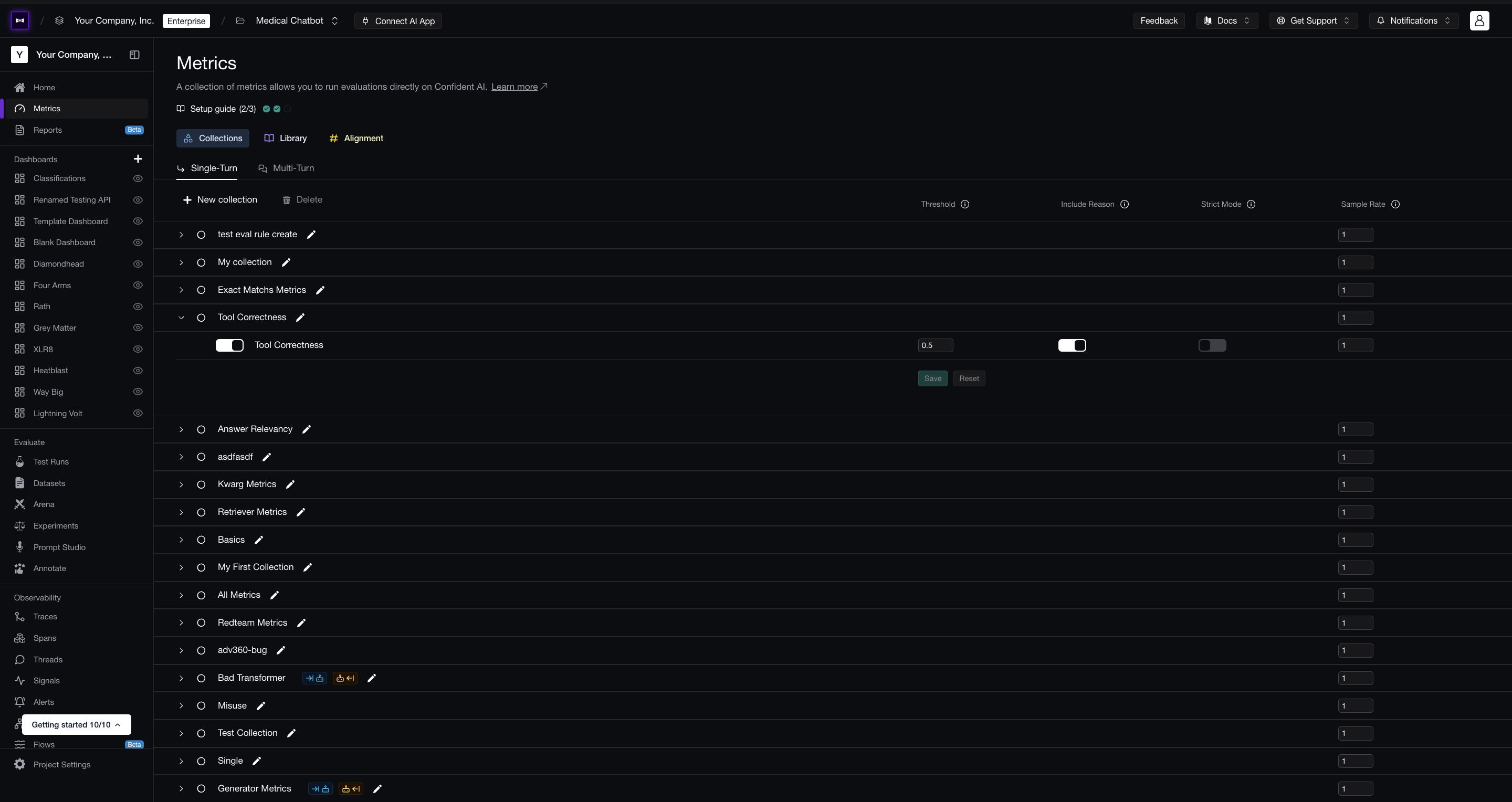
Metrics collections 페이지의 Sample Rate
Sample rate는 trace, thread, span의 온라인 ingest-time 평가를 관장해요. 요청 시(on-demand) 실행되는 평가에는 적용되지 않으며, 그런 평가는 무조건 실행돼요.
Metric Collection 이해하기
metric collection과 메트릭은 metric settings를 통해 간접적으로 연결돼요. metric settings는 각 메트릭의 threshold, strictness 등이 컬렉션마다 어떻게 다른지를 지정하죠.
• Metric Collection: 함께 평가하려는 메트릭들의 묶음(테스트 실행용이든 온라인 평가용이든).
• Metric Settings: metric collection 안의 메트릭이 어떻게 평가되어야 하는지에 대한 구성 옵션. threshold, strictness, include reasoning 여부 등을 포함해요.
graph TD
    A[Metric Collection 1] --> D[Metric Settings]
    A --> F[Metric Settings]

    B[Metric Collection 2] --> G[Metric Settings]
    B --> H[Metric Settings]

    C[Metric] --> D
    C --> F
    C --> G
    C --> H

    style A fill:#e1f5fe,color:#1e293b
    style B fill:#e1f5fe,color:#1e293b
    style C fill:#f3e5f5,color:#1e293b
    style D fill:#e8f5e8,color:#1e293b
    style F fill:#e8f5e8,color:#1e293b
    style G fill:#e8f5e8,color:#1e293b
    style H fill:#e8f5e8,color:#1e293b
metric collection 이름을 제공해 원격 eval을 실행하면, Confident AI는 해당 컬렉션의 메트릭과 설정을 가져온 뒤, 그 모든 설정을 사용해 평가를 실행해요.
더 알아보기
- Metrics Introduction — Confident AI 메트릭의 종류와 동작 원리
- G-Eval — 자연어 기준으로 커스텀 메트릭 만들기