
프로젝트 감사 로그
프로젝트 감사 로그 (Project Audit Logs)
프로젝트에서 수행된 모든 작업의 로그를 볼 수 있는 화면이에요. 감사 로그는 프로젝트에서 일어난 모든 작업의 시간순 기록을 제공해, 변경 추적·이슈 디버깅·책임 추적을 도와줘요.
출처: 문서
본문
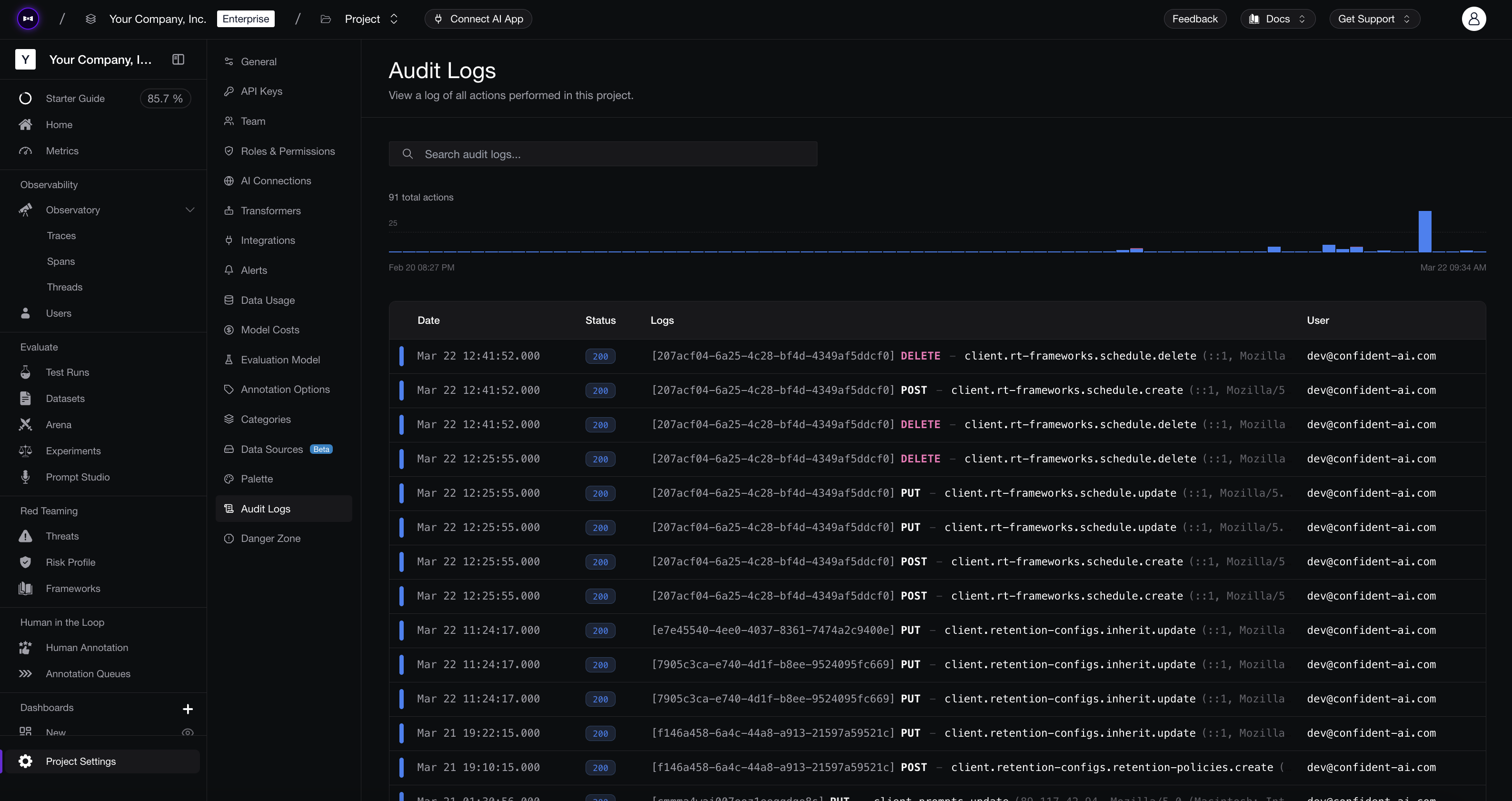
Project Audit Logs
개요 (Overview)
감사 로그 페이지에는 프로젝트에서 발생한 모든 API 및 사용자 작업이 표시돼요. 각 로그 항목에는 다음이 포함돼요.
| Column | Description |
|---|---|
| Date | Timestamp of the action (UTC). |
| Status | HTTP status code returned by the action (e.g., 200 for success). |
| Logs | The action performed, shown as a method and resource path (e.g., PUT client.prompts.update). |
| User | The email of the user or API key that triggered the action. |
상단의 타임라인 차트는 시간에 따른 작업량을 시각화해, 급증이나 비정상 활동을 쉽게 발견할 수 있게 해줘요.
로그 검색하기 (Searching Logs)
검색창으로 모든 필드(작업 이름, 사용자 이메일, 상태 코드, 리소스 경로)로 로그를 필터링해요. 특정 변경을 좁히는 데 유용해요 — 예를 들어 모든 보존 구성 업데이트나 특정 사용자의 작업을 찾을 때요.
로그 내보내기 (Exporting Logs)
Save as CSV를 클릭해 감사 로그를 내보내요. Current view를 선택하면 뷰어에 표시 중인 내용을, All time을 선택하면 이 프로젝트에 기록된 모든 감사 로그를 내보내요. 대화상자에서 커밋 전에 정확한 행 수와 날짜 범위를 보여줘요.
작은 내보내기는 즉시 다운로드돼요. 큰 내보내기는 백그라운드에서 준비돼요. 페이지에 진행 상황 카드가 나타나고, 파일이 준비되면 이메일을 받으며, Download CSV 버튼으로 완성된 파일(gzip된 CSV)을 받을 수 있어요. 다운로드 링크는 클릭할 때마다 새로 생성되고 15분 후에 만료돼요.
감사 로그는 조직 Owner와 Admin만 내보낼 수 있어요. 한 번에 한 건의 내보내기가 실행돼요.
프로그래매틱하게 내보내기를 시작할 수도 있어요.
Request (POST /v1/projects/{projectId}/audit-logs/exports) — API reference
curl -X POST "https://api.confident-ai.com/v1/projects/{projectId}/audit-logs/exports" \
  -H "CONFIDENT_API_KEY: <ORGANIZATION-API-KEY>" \
  -H "Content-Type: application/json" \
  -d '{}'
import requests

response = requests.post(
    "https://api.confident-ai.com/v1/projects/{projectId}/audit-logs/exports",
    headers={
        "CONFIDENT_API_KEY": "<ORGANIZATION-API-KEY>",
    },
    json={},
)

print(response.json())
const response = await fetch("https://api.confident-ai.com/v1/projects/{projectId}/audit-logs/exports", {
  method: "POST",
  headers: {
    "CONFIDENT_API_KEY": "<ORGANIZATION-API-KEY>",
    "Content-Type": "application/json",
  },
  body: JSON.stringify({}),
});

const data = await response.json();
console.log(data);
package main

import (
	"fmt"
	"io"
	"net/http"
	"strings"
)

func main() {
	body := `{}`

	req, err := http.NewRequest("POST", "https://api.confident-ai.com/v1/projects/{projectId}/audit-logs/exports", strings.NewReader(body))
	if err != nil {
		panic(err)
	}
	req.Header.Set("CONFIDENT_API_KEY", "<ORGANIZATION-API-KEY>")
	req.Header.Set("Content-Type", "application/json")

	res, err := http.DefaultClient.Do(req)
	if err != nil {
		panic(err)
	}
	defer res.Body.Close()

	out, err := io.ReadAll(res.Body)
	if err != nil {
		panic(err)
	}

	fmt.Println(string(out))
}
import java.net.URI;
import java.net.http.HttpClient;
import java.net.http.HttpRequest;
import java.net.http.HttpResponse;

public class Example {
    public static void main(String[] args) throws Exception {
        String body = """
            {}""";

        HttpRequest request = HttpRequest.newBuilder()
            .uri(URI.create("https://api.confident-ai.com/v1/projects/{projectId}/audit-logs/exports"))
            .header("CONFIDENT_API_KEY", "<ORGANIZATION-API-KEY>")
            .header("Content-Type", "application/json")
            .POST(HttpRequest.BodyPublishers.ofString(body))
            .build();

        HttpResponse<String> response = HttpClient.newHttpClient()
            .send(request, HttpResponse.BodyHandlers.ofString());

        System.out.println(response.body());
    }
}
use serde_json::json;

#[tokio::main]
async fn main() -> Result<(), Box<dyn std::error::Error>> {
    let response = reqwest::Client::new()
        .post("https://api.confident-ai.com/v1/projects/{projectId}/audit-logs/exports")
        .header("CONFIDENT_API_KEY", "<ORGANIZATION-API-KEY>")
        .json(&json!({}))
        .send()
        .await?;

    println!("{}", response.text().await?);

    Ok(())
}
일반적인 작업 (Common Actions)
작업은 resource.action 명명 패턴을 따라요. 몇 가지 예시를 볼게요.
client.retention-configs.inherit.update— 조직 상속 보존 설정을 업데이트client.retention-configs.retention-policies.create— 보존 정책을 생성client.rt-frameworks.schedule.create/delete— 실시간 프레임워크 스케줄을 생성 또는 삭제client.prompts.update— 프롬프트를 업데이트